Visibility
Take a published VitNode Content Engine record off the public site, search and sitemap without unpublishing it, then bring it back with the same URL and publish date.
Hiding takes a record off the public site right away while it stays published. It disappears from the public API, its page, search and the sitemap, and unhiding brings it back with its original URL and publish date. Reach for it when a post has to go now and the questions can wait. This guide follows the blog plugin, whose articles can be hidden.
| You want to | Use |
|---|---|
| Take a record down for now and put it back as it was | Hide |
| Turn a record back into a draft to rework it before it goes live again | Unpublish |
| Remove it for good | Delete |
Before you begin
Hiding needs publication, because a record that is never public has nothing to hide from.
Turn on visibility
The blog's article content type turns it on next to publication:
export const blogPostContentType = defineContentType({
  id: "blog.post",
  tableName: "blog_posts",
  publication: true,
  visibility: true,
  // ...
});
visibility takes only true or false. Without publication it throws when the content type is defined. With it, hiddenAt, hiddenBy and visibility are reserved and cannot be field names.
Build and migrate
Run pnpm db:migrate. The migration adds two nullable columns to the main table. For the blog, apps/api/migrations/20261011093549_content_visibility_id_strategies contains:
ALTER TABLE "blog_posts" ADD COLUMN "hiddenAt" timestamp;
ALTER TABLE "blog_posts" ADD COLUMN "hiddenBy" integer;
CREATE INDEX "blog_posts_hidden_by_idx" ON "blog_posts" ("hiddenBy");
ALTER TABLE "blog_posts" ADD CONSTRAINT "blog_posts_hiddenBy_core_users_id_fkey" FOREIGN KEY ("hiddenBy") REFERENCES "core_users"("id") ON DELETE SET NULL ON UPDATE CASCADE;
Existing records stay visible. hiddenAt is when the record was hidden and hiddenBy is the staff member who hid it. A later migration adds a third nullable column, hiddenReason (up to 500 characters), for the optional note left when hiding from the site.
Label the permission
Visibility adds a can_hide permission, separate from can_publish, so a moderator can take records down without being able to publish. The blog labels it next to its other article permissions:
{
  "@vitnode/blog:posts:can_hide": "Hide and unhide articles"
}
Grant it to the staff who should moderate in AdminCP → Staff.
Hide an article
Open AdminCP → Blog → Articles, open the More actions menu of a published article and choose Hide. Confirm with Yes, hide it:
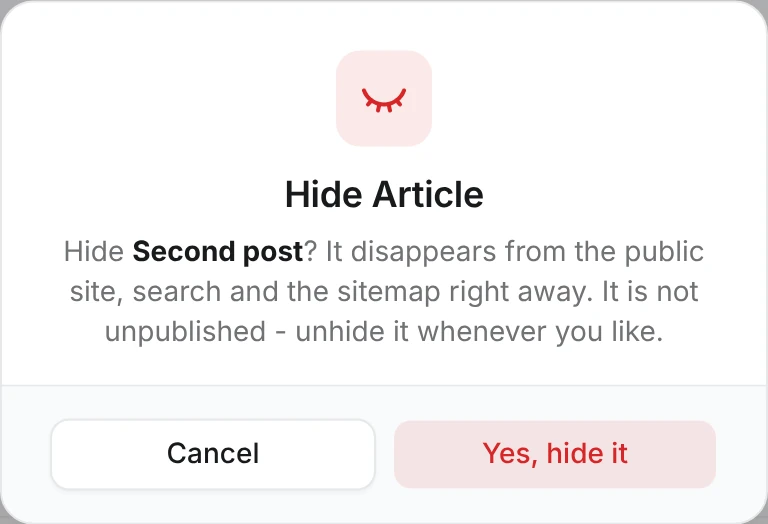
A toast says the article is now hidden. The row keeps its Published badge, and its title gets an eye-off icon in front with an Article hidden tooltip. The Visibility filter in the list toolbar shows only hidden or only visible records, and it combines with the Status filter:
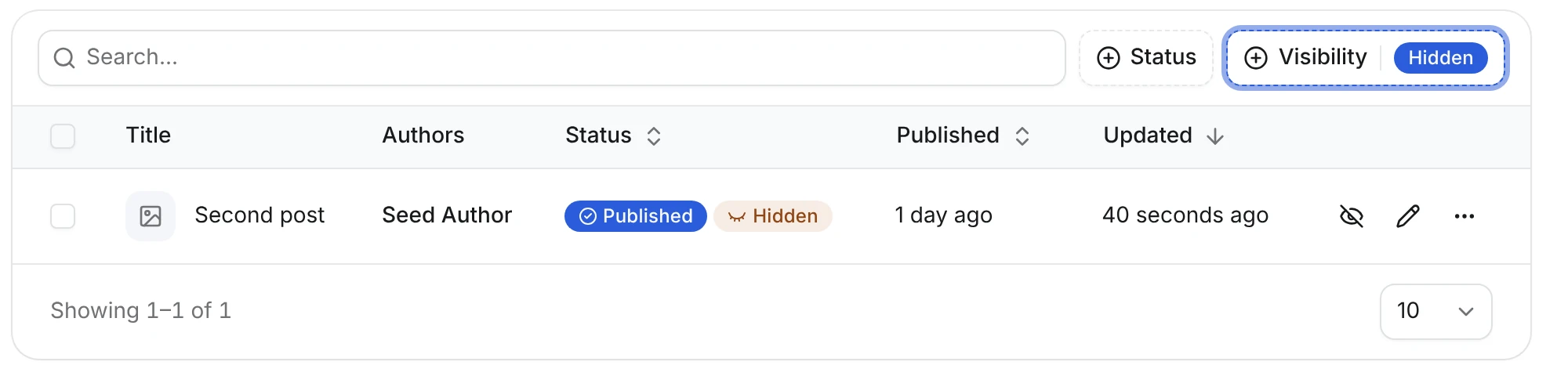
The edit page shows the same icon before the title, an Unhide action (in the blog's editor, it lives in the ▾ menu next to Save changes) and a note that publishing a hidden record does not make it public:

Choose Unhide in the same menu, or on the edit page, to bring the article back. In the database, hiding sets blog_posts."hiddenAt" and "hiddenBy", and unhiding clears both, along with "hiddenReason".
Cleaning up after a spam wave? Tick several articles and choose Visibility → Hide in the floating bar. The menu counts how many of them are still visible, such as Hide 2 of 3, and leaves the rest alone. Unhide works the same way. See Bulk actions.
What hiding does
A record is public only when it is published, its publishedAt is not in the future, and it is not hidden. While a record is hidden:
- The public API list leaves it out for everybody but the people who can still see it, and its detail route answers
404, in every language, including a language that falls back to the default one. - Its page answers
404, and so do its old slugs instead of redirecting. - The sitemap and other pages'
hreflangalternates leave it out, and site search marks its document private. - Signed preview links still work, and the AdminCP still shows it.
Who can still see it
Hidden doesn't mean gone for the people working on it. Signed in, a record's authors, its editors and its moderators still reach it:
- Authors are the users in the content type's
search.authorField, such as the blog's Author field. Without one, the public write owner is the author. - Editors are staff with
can_editon the content type, such asposts:can_editfor the blog. - Moderators with the moderator permission
can_view_hiddenon a reportable content type, in the record's scope when it has one. They need no AdminCP permission.
The route tells whose record it is by its id, so id must be in publicApi.fields. For them:
- The page opens with an eye-off icon before the title and a This article is hidden note, so nobody mistakes it for a live page. The response sends
noindexandCache-Control: private, no-store, so search engines and caches never keep it. - The detail route answers
200, andGET .../delivery/resolve/{slug}returnshidden: trueplus the record's own published translations inalternates, so the language switcher opens the same article in another language at its own slug. - The public list, such as
/blog, shows it among the published records with the eye-off icon before its title. API rows carryhidden: true, and the response isCache-Control: private, no-store. - Site search and the member timeline list it with the eye-off icon before its title and a tooltip like Article hidden.
On a list, moderators see every hidden record only when the content type has no moderation scope. With a scope, the list shows them what they authored or can edit, and the page itself still opens for them.
Everyone else, signed in or not, still gets a 404. Old slugs never redirect to a hidden record, and the list, sitemap and other pages' hreflang alternates leave it out for everybody.
Search learns that a record is hidden when it is hidden or unhidden. Records hidden before you updated VitNode show up for their authors and editors only after a reindex: Debug Panel → Search (/admin/core/debug/search), then Reindex on the collection, such as blog.post. See Search.
Hiding changes nothing else. status and publishedAt stay as they are, so unhiding a published record puts it back with its original date. Publishing, unpublishing and scheduled publishes never change visibility, so publishing a hidden record keeps it off the site until someone unhides it. Restoring a revision never changes visibility either.
With editorial, hiding and unhiding raise the record's version and store a revision, shown as Hidden or Unhidden in the history. Hiding a record that is already hidden changes nothing: no write, no revision and no event.
Hiding is per record. To take one language off the site, unpublish that translation instead.
Hide from the API
The admin module has POST /{id}/hide and POST /{id}/unhide, such as POST /api/@vitnode/blog/admin/content/posts/703/hide for the blog. Both need can_hide and accept an optional body:
{ "expectedVersion": 4 }With expectedVersion, the call fails with 409 and CONTENT_VERSION_CONFLICT when someone saved the record meanwhile, like any editorial write. Both routes answer 200 with { changed, row }, where changed is false when the record was already in that state. A malformed id is 400 and a missing record is 404. With delivery.redirects, unhiding can also fail with 409 when another record took the URL while this one was hidden.
The admin list route accepts ?visibility=hidden or ?visibility=visible, and it combines with ?status=.
From your own code, hide(id, options) and unhide(id, options) exist on the services when visibility is on. See Services.
Show it on your pages
The people who still see a hidden record should know readers don't. Tell them on the page:
- A page with delivery reads
metadata.hiddenfromcontentDeliveryPage. The blog shows an eye-off icon before the title and a notice, and drops the Report button. - A page without delivery reads the
X-Content-Hiddenheader ofGET /{slug}, which is"true"only for a hidden record:
import { CONTENT_HIDDEN_HEADER } from "@vitnode/core/content";

const detail = await fetcher({
  plugin: manifest.id,
  method: "get",
  module: "content/letters",
  path: "/{slug}",
  args: { params: { slug: encodeURIComponent(slug) } },
});
// Only the author and moderators get a hidden letter; readers get 404.
const hidden = detail.headers.get(CONTENT_HIDDEN_HEADER) === "true";

// The loader returns `hidden` with the letter, and the page reads it:
{item.hidden ? (
  <Alert icon={<EyeOffIcon />} variant="warning">
    <AlertTitle>{t("hidden.title")}</AlertTitle>
    <AlertDescription>{t("hidden.desc")}</AlertDescription>
  </Alert>
) : null}
useContentPermissions already answers canReport: false for a hidden record, and canEdit: false for its author, so the page needs no extra checks for its buttons. A moderator can still edit it.
Delete, hide, unpublish or reject
The public site creates and edits; it never deletes or hides. These actions belong to staff:
| Action | Readers afterwards | Who, and where |
|---|---|---|
| Hide | 404; authors and moderators still see it | Staff with can_hide in the AdminCP, or moderators acting on a report |
| Unpublish | 404; the record is a draft again | Staff with can_publish, in the AdminCP |
| Reject approval | A new record stays a draft; a proposed edit never applies | Moderators with can_approve, in the approvals queue |
| Delete | Gone for good, with its URL | Staff with can_delete, in the AdminCP |
Hiding is the reversible one. The record keeps its revisions, its reports and its place in a thread. There is no public delete route, so don't put a Delete button on a public page.
Events and caches
A hide emits content.blog.post.hidden with { actorUserId, contentId, hiddenAt }, and an unhide emits unhidden with { actorUserId, contentId }. Both update the search index and the delivery data. See Events.
Front ends listed in content.revalidateOrigins are notified at once when a hide or unhide changes what the public can see. Hiding a draft notifies nobody, because nothing public changed.
Check the result
Hide the published "Second post", then request its page and its API entry:
curl -o /dev/null -w "%{http_code}\n" "http://localhost:3000/blog/article/second-post"
curl -o /dev/null -w "%{http_code}\n" "http://localhost:3000/api/@vitnode/blog/content/blog/article/second-post"
Both answer 404, like a draft, and the article drops out of the blog list and the sitemap. In the AdminCP it is still Published. Unhide it, and the same requests answer 200 with the original publishedAt. Open /blog and the page while signed in as one of its authors, and the list shows it with the eye-off icon and the page loads with the hidden note.
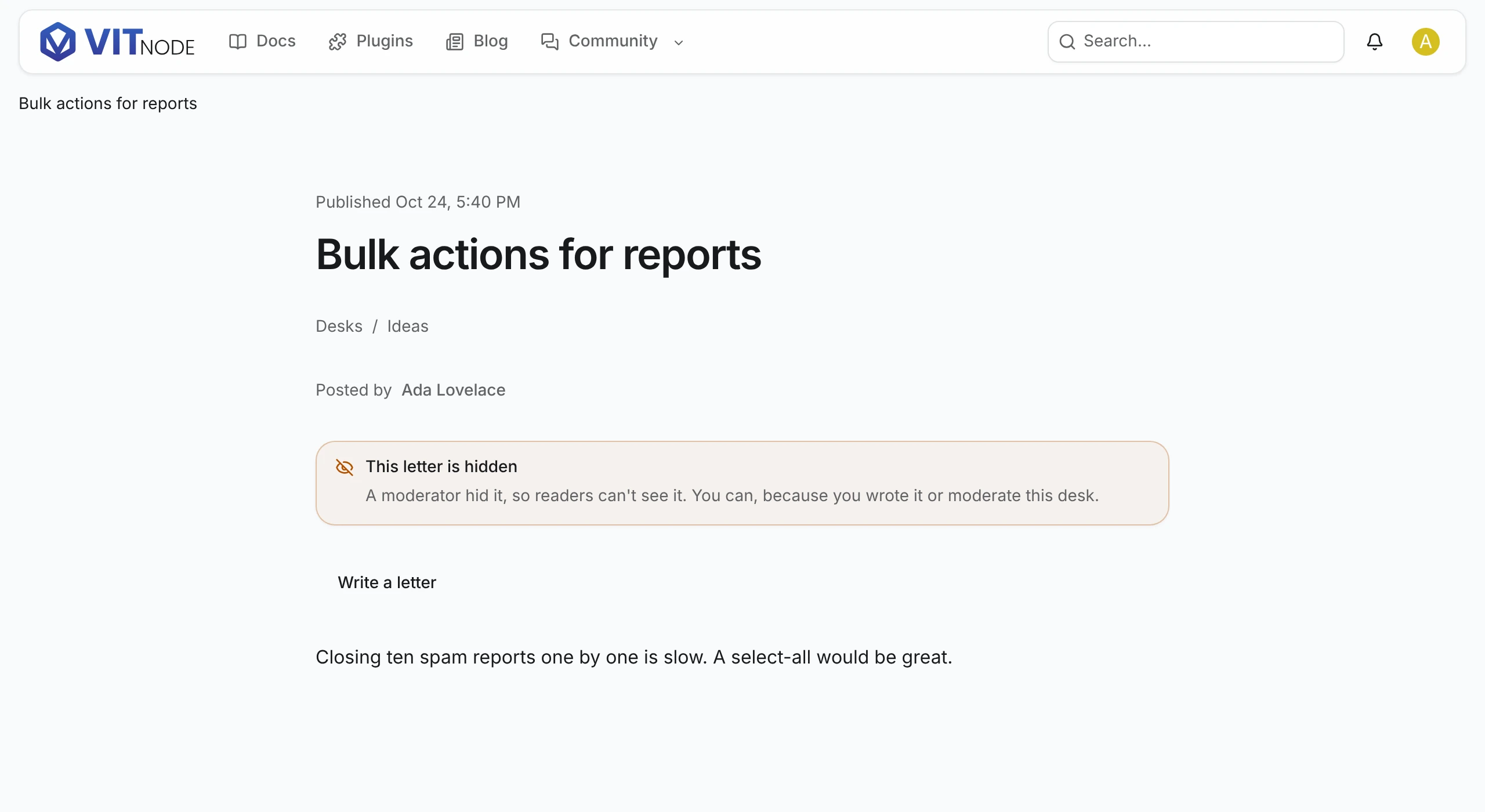
The newsroom plugin's letters to the editor show the same note through the header. Ada Lovelace opens their own hidden letter, and only they and the moderators can: