Search
Add a Content Engine content type to the VitNode site search, keep the search index in sync with published records, and rebuild it from the AdminCP.
Add a search block to a content type and its published records show up on the site search page at /search. VitNode writes a search document after every save, publish and delete, so you never call the search engine yourself. This guide turns search on for newsroom.story from the newsroom plugin.
Before you begin
The content type needs publication and a public API, because a search result is a link to a public page and its text has to be public already. Without them, the definition throws when it loads: search needs `publication: true`. or search needs `publicApi: { path, fields }`.
It also needs a page that serves the result URL. Content page shows how to add one.
Add the search block
Add search to the definition. This excerpt leaves out the fields and blocks search does not read:
export const storyContentType = defineContentType({
  id: "newsroom.story",
  tableName: "newsroom_stories",
  fields: {
    title: field.text({ required: true, minLength: 3, maxLength: 200 }),
    slug: field.slug({ source: "title" }),
    // ...
    excerpt: field.textarea({
      ai: {
        action: "newsroom:story.excerpt",
        mode: "suggestion",
        sourceFields: ["title", "code"],
      },
      maxLength: 500,
      nullable: true,
    }),
    // ...
    author: field.user(),
    // ...
  },
  publication: true,
  // ...
  publicApi: {
    path: "stories",
    fields: [
      "title",
      "slug",
      "excerpt",
      "featured",
      "category",
      "animation",
      "gallery",
      "noIndex",
      "publishedAt",
    ],
    // ...
  },
  search: {
    titleField: "title",
    descriptionField: "excerpt",
    contentFields: ["title", "excerpt"],
    pathTemplate: "/stories/{slug}",
    authorField: "author",
  },
  // ...
});titleFieldis the result heading. It must be afield.text()that is not nullable, or a relation that lends the related record's title (see Borrow the title from a related record).descriptionFieldis optional and leads the result excerpt. Text, textarea or rich text.contentFieldsis the searchable body. It takes at least one field and no duplicates. Text, textarea, rich text or slug fields, plus repeatable leaves such as"faq.answer". Rich text is indexed as its words, never as JSON. The title always ranks higher than the body, so listing it here as well only repeats it in the excerpt.pathTemplateis the result URL. It starts with/and contains{slug}exactly once. Leave the language out, because your i18n settings add it (see Localized content types).authorFieldis optional and credits a top-levelfield.user()on member timelines.imageFieldis optional and shows afield.file()image next to each result. See Credit several authors and add an image.
Every field except authorField must be in publicApi.fields. Otherwise a result snippet would leak a private value, so the definition throws instead: search.titleField names "x", which is not in publicApi.fields. authorField may stay private, which is why author is not in the public list above. All options are in the reference.
Index the records you already have
VitNode indexes new writes from now on, but not the records saved before the search block existed. Open Debug Panel → Search in the AdminCP (/admin/core/debug/search), type newsroom.story into Search collections…, and click Reindex on that row. Rebuild index at the top rebuilds every collection.
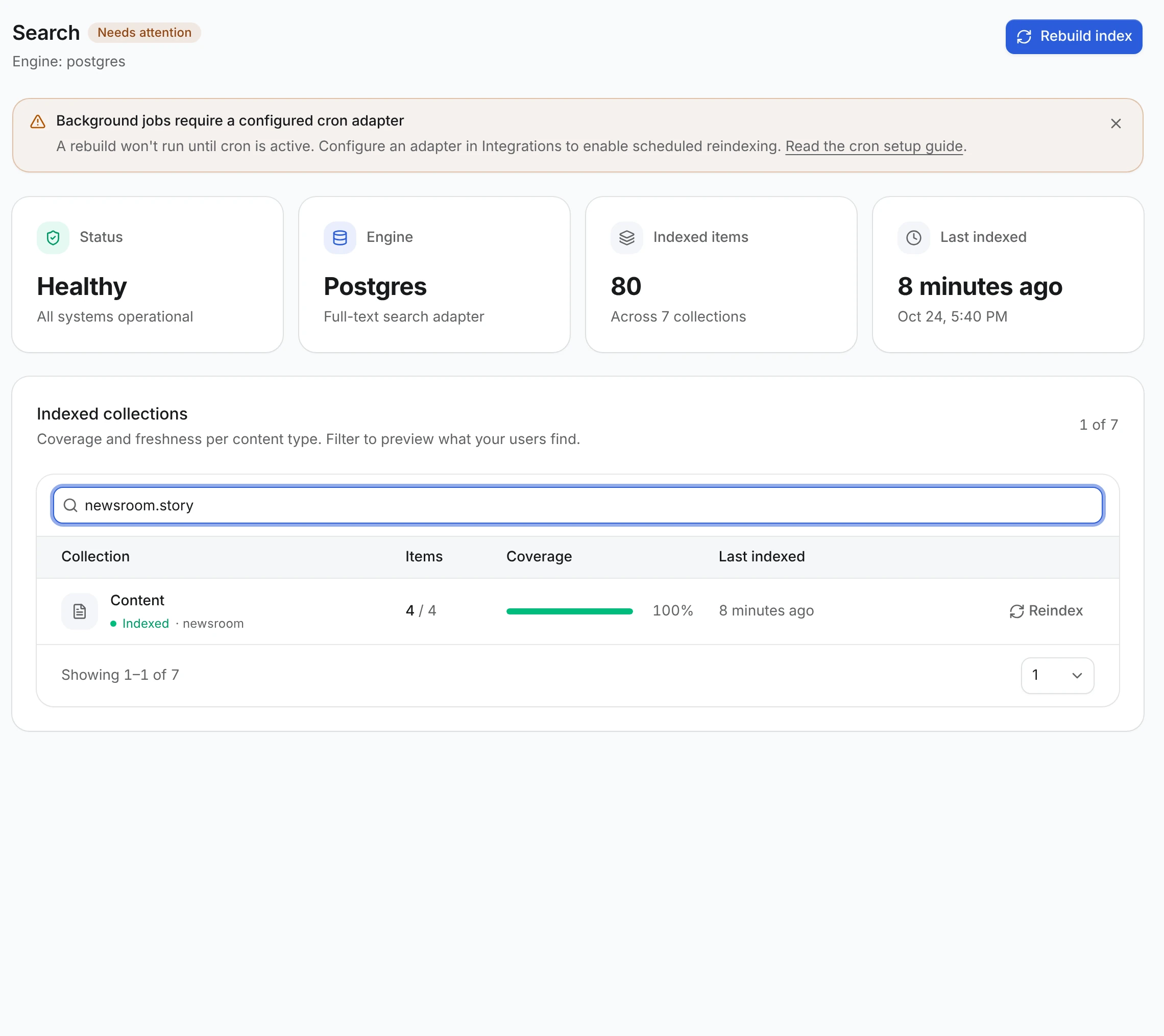
Both buttons need the Rebuild and clear the search index staff permission (system → can_manage_search). A rebuild clears the collection and refills it in pages of 200 records. It is a queued job, so it only runs while cron is running.
Items compares indexed documents with records in the table, drafts included. Content Engine collections are all labelled Content for now, so filter by the content type id to find yours.
Credit several authors and add an image
A result can show everyone who wrote the record and a picture of it, on /search, /discover and member timelines. The blog does both: an article lists all its authors and its cover image.
Make the author field hold several users, add a single image field, and point search at both:
export const blogPostContentType = defineContentType({
  fields: {
    title: field.text({ required: true }),
    friendlyUrl: field.slug({ source: "title" }),
    content: field.richText(),
    authorId: field.user({ min: 1, multiple: true, ordered: true }),
    coverImage: field.file({
      allowedExtensions: [".jpg", ".jpeg", ".png", ".webp", ".avif"],
      allowedMimeTypes: ["image/jpeg", "image/png", "image/webp", "image/avif"],
    }),
  },
  publication: true,
  publicApi: {
    path: "blog",
    fields: ["id", "title", "friendlyUrl", "content", "coverImage"],
  },
  search: {
    titleField: "title",
    contentFields: ["title", "content"],
    pathTemplate: "/blog/article/{slug}",
    authorField: "authorId",
    imageField: "coverImage",
  },
});- Authors. With
multiple: true, every user in the field is credited, andordered: truekeeps the order you pick in the editor. A result shows up to three overlapping avatars and the names in that order, such as admin, devloop_tester and aXen. Past three it says admin, devloop_tester and 2 others. Every co-author gets the record on their own timeline. - Image.
imageFieldnames one sharedfield.file(), not a list and not a localized field, and it must be inpublicApi.fields, because everybody who finds the result sees it. It shows as a small 16:9 thumbnail on the right of the result, and full width above the text on phones. Records without an image show none, and a file that is not an image is skipped.
The definition throws when either one points at the wrong kind of field, for example search.imageField names "gallery", which is not a shared single field.file() on the record itself.
Adding authorField or imageField to content that already exists needs a Reindex of the collection, so older records pick them up. After that, changing the authors or the image re-indexes the record on save.
In the API, each result carries authors (id, name, nameCode, avatar) in order, authorIds, and image with url, width and height, or null.
Borrow the title from a related record
Some records have no title of their own. A forum comment is one: on /search it should be headed by the topic it belongs to. Point titleField at a relation instead of a text field:
search: {
  titleField: "topic",
  contentFields: ["body"],
  authorField: "author",
  pathTemplate: "/forum/comments/{slug}",
},
The result is headed by the related record's own search.titleField, here the topic's title. The relation has a few rules:
- It points at exactly one record of another content type: to-one, not nullable and not
self: true. - It is in
publicApi.fields, like every other indexed field. - The target has a
searchblock of its own, because that is where the title comes from. Without one there is no heading to borrow, and the record stays out of the index. - The content type is not localized, because one related title would have to serve every language. The target may be localized: its title and link then come from its default-language translation.
A broken rule throws when the definition loads, for example search.titleField names the nullable relation "topic". A search result needs a heading, so the relation must not be nullable.
The two records then stay in step:
- A document is public only while both the record and the related record are. A comment under a draft or hidden topic stays out of
/search,/discoverand public timelines. - The document stores the related record as its container:
containerTypeis the target's content type id andcontainerIdits record id. - When the related record's search title changes, or it is published, unpublished, hidden or unhidden, every record that borrows its title is re-indexed. Deleting it removes their documents.
Records saved before you turned this on need a Reindex of the collection, or Rebuild index in Debug Panel → Search (/admin/core/debug/search).
Comments get this for free
A content type with thread and no search block is indexed this way automatically, so comments land in /search, /discover and profile timelines as "Maciej commented on Hello world" without a line of config. The engine fills in:
titleField: the thread'srootrelation.contentFields: every text and rich text field inpublicApi.fields, except the slug.authorField: thepublicWriteowner, when it's afield.user().pathTemplate: the comment'sdelivery.path, with:slugas{slug}.
It only kicks in when all of that exists and the root type is searchable itself. Otherwise the comments stay out of search, as before. Write your own search block to change any of it, or search: false to keep comments out.
Say where a record lives
A feed reads better as activity than as a list of headings: "aXen commented on Tabs or spaces", "aXen posted Tabs or spaces in General". For that, a document needs to know what it belongs to. search.context names that field:
search: {
  titleField: "title",
  contentFields: ["body"],
  authorField: "author",
  pathTemplate: "/forum/topics/{slug}",
  context: { field: "forum", pathTemplate: "/forum/{slug}" },
},
field is one of two things:
- A
field.container(). The context is the container's name, linked throughpathTemplate, because a container has no public URL of its own.{slug}is the container's slug. - A to-one
field.relation()to another searchable content type. The context is the related record's search title, linked to its own search URL, so leavepathTemplateout. WhentitleFieldalready borrows from a relation, that relation is the context automatically, which is why forum comments need nocontextline.
The document stores the context's title and URL in its metadata ({ context: { title, url } }) and the record it points at as containerType / containerId. Renaming a container, or changing its slug, re-indexes every record in it.
The feed turns that into a sentence for the types it knows, with links to the author, the record and its context, and the record's text underneath. Types without a sentence keep the plain heading-and-excerpt layout.
Like the title, the context is filled in on the next write or reindex.
What gets indexed and when
Every record is in the index, but only public ones show up on /search. A draft is stored as a private document without a URL. A hidden record's document turns private the moment it is hidden, and public again when it is unhidden. With authorField, it appears on its author's own timeline and on the AdminCP user page, but never in public results.
| Write | Search index |
|---|---|
| Create, edit, publish, unpublish, restore, hide, unhide, duplicate or delete in the AdminCP | Updated right after the write |
| A scheduled publish or unpublish | Updated when the job runs |
Your own route using the editorial service and contentEditorialEffects | Updated |
The plain service from model.service(c) | Not updated |
An edit rewrites the document only when an indexed field changed: the title, description, content fields, slug or author. Unpublishing keeps the document but makes it private, so the record drops out of /search at once. Deleting the record removes its document.
The plain service writes rows and nothing else. To change records from your own code and keep search in sync, use the editorial service.
If the search engine fails, the save still succeeds. The failure is logged with a [content-search] prefix and listed under Recent sync failures on the AdminCP Search screen. Reindex the collection to repair it.
Localized content types
A localized content type such as newsroom.bulletin gets one document per translation, with the language stored on it. A translation is public only when both the record and that translation are published. Deleting a translation removes only that language's document. Deleting the record removes all of them.
/search shows documents in the visitor's language. Documents of content types that are not localized match every language. With localization.fallback: "default", a visitor whose language has no published translation sees the default language's document instead.
Each document gets the URL of its own language. pathTemplate stays the English route, and VitNode adds the prefix, domain and translated segments from your localized URL settings. The table in Result URLs for Content Engine types shows what each setting produces. URLs are stored at indexing time, so reindex after changing pathTemplate or those settings.
Check the result
- Publish a story in AdminCP → Newsroom → Stories.
- Open
/searchand type a whole word or two from its title or excerpt. The result links to/stories/{slug}.
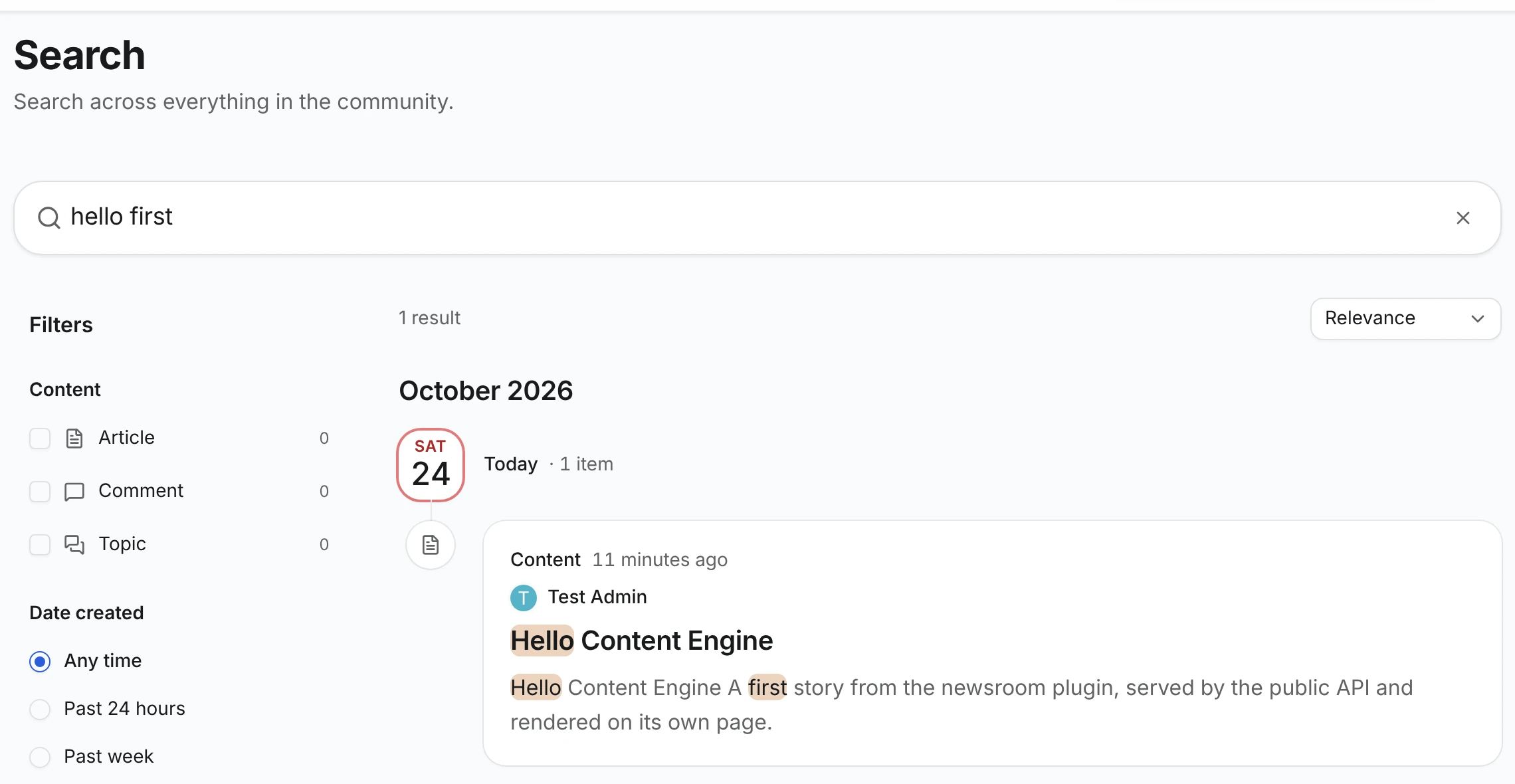
The same results come from the public search API. types limits them to one content type:
curl "http://localhost:3000/api/@vitnode/core/search?search=hello&types=newsroom.story"{
"edges": [
{
"pluginId": "newsroom",
"itemType": "newsroom.story",
"itemId": 3,
"languageCode": "",
"title": "Hello Content Engine",
"content": "Hello Content Engine A first story from the newsroom plugin, served by the public API and rendered on its own page.",
"url": "/stories/hello-content-engine",
"isPublic": true
}
]
}Unpublish the story and run the request again. This time edges is empty. If a record you published before adding search is missing, reindex the collection.
The index runs on Postgres full-text search by default. To switch engines, or to index data that is not a content type, see Search & Discovery and Elasticsearch.