Relations
Link one VitNode Content Engine record to another with field.relation and the references map. File each newsroom article under a category, migrate, and pick the category in the AdminCP.
A relation stores another record's id in a real foreign key column. This guide adds a newsroom.category content type and files each article under one category, which staff pick in the AdminCP.
Before you begin
You need the newsroom.article type from First content type, with its plugin in plugins/newsroom/, and an AdminCP account. Nothing else is required. The steps and the check below work in the AdminCP alone. If you followed later guides, keep their additions. This guide only adds files, one field and one list column.
Define the category type
Create src/content/category.ts. This is the complete file:
import { defineContentType, field } from "@vitnode/core/content";

export const categoryContentType = defineContentType({
  id: "newsroom.category",
  tableName: "newsroom_categories",

  fields: {
    name: field.text({ required: true, minLength: 2, maxLength: 80 }),
    slug: field.slug({ source: "name" }),
  },

  admin: {
    path: "newsroom/categories",
    titleField: "name",
    list: { columns: ["name", "slug", "updatedAt"] },
  },
});
A category is a small content type of its own, managed in the AdminCP. titleField: "name" is also what the article's category picker shows.
Create its model and export the table
Create src/database/categories.ts. This is the complete file:
import { createContentModel } from "@vitnode/core/content/server";

import { categoryContentType } from "@/content/category";

export const categoryContent = createContentModel(categoryContentType);

export const newsroom_categories = categoryContent.table;
The export matters, because migrations find tables through the exports of the plugin's src/database/*.ts files.
Register the category type
Add categoryContent to the staff API in src/api/modules/admin/admin.module.ts. This is an excerpt:
import { articleContent } from "@/database/articles";
import { categoryContent } from "@/database/categories";

  modules: [
    buildContentAdminModule({
      contentTypes: [articleContent, categoryContent],
    }),
  ],
Then add its link to contentTypes in src/admin/nav.tsx. This is an excerpt. src/admin/content.tsx re-exports the same list, so the screen needs no change:
import { FolderIcon, NewspaperIcon } from "lucide-react";

import { categoryContentType } from "@/content/category";

  contentTypes: [
    { definition: articleContentType, icon: <NewspaperIcon /> },
    { definition: categoryContentType, icon: <FolderIcon /> },
  ],
If you followed later guides, keep the comment type in both lists too.
Add the relation to the article
Edit src/content/article.ts. Import the category type and add a category field. This is an excerpt:
import { defineContentType, field } from "@vitnode/core/content";

import { categoryContentType } from "@/content/category";

  fields: {
    title: field.text({ required: true, minLength: 3, maxLength: 200 }),
    slug: field.slug({ source: "title" }),
    body: field.richText({ required: true }),
    category: field.relation({
      target: () => categoryContentType,
      nullable: true,
      onDelete: "set null",
    }),
},targetis a function, so two content types can point at each other without an import cycle.nullable: truelets the column start empty. Your articles already exist and have no category, so you could not add arequiredrelation to the table.onDelete: "set null"clears the link when a category is deleted."restrict"refuses to delete a category that still has articles, and"cascade"deletes them with it.
Then show the category in the AdminCP list by adding "category" to admin.list.columns in the same file. This is an excerpt, so keep any other columns you added, such as "status":
  admin: {
    path: "newsroom/articles",
    titleField: "title",
    list: {
      columns: ["title", "slug", "category", "updatedAt"],
      orderableFields: ["title"],
    },
  },
Map the reference
Edit src/database/articles.ts. This is the complete file:
import { createContentModel } from "@vitnode/core/content/server";

import { articleContentType } from "@/content/article";

import { newsroom_categories } from "./categories";

export const articleContent = createContentModel(articleContentType, {
  references: { category: () => newsroom_categories.id },
});

export const newsroom_articles = articleContent.table;
The definition names the content type a relation points at, and references names the column its foreign key uses. It needs exactly one entry per relation field, so a missing or extra key is a type error. field.user(), field.file() and self: true relations find their table on their own and need no entry.
Label the new fields
Add the category's labels and permissions to src/locales/en.json, and a category label to the article's fields. This excerpt shows only the new keys, in their place:
{
  "newsroom": {
    "content": {
      "article": {
        "fields": { "category": "Category" }
      },
      "category": {
        "label": "{count, plural, one {Category} other {Categories}}",
        "title": "Categories",
        "desc": "Sections that group the articles.",
        "fields": { "name": "Name", "slug": "Slug", "updatedAt": "Updated" }
      }
    }
  },
  "newsroom:category": "Categories",
  "newsroom:category:can_view": "View categories",
  "newsroom:category:can_create": "Create categories",
  "newsroom:category:can_edit": "Edit categories",
  "newsroom:category:can_delete": "Delete categories"
}
Build and migrate
Run these from the workspace root. While pnpm dev runs, db:migrate alone is enough:
bun run build:plugins
bun run db:migrate
The migration creates the categories table and gives articles a nullable category column with a foreign key and an index:
CREATE TABLE "newsroom_categories" (
	"id" serial PRIMARY KEY,
	"createdAt" timestamp DEFAULT now() NOT NULL,
	"updatedAt" timestamp DEFAULT now() NOT NULL,
	"name" varchar(80) NOT NULL,
	"slug" varchar(160) NOT NULL
);
ALTER TABLE "newsroom_articles" ADD COLUMN "category" integer;
CREATE INDEX "newsroom_articles_category_idx" ON "newsroom_articles" ("category");
ALTER TABLE "newsroom_articles" ADD CONSTRAINT "newsroom_articles_category_newsroom_categories_id_fkey" FOREIGN KEY ("category") REFERENCES "newsroom_categories"("id") ON DELETE SET NULL ON UPDATE CASCADE;
Check the result
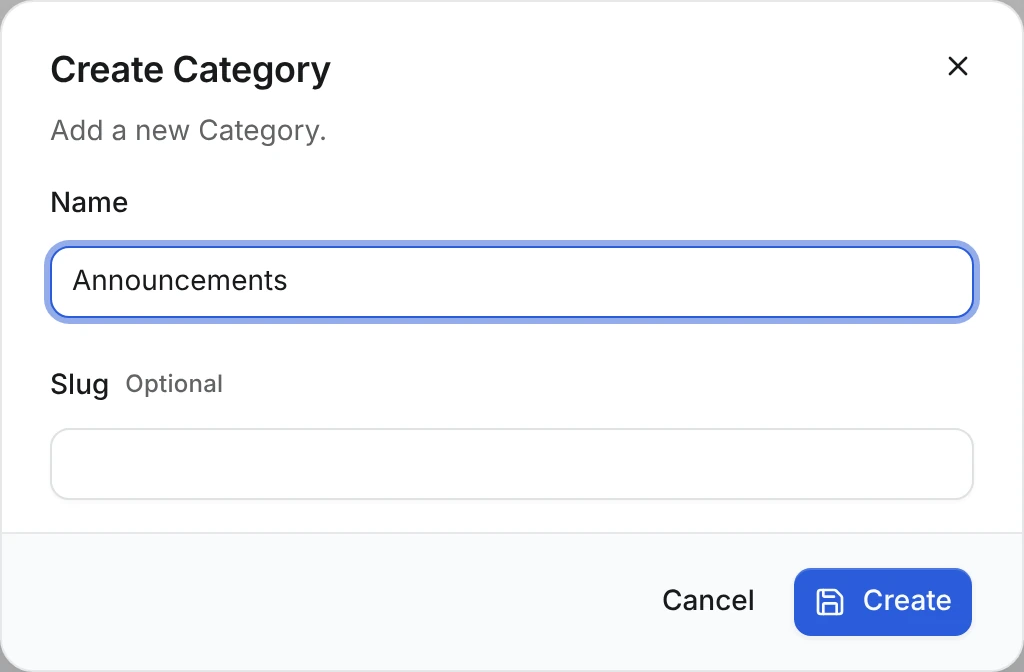
Open AdminCP → Newsroom → Categories, click Create Category, enter Announcements and click Create:
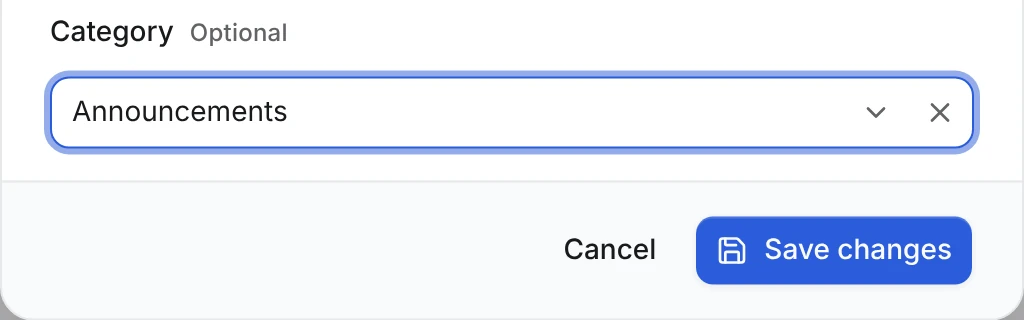
Open Newsroom → Articles and click the pencil on Welcome to the newsroom. The dialog now ends with a Category picker. Choose Announcements and click Save changes:
The list shows the category's name in the new column, and the other articles show a dash:
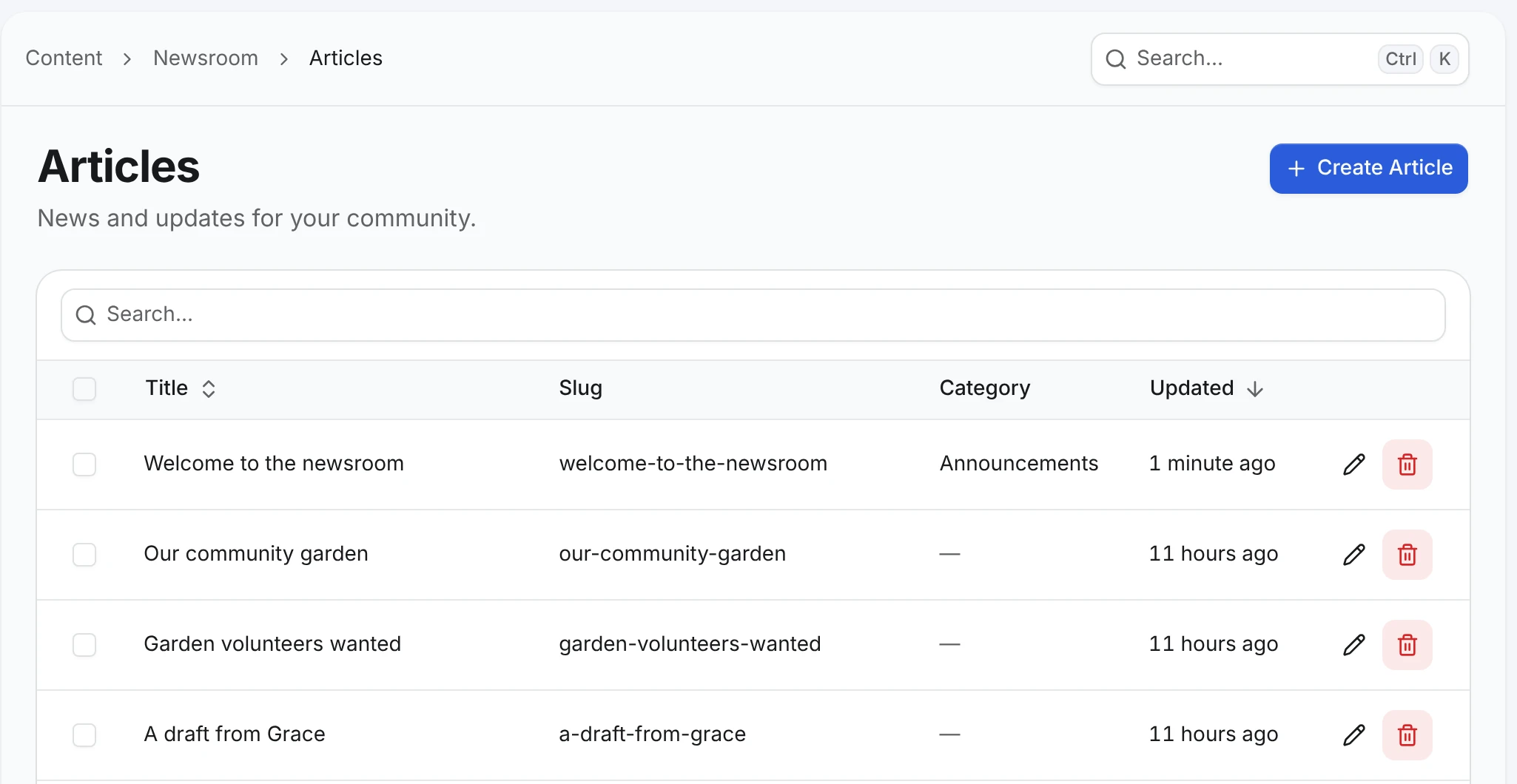
Now delete the category. In Newsroom → Categories, click the trash button in the Announcements row and confirm with Yes, delete it. Back in Newsroom → Articles, Welcome to the newsroom shows a dash again. The article stays, and only its category became null, because the relation says onDelete: "set null".
Read the category through the public API
This optional part needs the article's public API from Public API, which builds on Drafts & publishing, and a published article with a category. Assign a category again if you deleted it above.
Add "category" to publicApi.fields in src/content/article.ts. Change only that list, and keep every other option you configured, such as listFields, searchableFields and orderableFields:
  publicApi: {
    path: "news",
    fields: ["id", "title", "slug", "body", "category", "publishedAt"],
    // listFields, searchableFields, orderableFields and the rest stay as they are
  },
listFields decides what the list route returns. Add "category" there too only if list rows need it. Then request the article:
curl "http://localhost:3000/api/newsroom/content/news/welcome-to-the-newsroom"{
"id": 1,
"title": "Welcome to the newsroom",
"slug": "welcome-to-the-newsroom",
"category": { "id": 1 },
"publishedAt": "2026-10-23T18:57:51.156Z"
}A relation exposes only the related record's id, here the category's. The category's name is not part of the article's public answer. The AdminCP can show it because its staff list route adds a labels object with the names, and staff routes are not public.
Go further
- Show the category name to readers. Give the category type
publication: trueand its own public API, then read the category by id or list categories next to the articles. Or model categories as containers, which bring their own pages and filters. - Let members choose a category. Add
categorytopublicWrite.create.fields. Members may only link to records readers can see, so the category type then needspublication: trueand its ownpublicApi. Without them, the write route stops with an error that names the field. - Many categories, grouped fields, repeatable rows and mixed id types. See Advanced fields.