Create form
Build a page where members write VitNode Content Engine records with AutoForm and useContentPublicWrite, which shows server errors in the form, and send new records to the right page.
This page builds /news/new, where signed-in members write an article. It takes one form and one request. useContentPublicWrite from core sends the request and shows every refusal, so the page only decides what happens after a successful save.
This continues the article from Member writing, which turned on publicWrite with title and body in create.fields.
Add TanStack Query to the plugin
The page refreshes cached lists with useQueryClient, so the plugin needs @tanstack/react-query as a dependency. Run this from the workspace root:
bun add @tanstack/react-query --cwd plugins/newsroomWrite the form
Create src/pages/article-form.tsx. The edit form reuses it:
import {
  AutoForm,
  type AutoFormOnSubmit,
} from "@vitnode/core/components/form/auto-form";
import { AutoFormEditor } from "@vitnode/core/components/form/fields/editor";
import { AutoFormInput } from "@vitnode/core/components/form/fields/input";
import {
  isRichTextEmpty,
  type RichTextDocument,
  zodRichTextDocument,
} from "@vitnode/core/content";
import { useTranslations } from "use-intl";
import { z } from "zod";

/** The fields the form renders, so server errors on them show in place. */
export const ARTICLE_FORM_FIELDS = ["title", "body"] as const;

export interface ArticleFormValues {
  body: RichTextDocument;
  title: string;
}

const createArticleFormSchema = (defaults: ArticleFormValues) =>
  z.object({
    title: z.string().trim().min(3).max(200).default(defaults.title),
    body: zodRichTextDocument
      .refine(doc => !isRichTextEmpty(doc))
      .default(defaults.body),
  });

export type ArticleFormSchema = ReturnType<typeof createArticleFormSchema>;

export const ArticleForm = ({
  defaultValues,
  onSubmit,
  submitLabel,
}: {
  defaultValues: ArticleFormValues;
  onSubmit: AutoFormOnSubmit<ArticleFormSchema>;
  submitLabel: string;
}) => {
  const t = useTranslations("newsroom.articles.form");

  return (
    <AutoForm
      fields={[
        {
          id: "title",
          component: props => <AutoFormInput {...props} label={t("title")} />,
        },
        {
          id: "body",
          component: props => (
            <AutoFormEditor {...props} format="json" label={t("body")} />
          ),
        },
      ]}
      formSchema={createArticleFormSchema(defaultValues)}
      onSubmit={onSubmit}
      submitButtonProps={{ children: submitLabel, className: "self-start" }}
    />
  );
};
The schema checks the values in the browser first, with the same limits as the definition, so members see mistakes before anything is sent. format="json" makes the editor produce the document a rich text field stores. AutoForm disables the submit button while onSubmit runs, so a double click never posts twice.
Write the page
Create src/pages/article-new-page.tsx:
import type { AutoFormOnSubmit } from "@vitnode/core/components/form/auto-form";

import { useQueryClient } from "@tanstack/react-query";
import { emptyRichTextDocument } from "@vitnode/core/content";
import { definePluginRoute } from "@vitnode/core/routing";
import { useContentPublicWrite } from "@vitnode/core/tanstack/content";
import { fetcher } from "@vitnode/core/tanstack/fetcher";
import { useHrefNavigate } from "@vitnode/core/tanstack/link";
import { toast } from "sonner";
import { useTranslations } from "use-intl";

import { manifest } from "@/manifest.gen";

import {
  ARTICLE_FORM_FIELDS,
  ArticleForm,
  type ArticleFormSchema,
} from "./article-form";

export const route = definePluginRoute({
  head: ({ t }) => ({
    robots: "noindex, nofollow",
    title: t("newsroom.articles.new.title"),
  }),
});

const ArticleNewPage = () => {
  const t = useTranslations("newsroom.articles.new");
  const navigate = useHrefNavigate();
  const queryClient = useQueryClient();
  const write = useContentPublicWrite({
    fields: ARTICLE_FORM_FIELDS,
    uniqueField: "title",
  });

  const onSubmit: AutoFormOnSubmit<ArticleFormSchema> = async (
    values,
    form,
  ) => {
    const record = await write.submit(
      form,
      async () =>
        await fetcher({
          plugin: manifest.id,
          method: "post",
          module: "content/news",
          path: "/",
          args: { body: { values } },
        }),
    );
    if (!record) return;

    await queryClient.invalidateQueries({
      queryKey: [manifest.id, "articles"],
    });

    // Waits for a moderator. Its public page answers 404 until approval.
    if (record.approval?.status === "pending") {
      toast.info(t("pending.title"), { description: t("pending.desc") });
      await navigate(`/news/${record.id}/edit`);

      return;
    }

    // A draft nobody has to review. It stays private, so open its edit page.
    if (record.status !== "published") {
      toast.info(t("draft.title"), { description: t("draft.desc") });
      await navigate(`/news/${record.id}/edit`);

      return;
    }

    toast.success(t("success.title"), { description: t("success.desc") });
    await navigate(`/news/${record.slug}`);
  };

  return (
    <div className="container mx-auto flex max-w-3xl flex-col gap-6 px-4 py-8">
      <h1 className="text-3xl font-semibold tracking-tight text-balance">
        {t("title")}
      </h1>
      <ArticleForm
        defaultValues={{ body: emptyRichTextDocument(), title: "" }}
        onSubmit={onSubmit}
        submitLabel={t("submit")}
      />
    </div>
  );
};

export default ArticleNewPage;-
write.submitsends the request and returns the new record, ornullafter showing why the server said no: an issue on a field appears under it, a taken title appears under Title (uniqueField), and anything else, such as an expired session, is a toast. The Form helpers reference lists every case. -
The owner comes from the server;
valuesnever includesauthor. -
invalidateQueriesexpires the cached article list, whose query key starts with[manifest.id, "articles"], so the new article shows there at once. -
Before navigating, the page reads two fields of the answer, because a new article can end in three states. Only a published one has a public page; the other two answer
404there, so the author goes to the edit page with a message that says what happened:statusapprovalWhat the author hears "published"nullArticle published, on the article's page "draft"nullDraft saved. It is private and nobody was asked to review it "draft"{ status: "pending" }Sent for approval. A moderator reviews it first Newsroom articles use
create.status: "published"and have no container, so members always get the first row.create.status: "draft"gives the second. The third only happens for a content type filed in a container whose publishing rules hold new posts for approval; see Drafts and approval.
Add the route
Edit src/routes.ts and add the page before /news/:slug. This is an excerpt:
  page("/news/new", {
    component: lazy(() => import("./pages/article-new-page")),
    messages: ["newsroom.articles"],
    requires: "authenticated",
  }),

  page("/news/:slug", {
requires: "authenticated" sends guests to the sign-in page and brings them back afterwards. The static /news/new wins over /news/:slug, so an article whose slug is new would be hidden behind the form; pick another URL, such as /news/write/article, if that can happen in your app.
Add the labels
Add these keys under newsroom.articles in src/locales/en.json:
{
  "newsroom": {
    "articles": {
      "form": { "title": "Title", "body": "Article" },
      "new": {
        "title": "Write an article",
        "submit": "Publish article",
        "success": { "title": "Article published", "desc": "Readers can see it now." },
        "draft": {
          "title": "Draft saved",
          "desc": "It is not public yet, so only you and the site's staff can see it."
        },
        "pending": {
          "title": "Sent for approval",
          "desc": "A moderator reviews it before readers can see it."
        }
      }
    }
  }
}
Error messages come from core and follow the reader's language, so the plugin needs none.
Check the result
Sign in as a member and open http://localhost:3000/news/new:
- Click Publish article with an empty form. Both fields show an error, and nothing is sent.
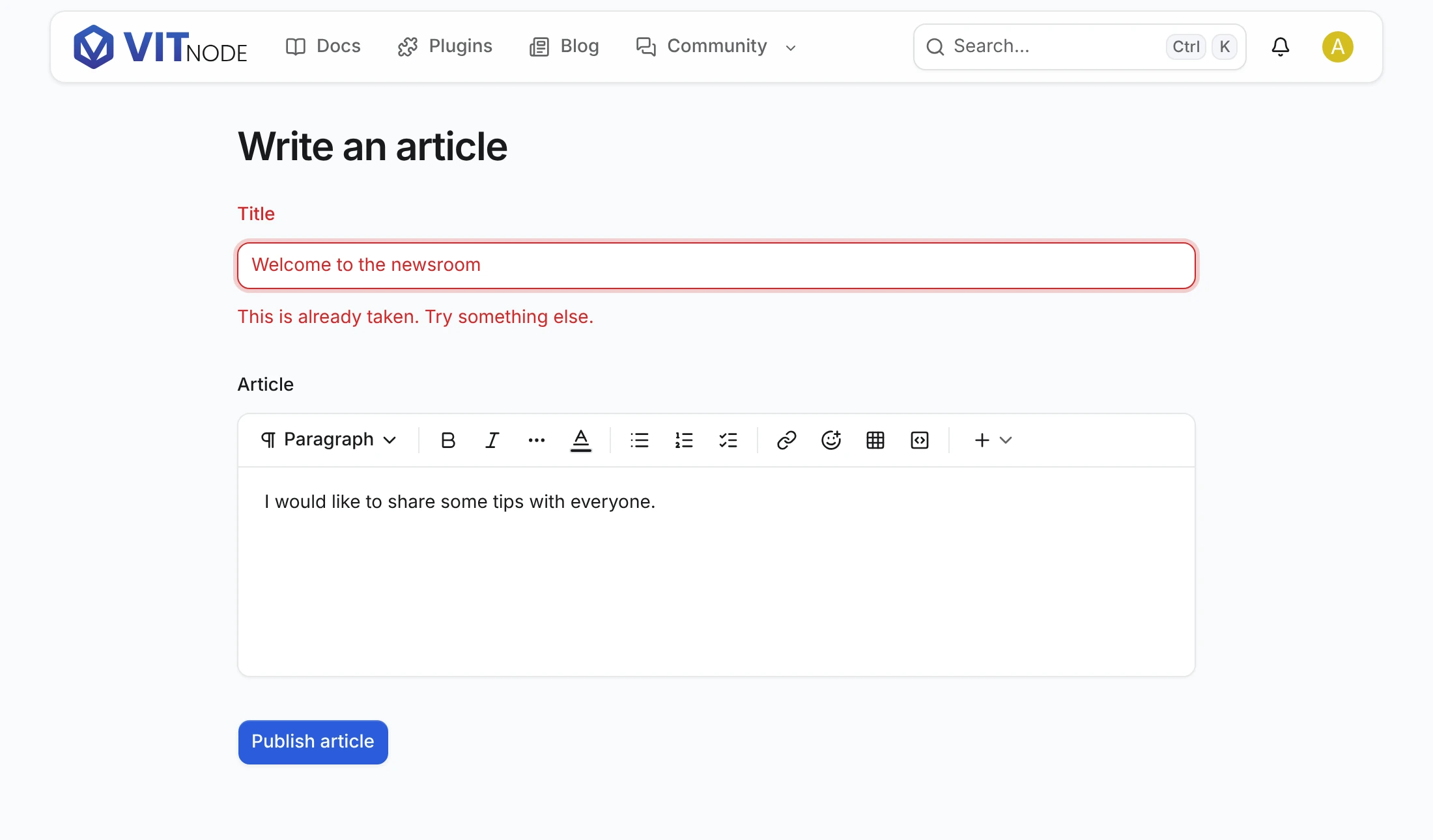
- Enter the title
Welcome to the newsroom, which an article already has, and a message. This is already taken. Try something else. appears under Title, and your text stays. - Change the title and click Publish article. Article published appears, you land on
/news/{slug}, and the article tops/news. - Open
/news/newsigned out. The app sends you to the sign-in page. - Optional: set
create.statusto"draft"insrc/content/article.tsand post again. Draft saved appears, you land on the edit page, and the article is missing from/newsuntil staff publish it. Set it back to"published"afterwards.
Captcha
With create.captcha: true in publicWrite, every create needs a captcha token. Give ArticleForm a captcha prop that it passes on to AutoForm, then forward the token AutoForm hands to onSubmit:
const { data: config } = useMiddlewareConfigQuery(); // from @vitnode/core/tanstack/auth

const onSubmit: AutoFormOnSubmit<ArticleFormSchema> = async (values, form, { captchaToken }) => {
  const record = await write.submit(form, async () =>
    await fetcher({
      plugin: manifest.id,
      method: "post",
      module: "content/news",
      path: "/",
      captchaToken,
      args: { body: { values } },
    }),
  );
};

// In ArticleForm: <AutoForm captcha={captcha} ... />
<ArticleForm captcha={config?.captcha} /* ...the other props */ />;
Next, let authors fix their articles with an Edit form.