Live editing
Let several editors work on one Content Engine record at once in the AdminCP, with autosave to a shared draft, presence outlines, field locks and real-time rich text co-editing.
Live editing lets a team work on the same record at the same time without overwriting each other. Changes autosave to a shared draft, everyone sees who is in which field, plain fields are edited by one person at a time, and rich text fields are typed in together.
Turn it on
Add liveEditing: true next to editorial. Live editing needs editorial, because field locks and the shared draft are measured against the record version it adds. Without it, defineContentType throws liveEditing needs `editorial` , and TypeScript flags the option first:
export const storyContentType = defineContentType({
  id: "newsroom.story",
  tableName: "newsroom_stories",
  // ...
  editorial: {
    revisions: { retention: 20 },
    preview: { expiresInMinutes: 30 },
    scheduling: true,
  },
  liveEditing: true,
  // ...
});
A live session starts when someone opens an existing record's edit form in the AdminCP. That needs three things:
- An AdminCP session, from signing in at
/admin. - The content type's
can_editpermission. Someone who can only view the record does not join. - A saved record. The create form is not live, because there is nothing to share yet.
Presence and rich text co-editing also need the API's WebSocket. Without it, autosave and field locks still work over HTTP, a little slower. Deployment requirements lists what each setup gets.
What editors see
Presence
The form header shows an avatar for everyone else in the record, up to five and then +N. Hover or focus an avatar to read where that person is, such as "editing Title". A ring in their color means they are in a field right now.
The field they are in gets an outline in their color with a name tag. When they move to another field, the outline glides after them, and nothing on the page shifts to make room. In a localized form, the language switcher marks the languages people are working in. You never see yourself, and one person in several tabs counts once.
Field locks
Clicking into a plain field, such as a title, slug or category, takes a lock on that field in that language. Everyone else sees the field dimmed and read-only inside the editor's outline, and the value updates as they type. Screen readers announce "Anna Kowalska is editing".
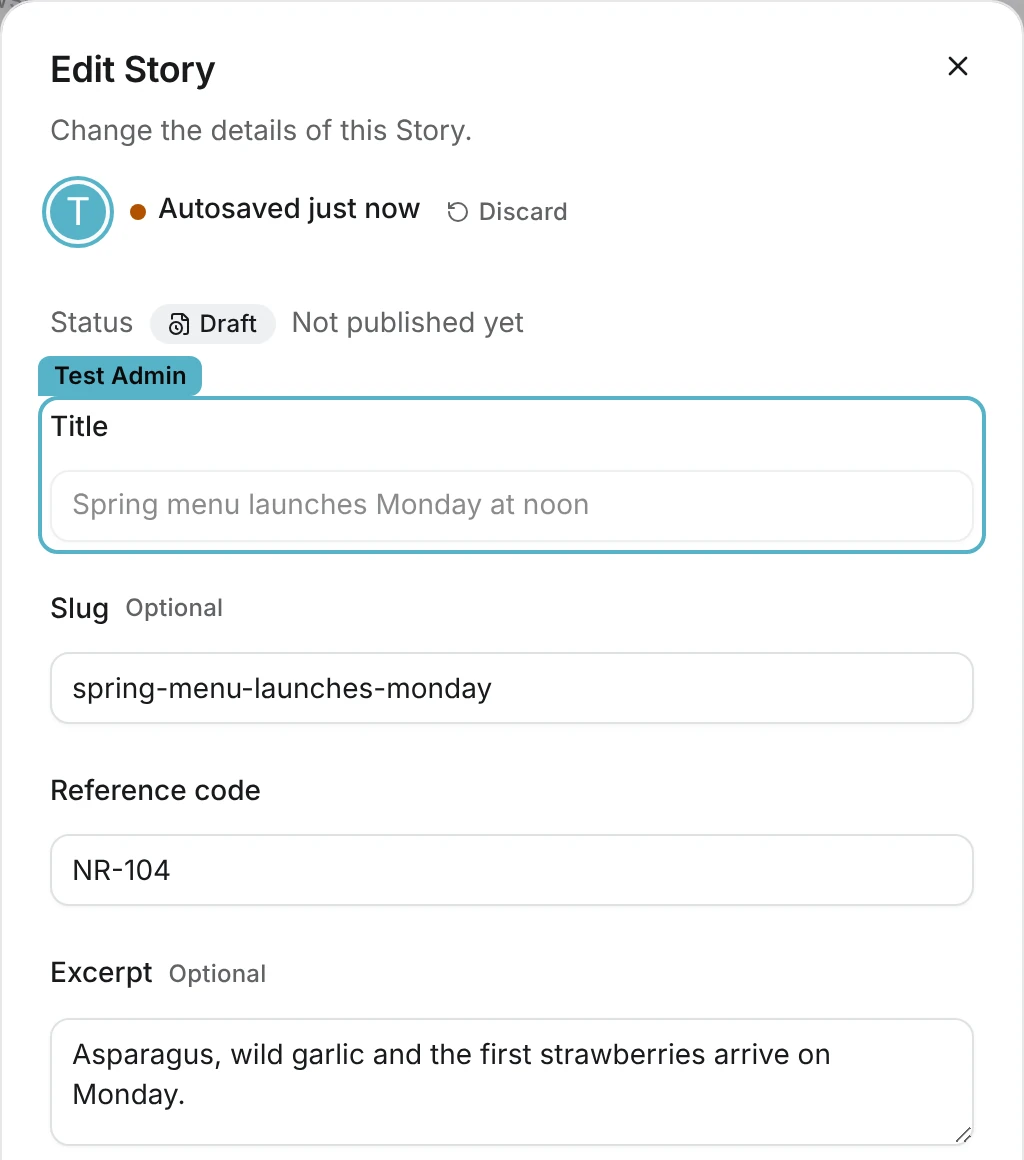
A lock lasts 60 seconds and renews every 20 seconds while the editor stays in the field. Leaving the field releases it, and so does closing the record. A lock nobody renews, say because a laptop went to sleep, expires on its own.
Autosave and the shared draft
About 1.5 seconds after you stop typing in a field you hold, the value is saved to the record's draft. Close the tab and it's still there, but readers don't see it yet. The header shows Saving… and then Autosaved just now, later Autosaved 5 minutes ago, or Autosave failed when the write failed. An amber dot in front means the draft holds changes the record doesn't have yet, and it stays until someone clicks Save changes. Hover it for a reminder.
Changed your mind? Discard next to the autosave time throws the draft away after you confirm, and the form goes back to the last saved version. It is a team draft, so everyone editing the record goes back too, and they get a short note saying so.
There is one draft per record and language, shared by the whole team. When you open the record, you see the draft, not only what was last saved. Save commits it through the usual version check and creates one revision. Autosave itself never creates revisions, emits no events and leaves search and caches alone. Preview links also ignore the draft until someone saves.
Rich text co-editing
Rich text fields are not locked and get no outline. Everyone in the same field and language types into one shared document and sees each other's caret with a name tag, plus a tint over the text they select. Undo only undoes your own changes. The newsroom plugin's story has no rich text field, so this is the blog plugin's article editor:
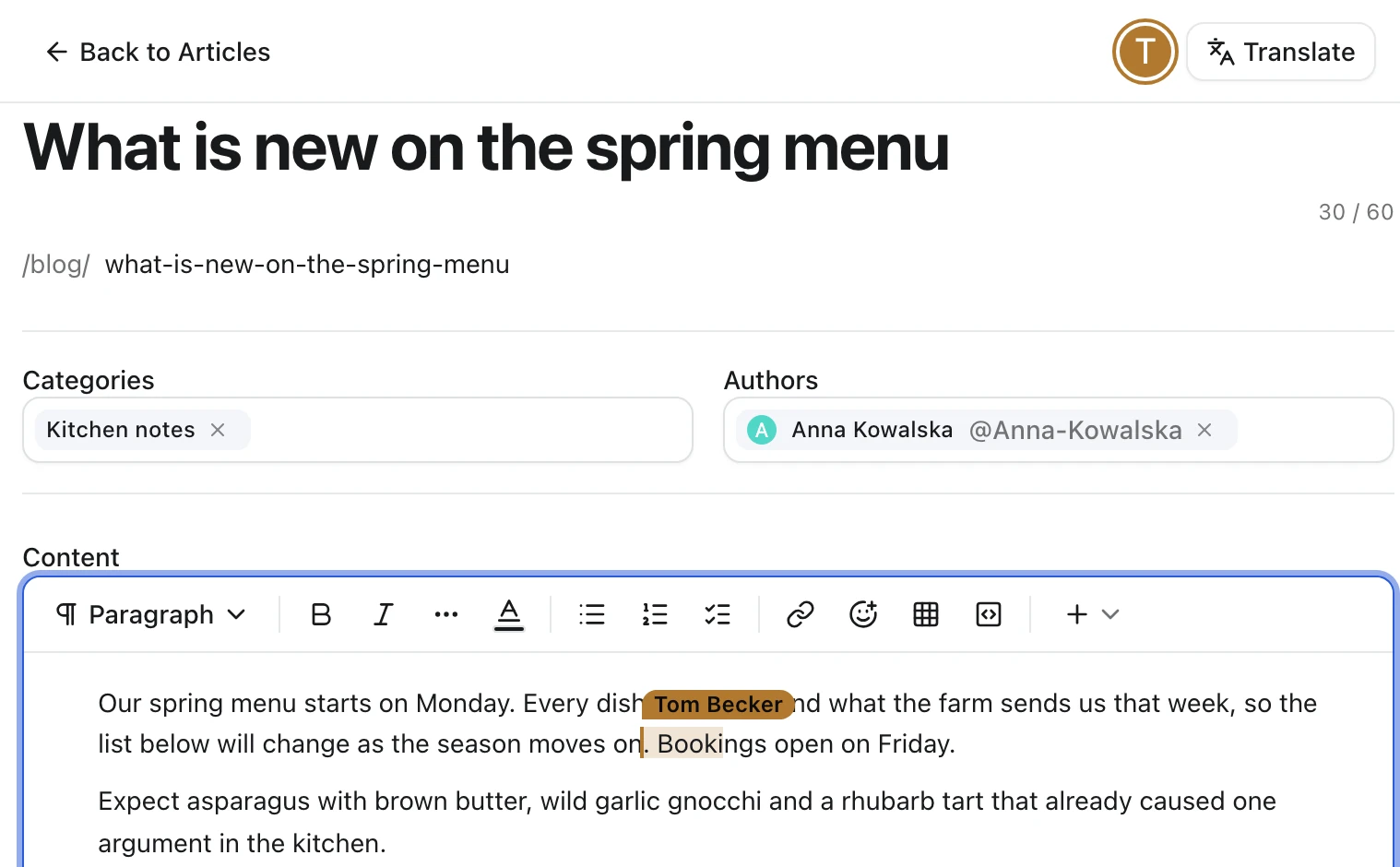
Each language has its own shared document. The first person to open a field fills it from the record. If the connection drops, the editor keeps what you type and sends it when the connection comes back. The server stores the document about two seconds after the last change, and Save writes its current content, everyone's edits included, to the record.
Restores and deletes
Restoring a revision or deleting the record throws away its drafts, locks and shared documents. Everyone in the session gets a notice, and the form reloads with the new state.
Check the result
- Sign in at
/adminas two staff members withcan_edit, for example in two browser profiles. - Open the same record's edit form in both.
- Click into Title in one window. The other window shows the outline and name tag, and the field turns read-only there.
- Type a few words and wait two seconds. The other window shows the new value, and the header of the first says Autosaved just now.
Building your own form layout, or calling the lock and draft routes yourself? See the live editing API.