Activity logs
How VitNode records every Content Engine write in the Activity Logs automatically, inside the write's transaction, and how to tune or disable it per content type with the audit option.
Every content type is audited out of the box, no code required. Creating, editing, deleting, duplicating, publishing, hiding, restoring, scheduling and every translation change land in the Activity Logs with the actor, the record, the changed fields and, for an editorial content type, the revision it created. This page covers what gets recorded and how to tune it.
What an entry contains
| Field | Value |
|---|---|
| Plugin | The content type's plugin, from the content registry, never from the request |
| Action | content.created, content.updated, content.translation_published... |
| Target | The content type id (blog.category), the record id and its title at the time |
| Changed fields | The canonical paths the write moved (seo.title, categories) |
| Changes | Without editorial: bounded before/after values of the changed scalar fields. With it: none, the revision holds them |
| Revision | The revision the write created, shown as a diff against the previous one |
| Locale | For translation operations |
Delivery events (delivery_slug_changed, delivery_redirect_created) do not
get entries of their own. The slug change is part of the content.updated
entry. The area follows the request: admin from the AdminCP, public for a member's own
write, moderator from a report or approval, system for scheduled work.
Why entries are written in the transaction
Content events fire after a write commits, which is too late for a listener to keep the audit trail atomic. So the Content Engine writes the entry inside the write's transaction: beside the revision for an editorial content type, and in the plain service's transaction otherwise. A rolled-back write leaves no entry, and a write whose entry cannot be stored does not commit.
This holds for the generated AdminCP routes, the public write API, approvals,
moderation actions and your own code calling model.service(c) or
model.editorialService(c), because they all go through the same services.
One operation, one entry
Some operations write more than one thing. The Content Engine records the operation the person asked for:
| Operation | Entries |
|---|---|
| Create a localized record with its translations | One content.created, labelled with the default translation's title, listing the locales |
| Publish a localized record | One content.published listing the languages it published |
| Duplicate a record | One content.duplicated on the copy, with the source id |
| Save shared fields and a translation together | One entry per part that moved, sharing a request id |
Scheduled publishing
The system runs a scheduled publish or unpublish, so its entry has the
System actor and area: system. Whoever booked it travels in the metadata:
{
  "action": "content.published",
  "actorType": "system",
  "metadata": {
    "scheduledByUserId": 12,
    "scheduleId": 40,
    "trigger": "scheduled_task"
  }
}
Booking and cancelling the schedule are entries of their own
(content.scheduled, content.schedule_cancelled) attributed to the admin.
The execution runs in the schedule's claim transaction, so a retried run never
records twice.
Tune or disable it
Auditing is on by default. Pass audit to defineContentType to keep noisy
fields out of the recorded changes, or false to turn it off.
import { defineContentType, field } from '@vitnode/core/content'

export const productContentType = defineContentType({
  id: 'shop.product',
  tableName: 'shop_products',
  fields: {
    name: field.text({ required: true, maxLength: 200 }),
    stock: field.number({ integer: true, required: true }),
  },
  // Stock moves with every order; the entry still says the product changed.
  audit: { excludeFields: ['stock'] },
})| Option | Type | Default | Description |
|---|---|---|---|
excludeFields | field names | [] | Never named or diffed in an entry; a group name covers its nested fields. The write itself is still recorded. An unknown field name throws when the content type is defined. |
trackChanges | boolean | true | false records the operation only, without changed fields or values. |
audit: false records nothing for the content type. Use it only for
high-volume, non-sensitive content. Sensitive field names (passwords, tokens,
secrets, API keys) are redacted no matter what you set here.
See a record's history in the AdminCP
Every content list has an Activity row action for admins with can_view
on the content type. It opens the record's entries, newest first, with their
changes, for any content type, editorial or not. Don't mix it up with
History, which shows what the content itself used to be.
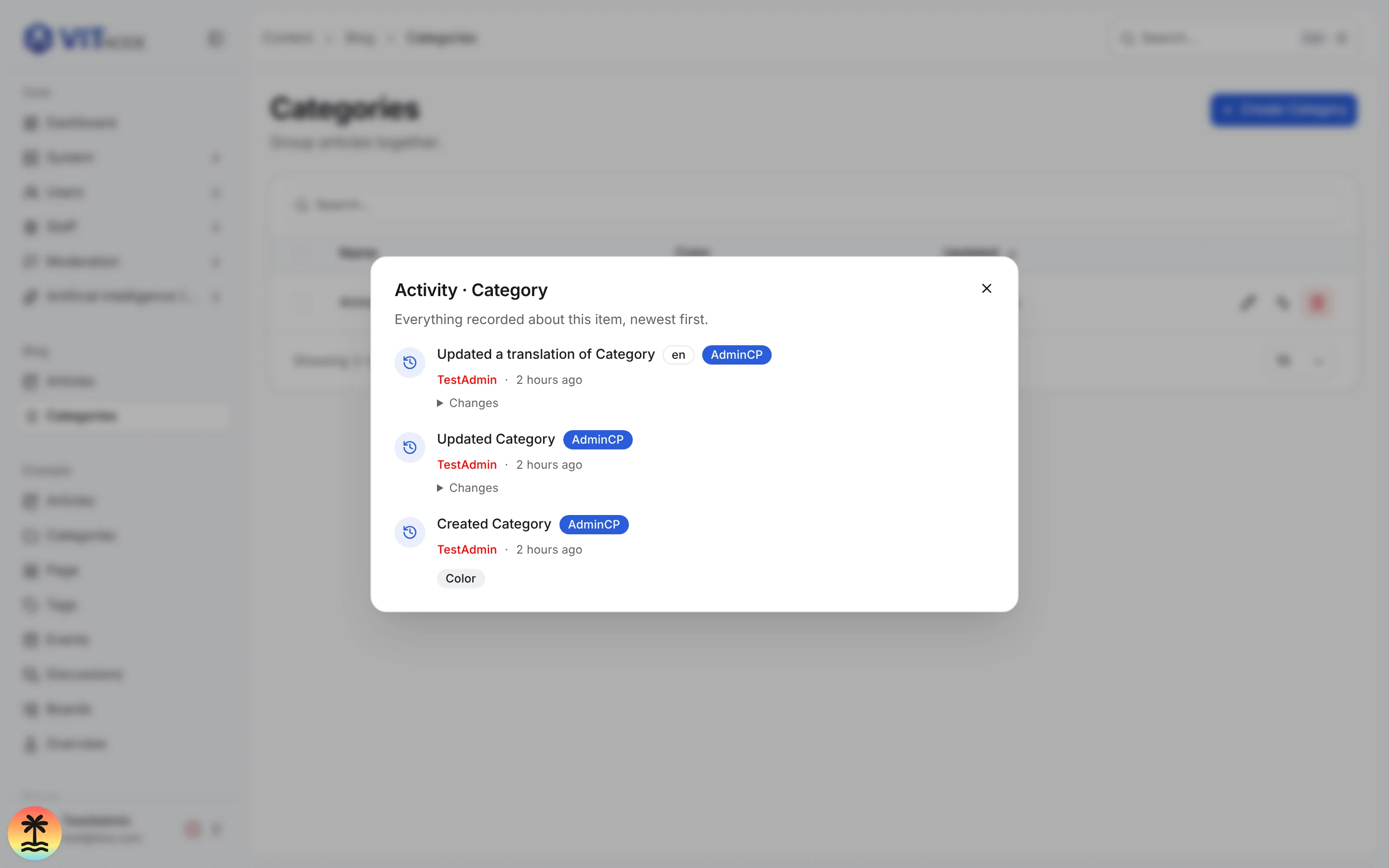
To show the same history on your own AdminCP screen, render ActivityHistory
inside RouteMessages with the Activity Logs messages and your plugin's
content labels:
import { RouteMessages } from '@vitnode/core/tanstack/i18n'
import { ActivityHistory } from '@vitnode/core/views/activity-logs/activity-history'

export const CategoryActivity = ({ categoryId }: { categoryId: number }) => (
  <RouteMessages
    namespaces={['core.activity_logs', 'core.global', '@vitnode/blog.content']}
  >
    <ActivityHistory
      pluginId="@vitnode/blog"
      targetId={categoryId}
      targetType="blog.category"
    />
  </RouteMessages>
)
ActivityHistory reads GET /admin/activity-logs/entity, so it shows entries
only to admins allowed to read that record's history. RouteMessages suspends
while the messages load, so render it inside a Suspense boundary with a
skeleton fallback.
Related
- Activity Logs: where staff read every entry
- Record plugin events: audit your plugin's own tables
- Revisions: what a record used to be, and the History panel