Embedded list
Show a few VitNode Content Engine records inside another page, such as a Latest articles box under each article, by reusing the list's query options with useQuery and ContentListResults, server-rendered.
A list does not need its own route. The query options behind /news can also fill a small box on another page. This guide adds a Latest articles box under every article, with the five newest other articles, in the server-rendered HTML.
This continues Content page. It reuses articlesQueryOptions from src/pages/article-list.ts, written in Content list, and changes src/pages/article-page.tsx.
Add TanStack Query to the plugin
The box reads the list with useQuery, so the plugin needs @tanstack/react-query as a dependency. Run this from the workspace root:
bun add @tanstack/react-query --cwd plugins/newsroomWrite the box
Create src/pages/latest-articles.tsx. This is the complete file:
import { useQuery } from "@tanstack/react-query";
import { Skeleton } from "@vitnode/core/components/ui/skeleton";
import { ContentListResults } from "@vitnode/core/tanstack/content";
import { HrefLink } from "@vitnode/core/tanstack/link";
import { useLocale, useTranslations } from "use-intl";

import { articlesQueryOptions } from "./article-list";

/** How many articles the box shows, out of the first page of `/news`. */
const LATEST_COUNT = 5;

/** The newest published articles, without the one being read. */
export const LatestArticles = ({ currentId }: { currentId?: number }) => {
  const t = useTranslations("newsroom.articles.latest");
  const locale = useLocale();
  const { data, isError, isFetching } = useQuery(
    articlesQueryOptions({ locale, search: {} }),
  );
  const items = data?.edges
    .filter(article => article.id !== currentId)
    .slice(0, LATEST_COUNT);

  return (
    <section aria-labelledby="latest-articles" className="flex flex-col gap-3">
      <div className="flex items-center justify-between gap-4">
        <h2 className="text-xl font-semibold text-balance" id="latest-articles">
          {t("title")}
        </h2>
        <HrefLink className="text-sm font-medium hover:underline" href="/news">
          {t("all")}
        </HrefLink>
      </div>

      <ContentListResults
        className="flex flex-col divide-y rounded-lg border"
        empty={<p className="text-muted-foreground text-sm">{t("empty")}</p>}
        error={<p className="text-muted-foreground text-sm">{t("error")}</p>}
        getKey={article => article.id}
        isError={isError}
        isFetching={isFetching}
        isFiltered={false}
        itemClassName="px-4 py-3"
        items={items}
        label={t("title")}
        loading={
          <div
            aria-busy="true"
            className="flex flex-col gap-3 rounded-lg border p-4"
          >
            <span className="sr-only" role="status">
              {t("loading")}
            </span>
            {[0, 1, 2].map(key => (
              <Skeleton className="h-5 w-2/3" key={key} />
            ))}
          </div>
        }
        noResults={null}
        renderItem={article => (
          <HrefLink
            className="font-medium hover:underline"
            href={`/news/${article.slug}`}
          >
            {article.title}
          </HrefLink>
        )}
      />
    </section>
  );
};
articlesQueryOptions({ locale, search: {} })is the plain list, the first page of/newswith the ten newest articles. The box shares that request and its cache entry with the list page.- Five of ten. The box drops the article being read and keeps five, so it stays full while the list has at least six articles.
ContentListResultspicks the state:loadinguntil the first answer,errorwhen it failed,emptywhen nothing else is published.isFilteredisfalsebecause the box never filters, sonoResultsnever shows. The skeleton is hidden from screen readers, which hear therole="status"label instead.
Render it under the article
Edit src/pages/article-page.tsx. Import the box and render it after the <article>, in a wrapper that keeps the page's width. This is an excerpt:
import { LatestArticles } from "./latest-articles";

const ArticlePage = ({
  loaderData: { item },
}: PluginRoutePageProps<ArticlePageData>) => (
  <div className="container mx-auto flex max-w-3xl flex-col gap-10 px-4 py-8">
    <article className="flex flex-col gap-6">
      {/* the header and RichTextContent, as before */}
    </article>

    <LatestArticles currentId={item.id} /> {}
  </div>
);
The container classes move from <article> to the wrapper. The box sits outside <article> because it is not part of the article.
Warm the query on the server
useQuery does not fetch during server rendering, so on its own the box arrives as a skeleton and loads in the browser. To send it with the HTML, warm the same options in the page's loader. That needs the query client, which defineRoute from @vitnode/core/tanstack/plugin-routes passes to load. Replace the route in src/pages/article-page.tsx; this is an excerpt:
import type { PluginRoutePageProps } from "@vitnode/core/routing";
import { defineRoute } from "@vitnode/core/tanstack/plugin-routes";

import { articlesQueryOptions } from "./article-list";

export const route = defineRoute({
  load: async ({ context, params }) => {
    const page = await loadArticle(params.slug);
    // A failure leaves the box to retry in the browser instead of
    // breaking the article.
    await context.queryClient
      .query(articlesQueryOptions({ locale: context.locale, search: {} }))
      .catch(() => null);

    return page;
  },

  head: ({ loaderData }) =>
    contentDeliveryPageHead(loaderData?.metadata, {
      title: loaderData?.item.title,
    }),
});
definePluginRoute is no longer imported from @vitnode/core/routing; only the PluginRoutePageProps type is. The /news loader passes LOADER_DATA_QUERY_META, which keeps its query out of the HTML because the page reads it from loader data. This loader leaves it out on purpose. The server sends the query with the page, so useQuery finds it in the browser without a request. Both build the same query key, so moving from /news to an article reuses the cached list too.
Add the labels
Add a latest group under newsroom.articles in src/locales/en.json. The article page already loads the newsroom.articles messages:
{
  "newsroom": {
    "articles": {
      "latest": {
        "title": "Latest articles",
        "all": "All news",
        "empty": "No other articles yet.",
        "error": "The latest articles could not be loaded.",
        "loading": "Loading the latest articles"
      }
    }
  }
}
Check the result
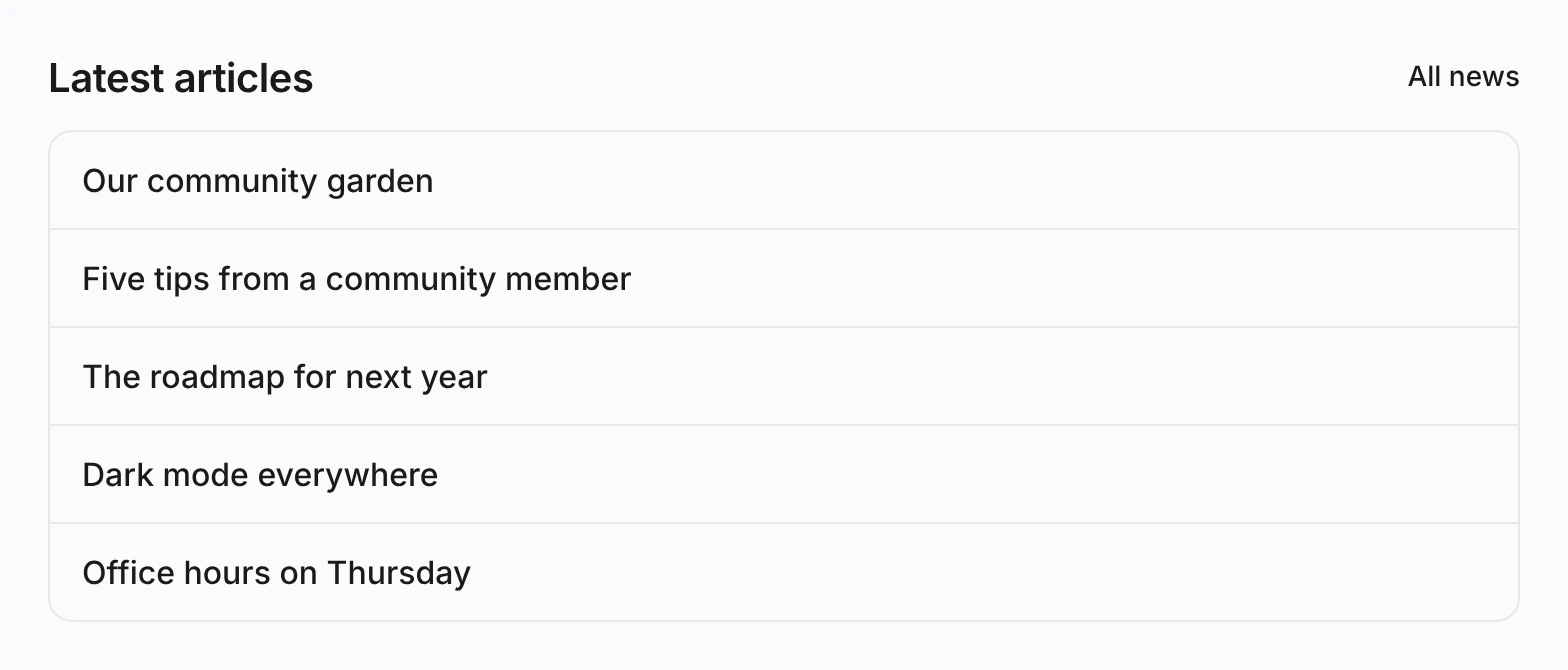
Open http://localhost:3000/news/welcome-to-the-newsroom. Below the article, Latest articles lists the five newest other articles, with All news linking to /news:
- View the page source. The five titles are in the HTML, so the box needs no request after the page loads.
- Open another article. The box leaves that article out and shows the next one instead.
- Publish an article in the AdminCP and reload an article page. The new article tops the box. Pages that write articles, such as the Create form, invalidate
[manifest.id, "articles"], which refreshes the box together with/news.
Use a different list shape
Reusing the first page of /news keeps one request and one cache entry, but it also means the box follows that list's sort and size. For a box that needs its own page size, sort or filter, such as the three newest articles in one category, declare a second list with defineContentList and its own query options. Keep the queryKey prefix [manifest.id, "articles"], so one invalidation still refreshes both.
Next, let members write articles too with Member writing. To let readers flag an article first, Reports works from here as well.