Approval notices
Extend a VitNode Content Engine edit page so authors see pending and rejected submissions. Open the form on the proposed values, show a notice from the approval field, and pick the right message after a save that waits for a moderator.
When a container's publishing rules hold edits for a moderator, a successful save does not mean the change is live. This guide adds what an author needs on the edit page: the form opens on their pending proposal, a notice says what is waiting or why it was declined, and the toast after a save tells the truth.
The example is the Forum plugin's edit page, plugins/forum/src/pages/topic-edit-page.tsx. The code below is excerpts from that file.
Before you begin
Approval only exists for records filed in a container whose definition has policies. Check that your content type has all three:
- A container with policies. The forum's
forumContainersinplugins/forum/src/content/forums.tssetspolicies: { defaults: { ... } }. - A record filed in it.
forum.topichasforum: field.container({ definition: forumContainers, required: true }). A comment can inherit its topic's forum withfield.relation({ target: () => topicContentType, container: true }). - A rule that waits. In the AdminCP, open
/admin/containers/forum/forums, choose Publishing in a forum's row menu, set Edits to published posts to Wait for approval for topics and choose Save rules.
You also need an edit page that loads GET /{id}/edit and saves with useContentPublicWrite, like the Edit form, and a member who is not a moderator in that forum. The excerpts use two names from such a page:
EditableTopicis the record type the loader returns,Extract<TopicEditData, { state: "ready" }>["record"], declared likeEditableArticlein Load the editable values.TopicFormValuesis the values type of the shared form, exported fromplugins/forum/src/pages/topic-form.tsxlikeArticleFormValuesfrom the article form.
The newsroom tutorial's articles are not filed in a container, so approval is always null for them. A content type without a container keeps its drafts as plain drafts, even with create.status: "draft"; see Drafts and approval.
Three kinds of values
With approval on, an edit page handles three different things. Keep them apart, or the author will think a change is live when it is not:
| What | Where it comes from | Readers see it |
|---|---|---|
| Live values | record.values from GET /{id}/edit and PATCH /{id} | Yes |
| Proposed values | record.approval.values, when approval.status is "pending" and approval.kind is "edit" | No, until a moderator approves |
| A save that waits | PATCH /{id} answers 200 with approval.status: "pending"; values is still the live record | No |
Open the form on the proposal
When the author reopens a page whose edit is pending, the form should show what they sent, not the live text. approval.values is untyped, so parse the fields the form knows and fall back to the live value for the rest:
import { zodRichTextDocument } from "@vitnode/core/content";
import { z } from "zod";

import type { TopicFormValues } from "./topic-form";

const zodProposedValues = z
  .object({
    body: zodRichTextDocument.optional(),
    title: z.string().optional(),
  })
  .catch({});

const formValuesOf = (record: EditableTopic): TopicFormValues => {
  const { approval } = record;
  const proposed =
    approval?.status === "pending" && approval.kind === "edit"
      ? zodProposedValues.parse(approval.values ?? {})
      : {};

  return {
    body: proposed.body ?? record.values.body,
    title: proposed.title ?? record.values.title,
  };
};
Use formValuesOf(record) wherever the basic edit form used record.values for its defaults.
Show a notice from the server's answer
approval is null when nothing waits. Otherwise it is a pending submission, or a rejected one nothing has replaced yet. The notice reads that object and nothing else:
import type { ContentApprovalState } from "@vitnode/core/content";

import {
  Alert,
  AlertDescription,
  AlertTitle,
} from "@vitnode/core/components/ui/alert";
import { HrefLink } from "@vitnode/core/tanstack/link";
import { HourglassIcon, XCircleIcon } from "lucide-react";
import { useTranslations } from "use-intl";

import { FORUM_PENDING_HREF } from "./forum-links";

/** Reads only the server's `approval`: neither the URL nor a draft status adds a notice. */
const ApprovalNotice = ({
  approval,
}: {
  /** Only what the notice reads, so the edit route's JSON answer fits as is. */
  approval: null | Pick<ContentApprovalState, "kind" | "reason" | "status">;
}) => {
  const t = useTranslations("@vitnode/forum.topics.approval");

  if (approval?.status === "rejected") {
    return (
      <Alert icon={<XCircleIcon />} variant="destructive">
        <AlertTitle>{t("rejected.title")}</AlertTitle>
        <AlertDescription>
          {approval.reason
            ? t("rejected.reason", { reason: approval.reason })
            : t("rejected.desc")}
        </AlertDescription>
      </Alert>
    );
  }

  if (approval?.status === "pending" && approval.kind === "edit") {
    return (
      <Alert icon={<HourglassIcon />} variant="info">
        <AlertTitle>{t("pending_edit.title")}</AlertTitle>
        <AlertDescription>{t("pending_edit.desc")}</AlertDescription>
      </Alert>
    );
  }

  if (approval?.status === "pending" && approval.kind === "create") {
    return (
      <Alert icon={<HourglassIcon />} variant="info">
        <AlertTitle>{t("pending_create.title")}</AlertTitle>
        <AlertDescription>
          {t("pending_create.desc")}{" "}
          <HrefLink className="font-medium underline" href={FORUM_PENDING_HREF}>
            {t("pending_create.link")}
          </HrefLink>
        </AlertDescription>
      </Alert>
    );
  }

  return null;
};- Rejected shows the moderator's reason when there is one. The author can edit and save again, which opens a new submission.
- Pending edit needs
status: "pending"andkind: "edit", and says readers still see the published version. - Pending create needs
status: "pending"andkind: "create", which means a new topic waits for its first approval. It links to the author's list of posts awaiting approval,/forum/me/pending. - Nothing else.
approval: nullrenders no notice, even for a draft. A draft is not a submission, so the notice never looks atstatus, and it never reads the URL.
The approval state comes from the server. The route's loader awaits GET /{id}/edit before the page renders, and its answer carries approval. Every save replaces it with the one PATCH /{id} returns.
Keep the answer's state after a save
PATCH /{id} answers with the record's approval, slug and status. Keep them in state, so the notice and the View topic link follow every save, and pick the toast from approval:
import { useQueryClient } from "@tanstack/react-query";
import { useState } from "react";
import { toast } from "sonner";

import { invalidateForumTopics } from "./forum-queries";

// Inside the form component, next to `useContentPublicWrite`:
const queryClient = useQueryClient();
const [current, setCurrent] = useState({
  approval: record.approval,
  slug: record.slug,
  status: record.status,
});
const [defaults, setDefaults] = useState(() => formValuesOf(record));

// In onSubmit, after `const updated = await write.submit(...)`:
if (!updated) return;

setCurrent({
  approval: updated.approval,
  slug: updated.slug,
  status: updated.status,
});
setDefaults(values);
form.reset(values);
await invalidateForumTopics(queryClient);

if (updated.approval?.status === "pending") {
  toast.info(t("edit.pending.title"), { description: t("edit.pending.desc") });
} else {
  toast.success(t("edit.success.title"), {
    description: t("edit.success.desc", { title: values.title }),
  });
}
Render <ApprovalNotice approval={current.approval} /> above {write.conflict} and the form. invalidateForumTopics refreshes the forum's cached topic lists; in your plugin, invalidate your own list's query key, as the Edit form does. The server checks a proposal against the record's version like any edit, so the conflict alert keeps working.
Add the labels
The forum keeps the notice labels under topics.approval and the toast under topics.edit in plugins/forum/src/locales/en.json:
{
  "@vitnode/forum": {
    "topics": {
      "approval": {
        "rejected": {
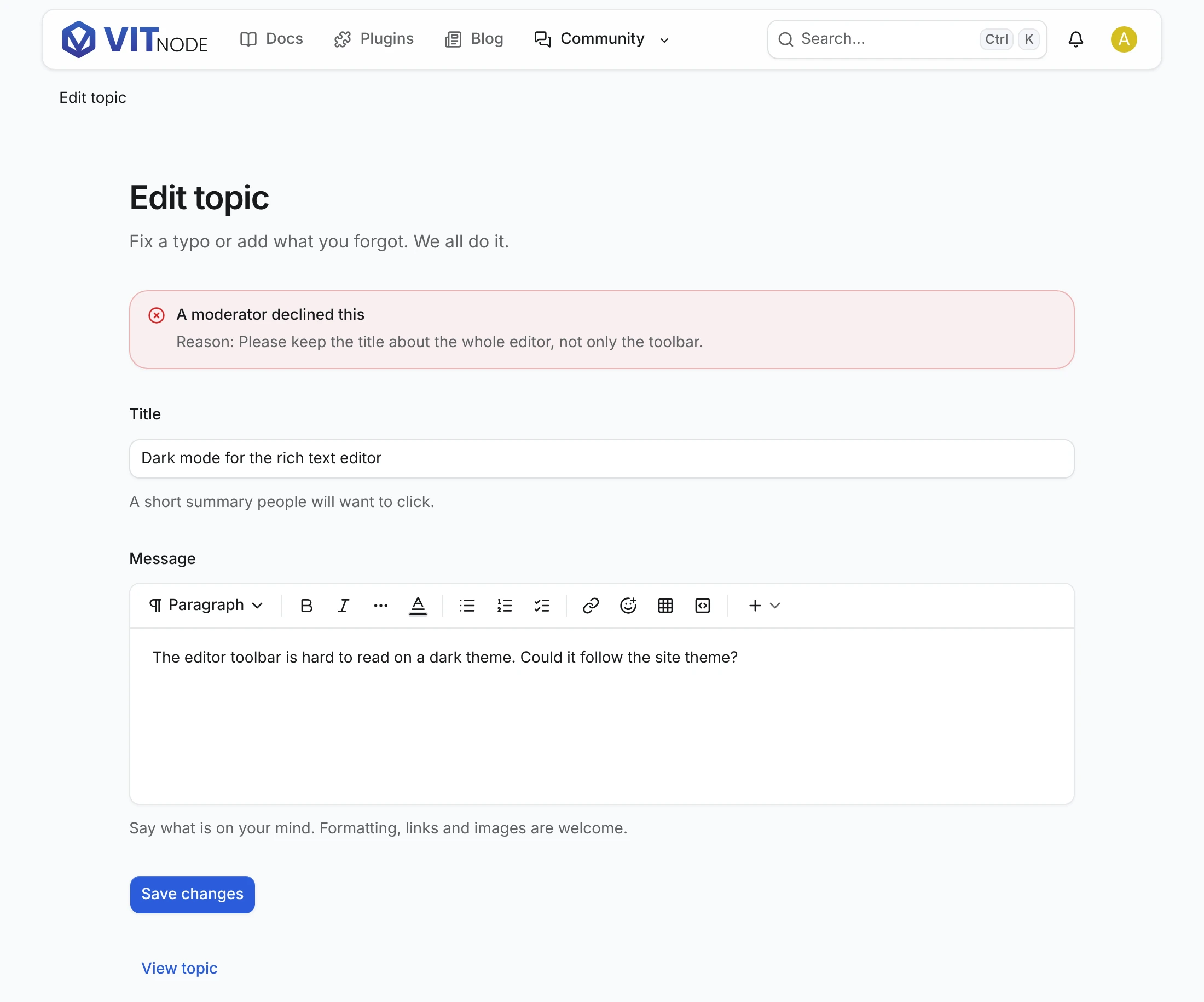
          "title": "A moderator declined this",
          "desc": "Your submission was not approved. You can edit it and send it again.",
          "reason": "Reason: {reason}"
        },
        "pending_edit": {
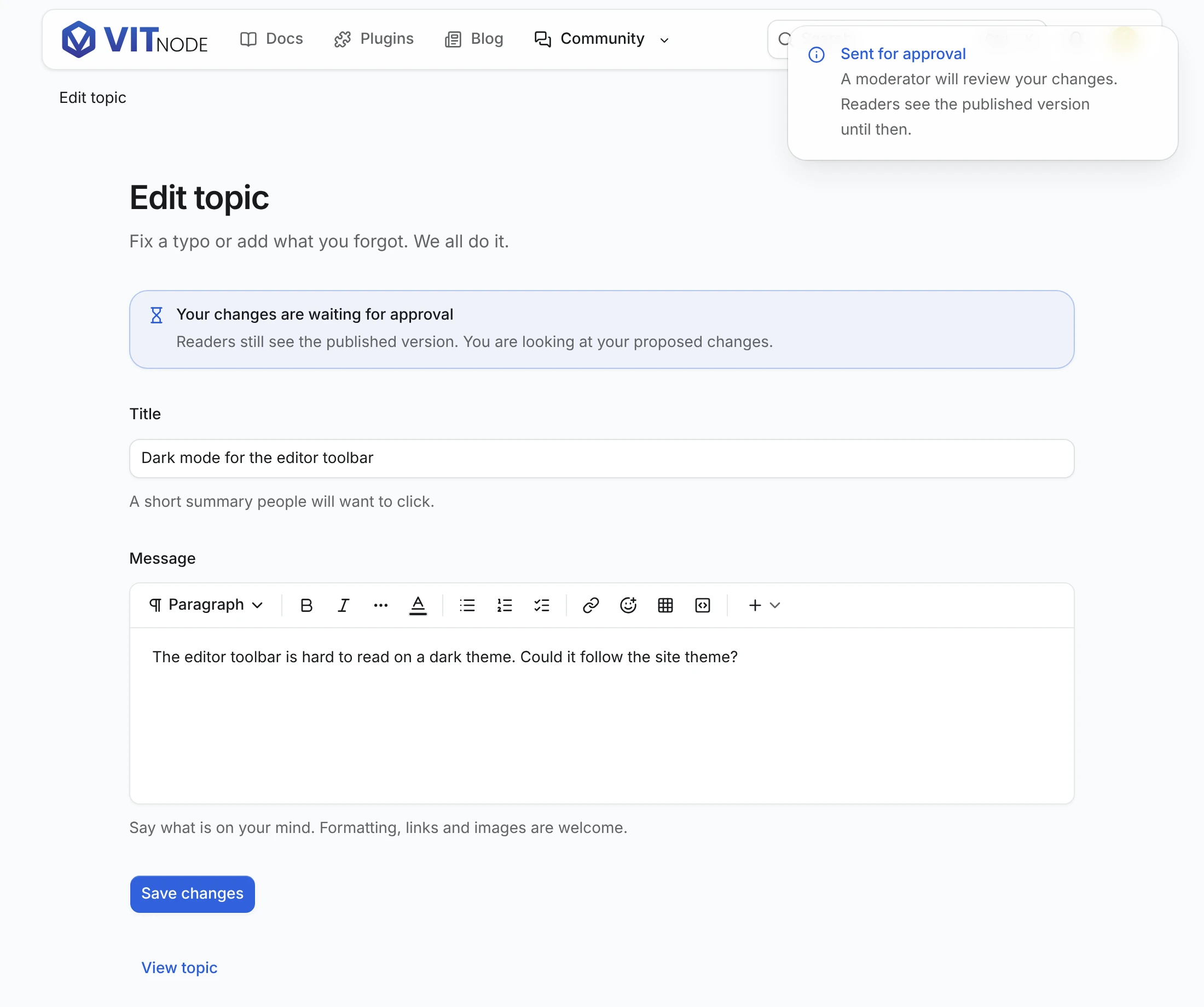
          "title": "Your changes are waiting for approval",
          "desc": "Readers still see the published version. You are looking at your proposed changes."
        },
        "pending_create": {
          "title": "Waiting for a moderator",
          "desc": "Your topic goes live as soon as a moderator approves it. You can still polish it here.",
          "link": "See all your posts awaiting approval."
        }
      },
      "edit": {
        "pending": {
          "title": "Sent for approval",
          "desc": "A moderator will review your changes. Readers see the published version until then."
        },
        "success": { "title": "Topic saved", "desc": "\"{title}\" is up to date." }
      }
    }
  }
}
Check the result
Sign in as a member who wrote a published topic in the forum that waits for edits, and open /forum/topics/{id}/edit.
- Change the title and click Save changes. Sent for approval appears, the notice says your changes wait, and the form keeps your new title. The topic's public page still shows the old title.
- Reload the edit page. The form opens on your proposal, not on the live title.
- As a moderator with
can_approvein that forum, reject the submission with a reason in the ModCP. Reload the author's edit page. The notice shows the reason, and the form shows the live text again.
- Save another change and approve it instead. After a reload the notice is gone, and both the form and the public page show the new title.
- Open a topic with nothing pending, then one that staff unpublished in the AdminCP, which is a draft with
approval: null. Neither shows a notice, even with?submitted=1added to the URL. Older Forum links carried that flag, and the edit page now ignores it.