Moderation
Review approvals
Approve or reject new content and edits waiting in the VitNode Moderator CP approval queue. Filter the queue, compare an edit with the live version and leave the author a reason.
When a container's publishing policy asks for approval, new content and edits from members do not go live straight away. They wait in the Approvals queue of the Moderator CP at /modcp/approvals until a moderator says yes or no. Approvals explains what is stored meanwhile and what authors see.
Before you begin
You need a moderator entry with can_approve for the content type, in a scope that covers the container the content lives in: the container itself, its subtree, or All resources. The queue only shows submissions you may decide, so two moderators can see two different queues. See Container-scoped permissions and Configure moderators.
Open the queue
Choose Moderator CP in the user menu, then Approvals. The number next to it counts what is still pending.
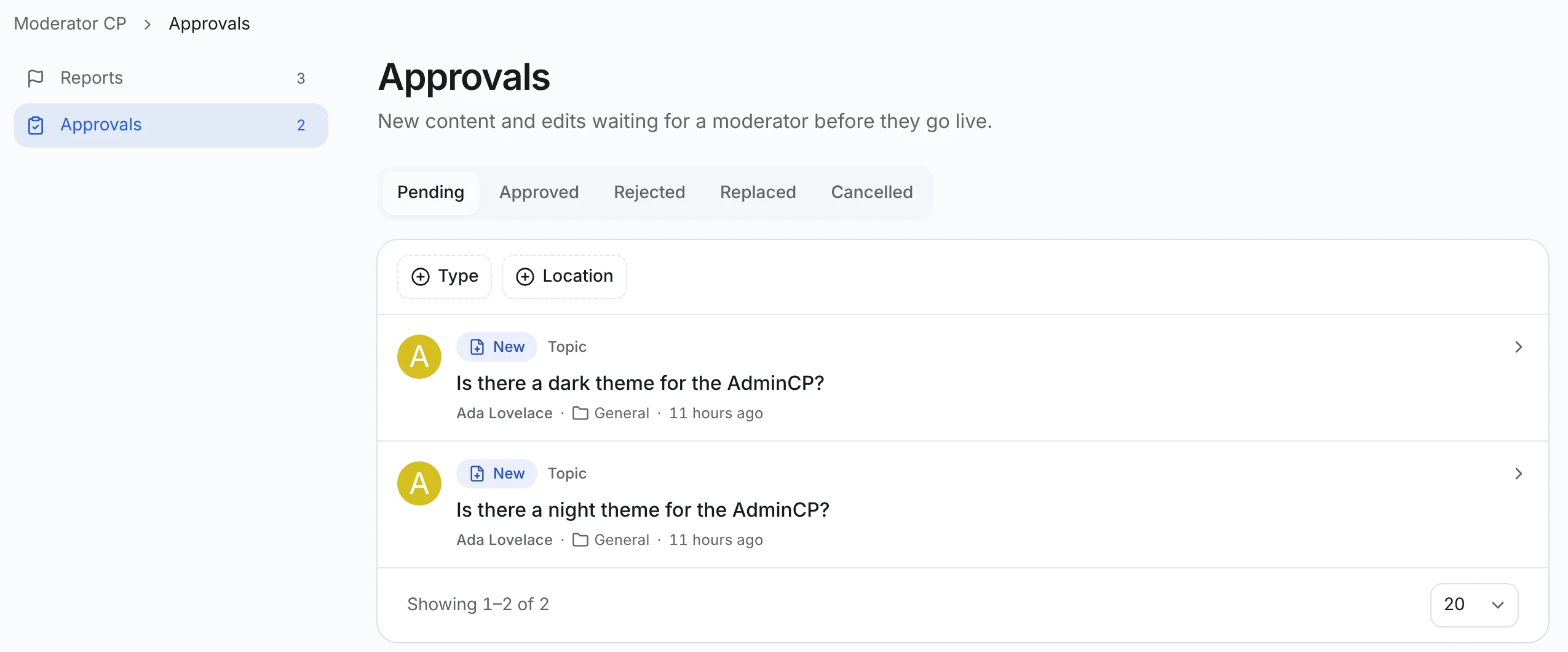
Each row shows who sent it, whether it is New content or an Edit of something already live, the content type (a topic or a comment, for example), where it lives and when it arrived.
- The tabs switch between Pending and the decided ones: Approved, Rejected, Replaced (the author sent a newer version) and Cancelled (the content was deleted first).
- Type and Location narrow the list to one content type or one container.
Tabs, filters and the page number live in the address, so a filtered queue is a link you can share.
Read the submission
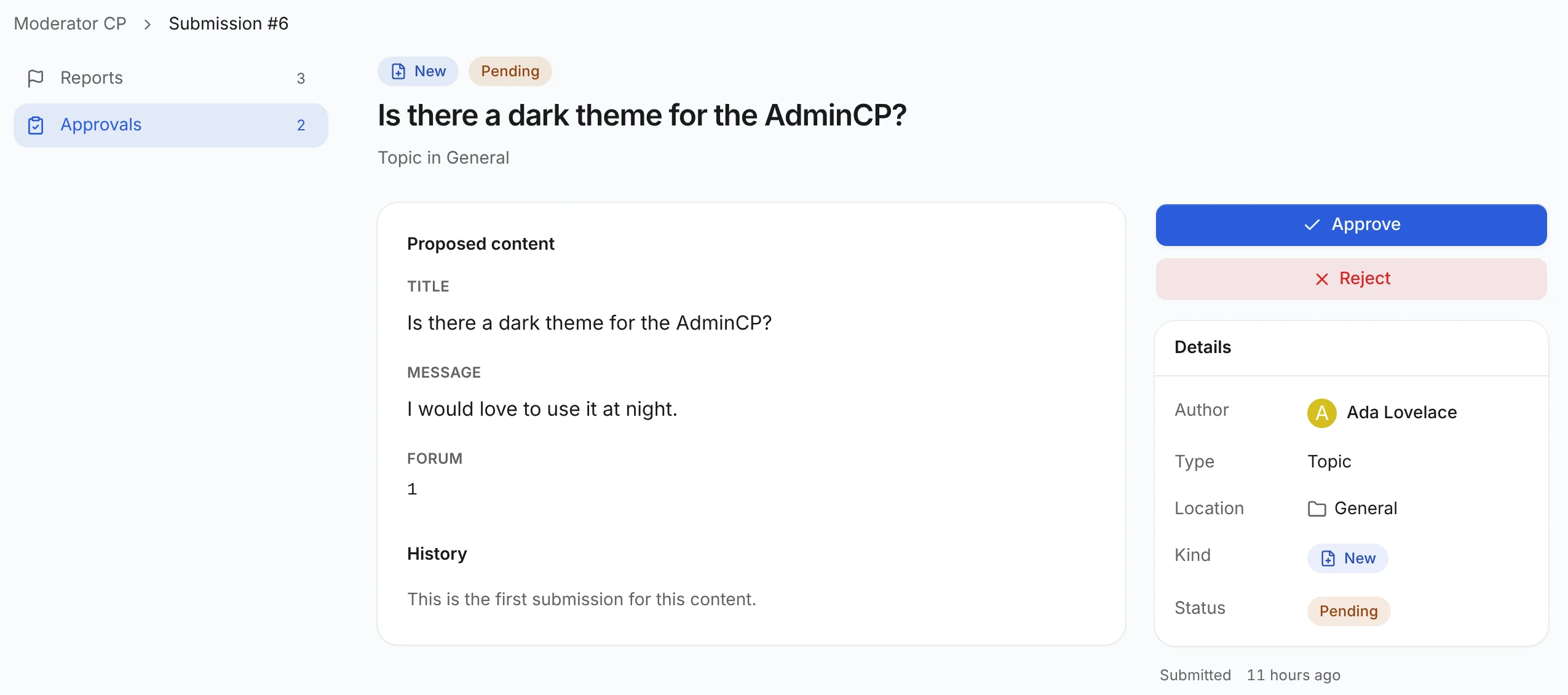
Open a row. For New content you see every proposed field. For an Edit you see Changes: each changed field shows Live now next to Proposed, and the untouched fields are folded away below.
History lists earlier submissions for the same content, with their outcomes and reasons. View live opens published content in a new tab when its content type has a page address (search.pathTemplate).
Decide
- Approve publishes new content, or applies the edit to the live version. On a content type with revisions, the edit is one new revision.
- Reject opens a dialog with an optional Reason. Nothing on the site changes, and the author can read your reason and try again.
Either way you land back in the queue with a short confirmation.
Get notified
When a plugin registers an approvalPending notification, as the Forum plugin does for topics and comments, you hear about new work in the notification bell. The item reads, for example, A new topic is waiting for approval in General, or An edit to a topic is waiting for approval in General, and opens the submission in the Moderator CP, where you approve or reject it as above. You do not need AdminCP access.
You get one notification per submission, and only when you could decide it:
- Your
can_approvefor that content type covers the container the content is filed in, through your own moderator entry or one of your roles, for that container, its subtree or All resources. A root role counts too.can_approvefor topics says nothing about comments. - You did not send it yourself.
- Overlapping grants still give you one notification.
What happens next:
| Situation | Notification |
|---|---|
| Someone approves or rejects it | Leaves your inbox |
| The author sends a newer version first | The old one leaves your inbox, and the newer version notifies again |
| The author resubmits after a rejection | A new notification, since it is a new submission |
| The content is deleted | Leaves your inbox |
You lose can_approve there | Not sent, or shows "This notification is no longer available" with no text or link. The submission itself answers Submission not found |
| The content moves to another container before the notification goes out | Sent only to moderators who cover both the container it was submitted in and the new one |
The queue keeps listing a moved submission under the container it was submitted in until someone decides it, and the decision checks the new container. That is why a move narrows who is notified rather than notifying the new container's moderators; they find it once it is decided or resubmitted. Notifications that already arrived are not re-sent after a move.
Turn the type off or on under Settings → Notifications, in the Moderation group. It is in-app only: these notifications have no email.
When a decision fails
| Message | What happened |
|---|---|
| Already decided | Another moderator got there first. |
| The record changed | Someone edited the content after the proposal was made. Reject it and ask the author to resubmit. |
| The content is gone | It was deleted, so the submission was cancelled. |
| Out of your reach | The content moved to a container where you cannot approve. |
| Submission not found | It no longer exists, or it is outside what you moderate. |
The detail page warns you when the content is gone or has changed before you click, so surprises should be rare. Rare, not extinct.