External sources
Add results from outside the search index, such as your Fumadocs documentation, to the header search dialog as their own group.
The header search dialog reads the site-wide search index. Some content lives somewhere else: docs, a help center, a changelog. An external search source adds those results to the same dialog, in their own group below Suggestions, so people don't have to guess which search box to use.
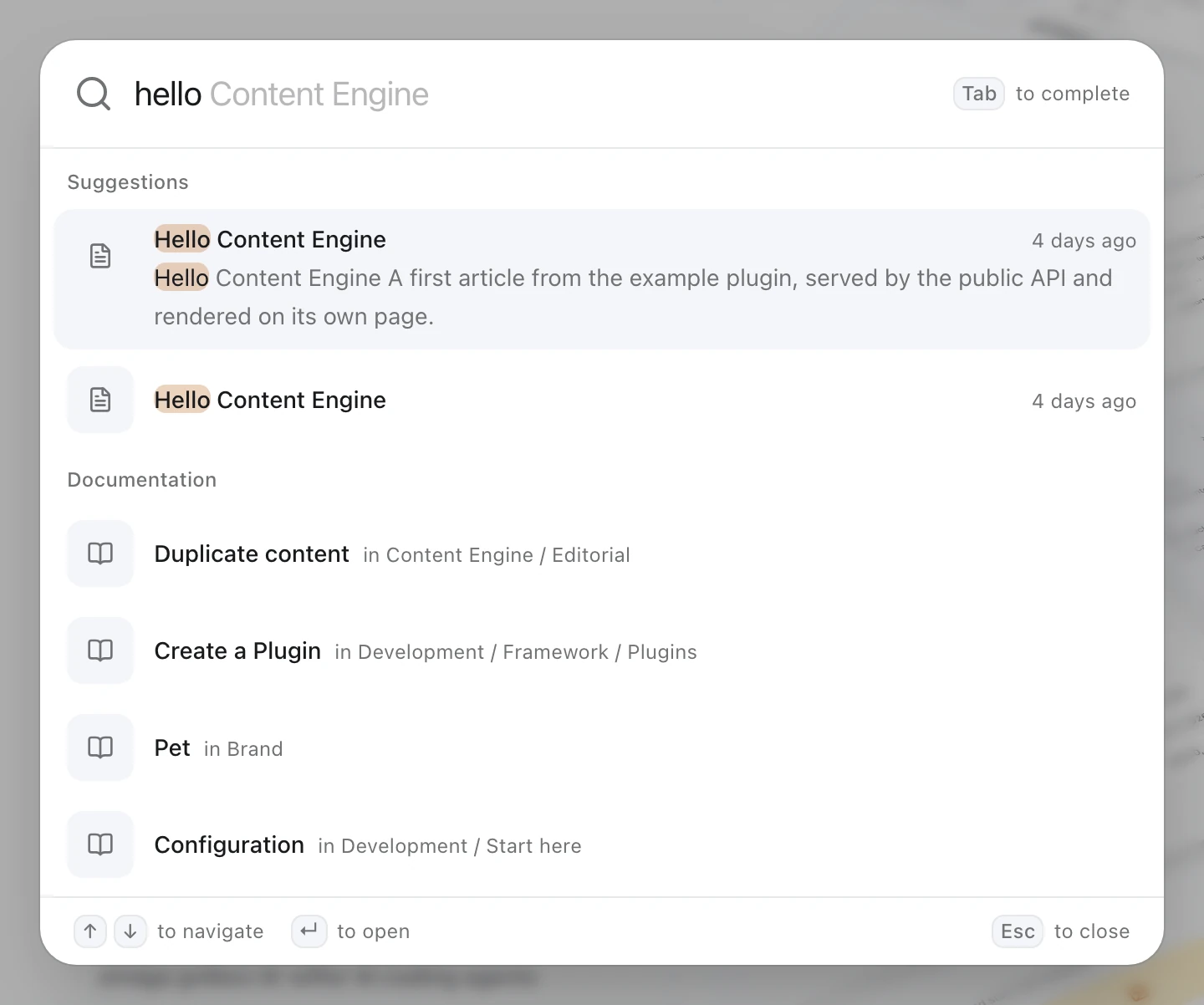
VitNode's own site does this for its docs: type hello and you get community content first, then matching documentation pages.
How sources behave
- A source runs only while someone types, from 2 characters, with the same short debounce as suggestions. The empty dialog still shows recent searches and popular content.
- Each source gets its own group, in the order you register them. A source with no matches stays hidden.
- Results are cached in the browser for 60 seconds and never retried. A failing source hides its group; the rest of the dialog keeps working.
- Only same-site paths (
/docs/...) are shown, because rows open through the router. Hashes are fine, so a row can jump to a section. - Results are not indexed, ranked against content or counted for popularity. The full
/searchpage doesn't show them.
Write the source
A source is a plain object. search receives the term, the UI locale and an AbortSignal, and returns up to a handful of items. This one asks the Fumadocs search route and keeps one row per page:
import type { SearchSource } from "@vitnode/core/tanstack/search";
import type { SortedResult } from "fumadocs-core/search";

import { BookOpenIcon } from "lucide-react";

export const docsSearchSource: SearchSource = {
  icon: BookOpenIcon,
  id: "docs",
  labelKey: "site.search.docs",
  namespace: "site.search",
  search: async ({ signal, term }) => {
    const response = await fetch(
      `/docs/search?${new URLSearchParams({ query: term }).toString()}`,
      { signal },
    );

    if (!response.ok) {
      throw new Error(`The docs search answered ${response.status}.`);
    }

    const results: SortedResult[] = await response.json();

    return results
      .filter(result => result.type === "page")
      .slice(0, 5)
      .map(page => ({
        context: page.breadcrumbs?.slice(1).join(" / ") || null,
        id: page.id,
        title: page.content,
        url: page.url,
      }));
  },
};
The real file also puts pages whose title matches first, links to the first matching section, and adds a plain-text excerpt for the highlighted row. It also gives each row its page's own icon in its category's color, so a UI page and a Development page look different at a glance.
An item's icon is a lucide icon name in kebab case (mouse-pointer-click), loaded on demand. color is any CSS color, such as var(--ui-color); it tints the icon and its tile. Without an icon, the row uses the source's icon in neutral grey.
| Field | Type | Description |
|---|---|---|
id | string | Unique source id, used in cache keys and option ids |
icon | LucideIcon | Shown in every row of the group |
labelKey | string | Full translation key of the group heading |
namespace | string | Translation namespace the dialog loads so labelKey resolves |
search | ({ term, locale, signal }) => Promise<SearchSourceItem[]> | Returns { id, title, url, context?, excerpt?, icon?, color? } items |
Translate the heading
Add the heading to your app's own messages, in every language you ship:
{
  "site": {
    "search": {
      "docs": "Documentation"
    }
  }
}
Register the source
Call configureSearchSources once, at module scope in your router file, so it runs on the server and in the browser:
import { configureSearchSources } from "@vitnode/core/tanstack/search";
import { docsSearchSource } from "./docs/search-source";

configureSearchSources([docsSearchSource]);
Calling it again replaces the list, so pass every source in one array.
Use the same search in your docs
The easiest way is to not build a second search at all. VitNode's docs render the public header above the Fumadocs layout, so the same search box, menu and sign-in sit on every docs page. Pass firstSearchSourceId to show that source's group above Suggestions, and switch off Fumadocs' own search so ⌘ K opens one dialog, not two:
import { MainHeader } from "@vitnode/core/tanstack/layout";
import { DocsLayout } from "fumadocs-ui/layouts/spacious";
import { RootProvider } from "fumadocs-ui/provider/tanstack";

<RootProvider search={{ enabled: false }} theme={{ enabled: false }}>
  <div className="[--fd-banner-height:--spacing(14)]">
    <MainHeader firstSearchSourceId={docsSearchSource.id} variant="bar" />
    <DocsLayout searchToggle={{ enabled: false }} themeSwitch={{ enabled: false }} tree={pageTree}>
      {children}
    </DocsLayout>
  </div>
</RootProvider>;
variant="bar" turns the floating header card into a flat, full-width bar that sits flush on the docs layout, and --fd-banner-height tells Fumadocs how tall it is, so its sidebar and page fit underneath. Need a button before the logo, like a sidebar toggle? Pass it as leading. Load the header's data in the docs route too, with loadMainShell(context) in its loader.
Got a layout without the VitNode header? Render HeaderSearch from @vitnode/core/tanstack/search on its own. It is the header's search button together with its dialog and ⌘ K shortcut. Pass firstSourceId={docsSearchSource.id} to put your source's group first. Core exports no dialog without its trigger.
Check the result
Open any public page, press ⌘ K and type a word from a docs page title. A Documentation group appears below the suggestions. Do the same on a docs page and the group comes first. Arrow down into it and press Enter: you land on that docs page, scrolled to the matching section.
If the group never shows up, open the browser's network tab and check that the source's request answers 200 with results.