Plugins
Catalog listing
Give your plugin a title and a Lucide icon so AdminCP → System → Plugins lists it with the version that is actually installed.
AdminCP → System → Plugins lists every plugin the running application is configured with: its icon, title, package ID, description and installed version, with the VitNode core version shown separately above the list. The version and description come from each plugin's own package.json at build time, so nobody types a version number by hand. The title and icon come from a small file in the plugin.
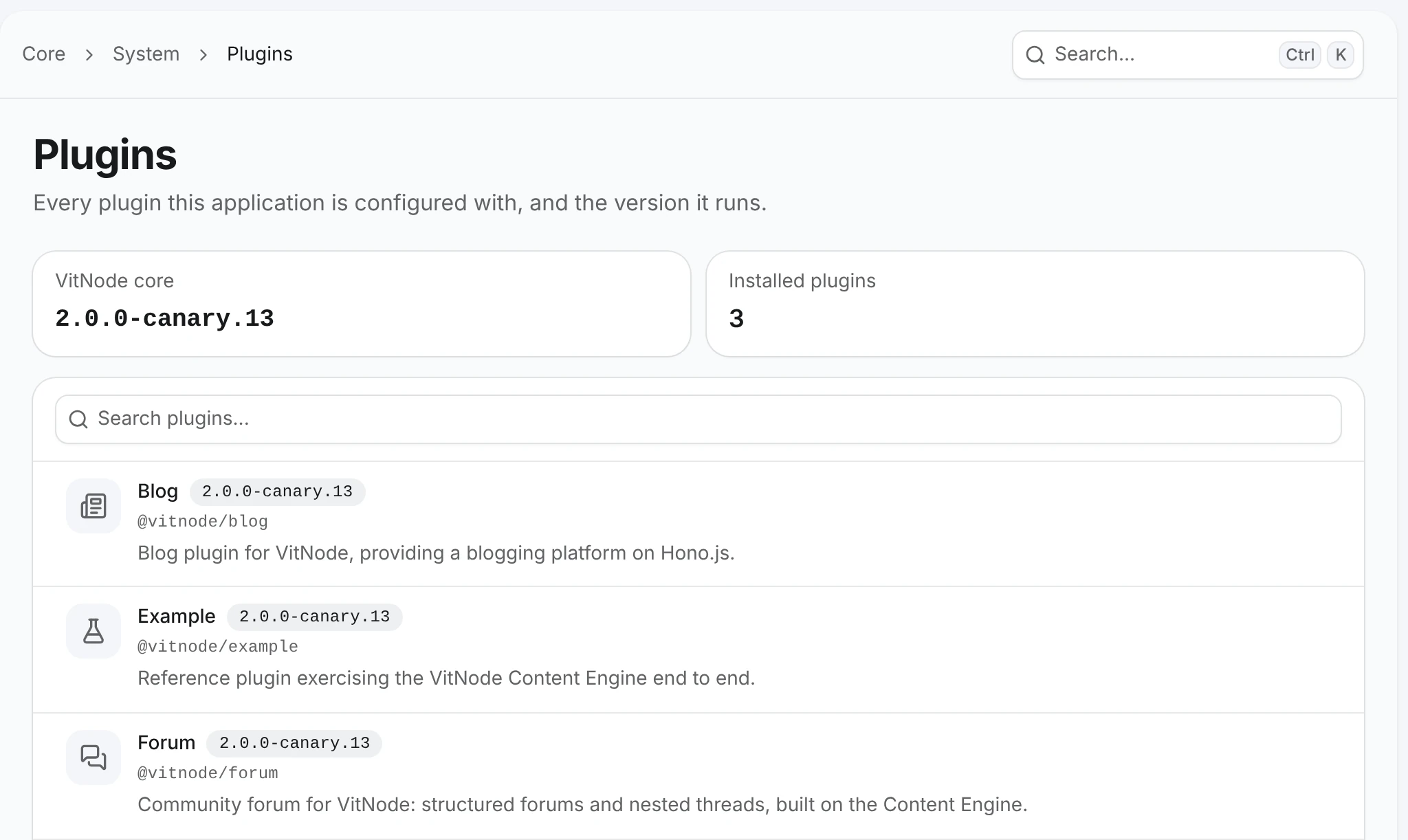
The catalog reports what is installed. It also shows available updates and security updates for core and for plugins that declare an update source - see Update checks. It never installs or removes plugins, or switches them on and off.
Add your plugin to the catalog
The steps use the site-notes plugin from Create a plugin. A generated plugin is already listed with the puzzle icon and the placeholder description "A VitNode plugin." These steps make the entry its own.
Describe the plugin in package.json
The generator writes "description": "A VitNode plugin.". Replace it with a sentence about your plugin, next to its name and version:
{
  "name": "site-notes",
  "version": "0.1.0",
  "description": "Pin short notes to any page of your community."
}
The name is the plugin id. Keep it as the generator wrote it, because the id also names the API path, the translation namespace and the imports in your app's config files.
Set the title and icon
Plugins created with the generator already have src/plugin-info.ts, with the puzzle icon. Change the icon to any Lucide icon name, and the title if you like:
import type { PluginInfo } from '@vitnode/core/lib/plugin-manifest'

export const pluginInfo: PluginInfo = {
  title: 'Site Notes',
  icon: 'sticky-note',
}
Check that the manifest is registered
vitnode build writes src/manifest.gen.ts. It holds the name, version, description, author and license from package.json and imports the title and icon from src/plugin-info.ts. It is also the single source of the plugin id (manifest.id), so nothing else spells the id by hand.
A generated plugin already passes manifest to both factories, so there is nothing to change. In src/config.tsx it sits next to the plugin's routes and translations:
export const siteNotesPlugin = () =>
  buildPlugin({
    manifest,
    localeFiles: {
      en: 'site-notes/locales/en.json',
    },
    messages,
    routes,
  })
And in src/config.api.ts:
export const siteNotesApiPlugin = () =>
  buildApiPlugin({
    manifest,
    modules: [helloModule],
  })
If you rewrite either factory, keep localeFiles and messages. Without them the plugin loses its translations.
Build the plugin
If pnpm dev is running at the workspace root, the plugin rebuilds when you save. Otherwise build it from the plugin's folder with its build:plugins script (which runs vitnode build):
cd plugins/site-notes
bun run build:plugins
The build regenerates src/manifest.gen.ts before TypeScript and tsdown run. Commit it, like types/api-registry.gen.d.ts.
Check the result
Restart your app, sign in to the AdminCP and open System → Plugins. Your plugin shows the sticky note icon, Site Notes, site-notes, your description and 0.1.0. Search matches the title, the package ID and the description.
Where each value comes from
| Value | Source | Required | Default |
|---|---|---|---|
| ID | name in package.json | Yes | - |
| Version | version in package.json | No | Unknown |
| Description | description in package.json | No | No description |
| Title | title in src/plugin-info.ts | No | The ID |
| Icon | icon in src/plugin-info.ts | No | Puzzle icon |
The ID is the plugin id: buildPlugin() and buildApiPlugin() read it from manifest.id. Title and description are plain text, shown as written in every language. The icon is a Lucide icon name in kebab-case, such as newspaper or messages-square. buildPlugin() and buildApiPlugin() throw at startup for anything else, and an unknown name falls back to the puzzle icon. Because an icon is just a name, the API returns it too, so plugins registered only in the API show their own icon as well.
When the manifest is regenerated
vitnode buildregenerates the file before every build, so a published package always carries its real version.vitnode devregenerates it wheneverpackage.jsonchanges, orsrc/plugin-info.tsis created or deleted. Edits insidesrc/plugin-info.tsneed no regeneration: the generated file imports it. The file is only rewritten when its content changes, so adding a dependency rebuilds nothing.- A broken
package.jsonedit is reported in the terminal and the last good file stays in place.
The app picks up a new plugin, a removed one or a new version after it is rebuilt and restarted. Nothing is stored in the database.
Frontend and API inventory
A plugin can be registered in vitnode.config.ts (frontend), in vitnode.api.config.ts (API), or both. The catalog lists each plugin ID once. The API cannot see the frontend config, so the web build hands it over: the Vite plugin writes src/plugin-inventory.gen.ts, a plain list of { id, manifest } entries with no plugin code, and you pass it to the API config:
import { buildApiConfig } from '@vitnode/core/vitnode.config'

import { frontendPlugins } from './plugin-inventory.gen'

export const vitNodeApiConfig = buildApiConfig({
  plugins: [siteNotesApiPlugin()],
  frontendPlugins,
  // ...the rest of your API config
})
New apps that serve their API from the web app already do this. If your API runs as a separate deployment without that web build, leave frontendPlugins out. The catalog then lists the API's plugins only and says so with a notice, instead of guessing what the browser runs.
Version mismatch warnings
When the web build and the API both report a version for the same plugin and the versions differ, the row shows a warning such as "Version mismatch: the web app runs 1.1.0, the API runs 1.2.0." It usually means one side was redeployed without the other. Rebuild and redeploy both.
A side that reports no version is unknown, not a mismatch.
Older plugins
buildPlugin() and buildApiPlugin() take the plugin id from manifest, so an older plugin that still passes pluginId needs src/manifest.gen.ts first. Run its build:plugins or dev script once, then pass manifest instead. A plugin without src/plugin-info.ts gets its ID as the title and the default icon. Add it when convenient.
A frontend inventory entry carrying the manifest of another package throws at startup: the API checks that manifest.id equals the entry's id.
Update and security information
Add updates.url to your plugin's src/plugin-info.ts and the catalog row also shows new releases and security updates. Setup is covered in Publish updates for your plugin; what administrators see is in Check for updates in the AdminCP.
Who can see the catalog
The page and its endpoint, GET /api/@vitnode/core/admin/plugins, require the Plugins → View installed plugins and their versions permission (plugins.can_view in the @vitnode/core module). Staff without it don't see the link, get a not-found page on a direct visit, and a 403 from the API. Root administrators have it automatically. The Check for updates button additionally needs plugins.can_check_updates.