Main Navigation
Define the header menu, its dropdowns and the phone bottom bar in vitnode.config.ts, with translated labels and a lucide icon per link.
The links in the site header and in the phone bottom bar come from one place:
the navigation option in src/vitnode.config.ts. There is no database
table, no API call and no AdminCP screen behind them, so the menu renders with
the page, even on a prerendered one. To
change it, edit the file and deploy.
Add the labels to your messages
Menu labels are message keys, so they follow the visitor's language like the
rest of the UI. Put them in your app's locale file, under one namespace such as
app.menu.
{
  "app": {
    "menu": {
      "community": "Community",
      "discover": "Discover",
      "discover_description": "Fresh posts from every corner of the site.",
      "search": "Search"
    }
  }
}
Add the same keys to every other language's file. For Polish, that is
src/locales/app/pl.json registered under pl in src/locales/app.ts.
Add header links
Add a navigation.header array to the config. Each item needs an href and a
title, which is the full message key.
import { buildConfig } from '@vitnode/core/vitnode.config'
import { CompassIcon, SearchIcon } from 'lucide-react'

export const vitNodeConfig = buildConfig({
  // ...
  navigation: {
    header: [
      { href: '/discover', icon: CompassIcon, title: 'app.menu.discover' },
      { href: '/search', icon: SearchIcon, title: 'app.menu.search' },
    ],
  },
})
Items show up in the order you list them. When the header runs out of room, the ones that do not fit move into a More dropdown at the end.
Group links in a dropdown
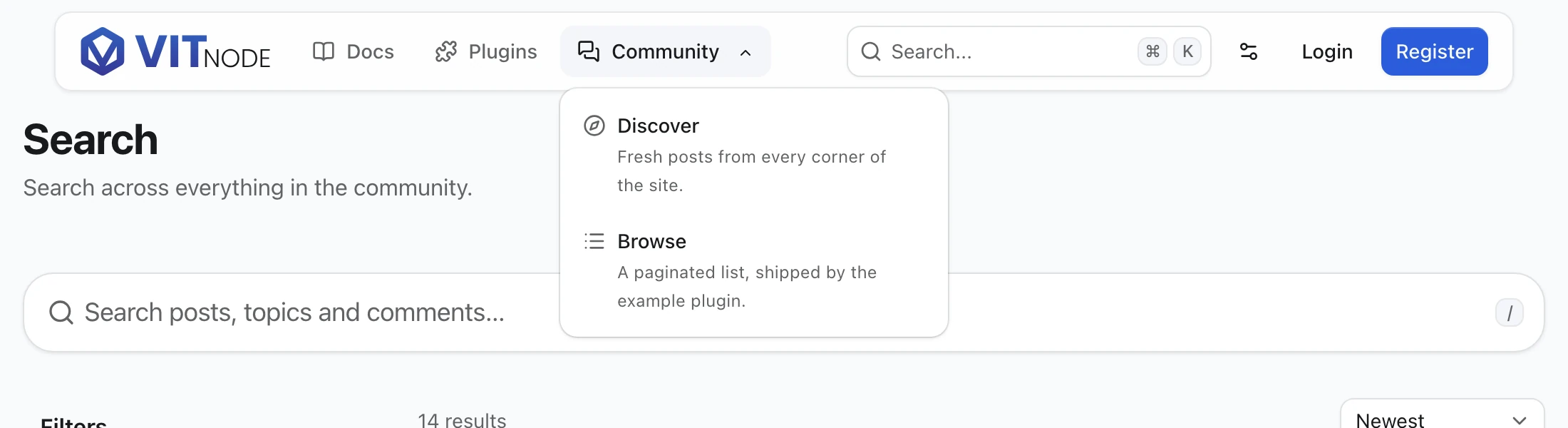
Give a header item an items array to turn it into a dropdown. The parent
opens the dropdown on hover and still follows its own href when clicked. Each
child can carry a description key, shown under its label.
import { CompassIcon, MessagesSquareIcon, SearchIcon } from 'lucide-react'

navigation: {
  header: [
    {
      href: '/forum',
      icon: MessagesSquareIcon,
      title: 'app.menu.community',
      items: [
        {
          description: 'app.menu.discover_description',
          href: '/discover',
          icon: CompassIcon,
          title: 'app.menu.discover',
        },
        { href: '/search', icon: SearchIcon, title: 'app.menu.search' },
      ],
    },
  ],
},
Dropdowns are one level deep. A child has no items of its own, and
TypeScript says so.
Item options
| Name | Type | Required | Default | Description |
|---|---|---|---|---|
href | string | Yes | - | A path on this site (/forum) or an https:// address |
title | string | Yes | - | Message key of the link label, such as app.menu.discover |
description | string | No | - | Message key of the text under the label inside a dropdown |
icon | ComponentType<{ className? }> | No | - | Drawn before the label, for example a lucide-react icon |
isOpenInNewTab | boolean | No | false | Opens the link in a new tab, with rel="noopener noreferrer" |
items | item array | No | - | Header items only: the links of the dropdown |
Pass the icon component itself (CompassIcon), not an element
(<CompassIcon />). Any component that accepts a className works, so your
own SVG icon fits too. Only the icons you import end up in the bundle.
The phone bottom bar takes the same items under navigation.mobileBottomBar,
without items. See Mobile Navigation.
How the labels load
Everything before the last dot of a key is its namespace: app.menu.discover
reads discover from app.menu. The layout loads the namespaces your menus
use together with the page, so server-rendered and prerendered pages arrive
with their labels. A key with no message in the visitor's language shows as the
key itself, which makes a missing translation easy to spot.
Keep the menu under one namespace. Each distinct namespace is one more subtree in the request, and at most 16 load at once.
Mistakes caught at startup
buildConfig checks the menu when the app starts and stops with an error that
starts with [VitNode navigation] when:
- an
hrefdoes not start with/orhttps://(plainhttp://,javascript:and//hostare refused), - a
titleordescriptionis not a key with a namespace, such asdiscoverinstead ofapp.menu.discover, mobileBottomBarholds more than three links,- the menus use more than 16 namespaces.
Check the result
Start the app and open the home page. The header lists your translated links in order, and hovering a parent opens its dropdown. Shrink the window below 640px to see the bottom bar and the side drawer take over.
bun devMoving from the AdminCP menu
Earlier versions stored the menu in the core_navigation table and edited it
in AdminCP → System → Navigation. That screen, its API routes, the
navigation staff permission and the navigation.* events are gone, and a
migration drops the table. Copy your items into vitnode.config.ts before you
run vitnode migrate.
Plugins no longer declare menu presets: remove the navigation array from
buildApiPlugin() and the navigation keys from the plugin's locale files.
To suggest a link, show the config snippet in your plugin's README.