Search suggestions
Show as-you-type search suggestions and popular content in the header search dialog, and count views, clicks and comments towards popularity.
The search box in the public header opens a search bar that floats over the page. On larger screens it sits near the top. On phones it pins to the very top, so the keyboard doesn't swallow it.
Before you type, it shows what's popular. After two characters, it shows matching suggestions, each with its image or a type icon. Everything comes from the site-wide search index, so every indexed content type shows up here without extra code.
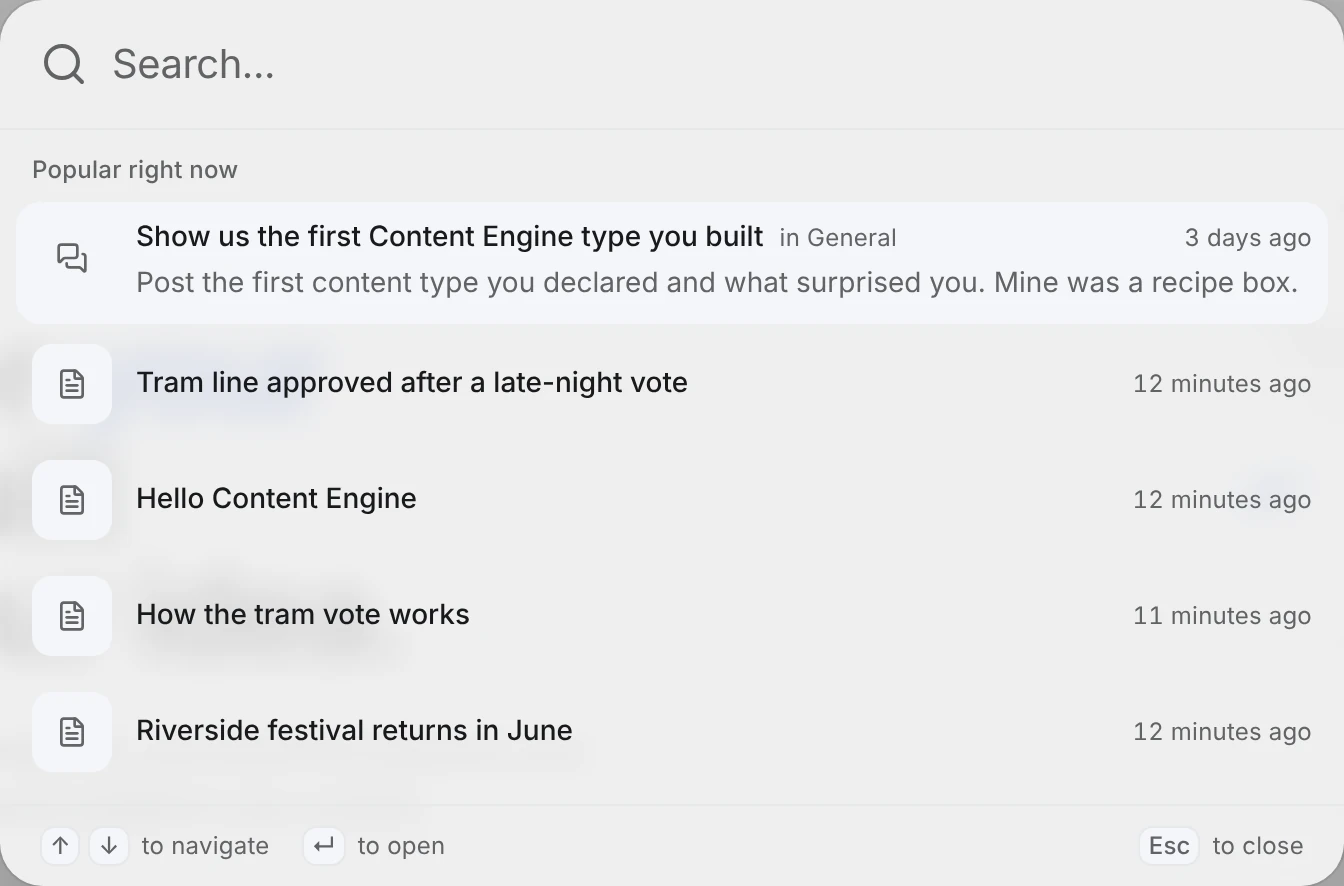
How the dialog works
Open it with the header search box, ⌘ K (Ctrl K on Windows and Linux), or / when you are not typing in a field.
| What you typed | What the dialog shows |
|---|---|
| Nothing or 1 letter | Your recent searches and Popular right now: up to 6 items this week |
| 2 or more letters | Suggestions: up to 6 items whose title words start with what you typed |
| 3 or more letters | A See all results row at the end that opens /search with the same term |
Move with ↑ ↓ and open with Enter; the bar at the bottom reminds you on larger screens. The highlighted row shows an excerpt, with your words marked. When a title starts with what you typed, the rest of it appears in grey. Press Tab (or → at the end of the field) to fill it in. Recent searches are remembered in your browser only, never on the server.
Suggestions match the start of every word in the title, so hel wor finds "Hello world". Words that only appear in the body are left to the full search page, which keeps suggestions fast on big sites. The best title match comes first; on a tie, the more popular item wins. Suggestions follow the same visibility rules as /search. Hidden content appears only for its authors and editors, and drafts never appear.
Suggestions and popular items always read the Postgres core_search_index table, so they also work when Elasticsearch answers /search.
Results that live outside the index, like your docs, can join the dialog as their own group. See External sources.
How popularity is counted
Each item gets one score, made of three signals:
| Signal | Counts when | Weight |
|---|---|---|
| View | Someone opens the item's page | 1 |
| Click | Someone picks the item in the search dialog | 3 |
| Comment | A new public comment on the item is indexed for the first time | 5 |
Points fade with a 7-day half-life. A click from today is worth 3, and the same click from a week ago is worth 1.5. Last month's hit topic slowly makes room for this week's.
With Redis configured, VitNode ignores a repeat view or click from the same viewer within 30 minutes. It tells viewers apart by user id, or by a hash of the IP address for signed-out visitors. Without Redis every request counts, and one person mashing refresh can push their own post to the top. Set up Redis before you trust the ranking on a public site.
Scores live in core_search_popularity, one row per item. Deleting an item removes its row. Rebuilding the search index keeps every score and never counts comments again.
Count views on your content page
Call useRecordView from @vitnode/core/tanstack/search in the page component that shows one item. Pass the item's content type id and record id:
import { useRecordView } from '@vitnode/core/tanstack/search'
import { topicContentType } from '@/content/topic'

const TopicPage = ({ loaderData }: PluginRoutePageProps<TopicPageData>) => {
  const { topic } = loaderData
  useRecordView({ itemId: topic.id, itemType: topicContentType.id })

  // ...
}
The hook sends one request from the browser after the page renders. It runs in the browser on purpose. Public pages often come straight from the HTML cache, and the server never sees those visits. Pass itemId: null to skip counting, for example while the item is hidden. The blog's article page and the forum's topic page already call it.
Comments need no code. Take a Content Engine type that gets its search title from a relation to another searchable type, like a forum comment that points at its topic. The first time a public comment is indexed, its topic gets a comment signal. A document you index yourself works the same way when containerType is a searchable content type id and containerId is the parent's id.
API routes
All three routes are public and live under /api/@vitnode/core/search.
| Route | Query or body | Returns |
|---|---|---|
GET /suggest | search (1-100 characters), lang, first (1-10, default 6) | { items: Suggestion[] } |
GET /popular | lang, first (1-10, default 6) | { items: Suggestion[] } |
POST /popularity | { itemType, itemId, signal: "view" | "click" } | { recorded: boolean } |
A Suggestion is { id, itemType, itemId, title, url, context, createdAt, excerpt, image }. context is the parent's title, such as the topic a comment belongs to, or null. excerpt is the first 500 characters of the indexed text. image is { url, width, height } or null.
curl "http://localhost:3000/api/@vitnode/core/search/suggest?search=hel&lang=en"{
"items": [
{
"id": 105,
"itemType": "newsroom.story",
"itemId": "3",
"title": "Hello Content Engine",
"url": "/stories/hello-content-engine",
"context": null,
"createdAt": "2026-10-10T10:55:34.335Z",
"excerpt": "Hello Content Engine A first story from the newsroom plugin, served by the public API and rendered on its own page.",
"image": null
}
]
}POST /popularity answers { "recorded": false } when the item is not public in the index or the same viewer already counted it in the last 30 minutes. Comments can't be sent this way; only the index adds them.