AdminCP page
Add an AdminCP page to the site-notes VitNode plugin that lists notes, creates them through a permission-guarded endpoint, refreshes the list and shows a toast, with a sidebar link only permitted staff see.
A plugin can add its own screens to the AdminCP, inside its sidebar, breadcrumb and session guard. In this lesson you give staff a Notes page that lists the notes and creates new ones through the guarded endpoint from the previous lesson.
Before you begin
- The
POST /api/site-notes/admin/notesendpoint and the Create notes permission from Permissions, plus the restricted second administrator you created there.
Add TanStack Query
The page reads the list with useQuery and refreshes it after a create. Add the dependency to the plugin from the workspace root:
bun add @tanstack/react-query --cwd plugins/site-notesShare the list query
Create src/pages/notes-query.ts. Every list of notes uses this query key, so one invalidation refreshes them all:
import { queryOptions } from "@tanstack/react-query";
import { fetcher } from "@vitnode/core/tanstack/fetcher";

import { manifest } from "@/manifest.gen";

export const NOTES_QUERY_KEY = [manifest.id, "notes"] as const;

export const notesQueryOptions = () =>
  queryOptions({
    queryKey: NOTES_QUERY_KEY,
    queryFn: async () => {
      const response = await fetcher({
        plugin: manifest.id,
        method: "get",
        module: "notes",
        path: "/",
      });
      if (!response.ok) throw new Error("Could not load notes.");

      return await response.json();
    },
  });
Create the page
Create src/pages/admin-notes-page.tsx. The form posts to the guarded endpoint; the list reads the public one:
import { useQuery, useQueryClient } from "@tanstack/react-query";
import { AutoForm } from "@vitnode/core/components/form/auto-form";
import { AutoFormInput } from "@vitnode/core/components/form/fields/input";
import { AutoFormTextarea } from "@vitnode/core/components/form/fields/textarea";
import { definePluginRoute } from "@vitnode/core/routing";
import { useAdminPermission } from "@vitnode/core/tanstack/admin";
import { fetcher } from "@vitnode/core/tanstack/fetcher";
import { toast } from "sonner";
import { useTranslations } from "use-intl";
import { z } from "zod";

import { manifest } from "@/manifest.gen";

import { NOTES_QUERY_KEY, notesQueryOptions } from "./notes-query";

const formSchema = z.object({
  title: z.string().trim().min(3).max(200),
  body: z.string().trim().min(1).max(2000),
});

const CreateNoteForm = () => {
  const t = useTranslations("site-notes.admin.notes");
  const queryClient = useQueryClient();

  return (
    <AutoForm
      fields={[
        {
          id: "title",
          component: props => <AutoFormInput {...props} label={t("form.title")} />,
        },
        {
          id: "body",
          component: props => <AutoFormTextarea {...props} label={t("form.body")} />,
        },
      ]}
      formSchema={formSchema}
      onSubmit={async (values, form) => {
        const response = await fetcher({
          plugin: manifest.id,
          method: "post",
          module: "admin/notes",
          path: "/",
          args: { body: values },
        });

        if (!response.ok) {
          toast.error(t("error.title"), { description: t("error.desc") });

          return;
        }

        const note = await response.json();
        form.reset();
        await queryClient.invalidateQueries({ queryKey: NOTES_QUERY_KEY });
        toast.success(t("created.title"), {
          description: t("created.desc", { title: note.title }),
        });
      }}
      submitButtonProps={{ children: t("form.submit") }}
    />
  );
};

const AdminNotesPage = () => {
  const t = useTranslations("site-notes.admin.notes");
  const canCreate = useAdminPermission({
    plugin: manifest.id,
    module: "notes",
    permission: "can_create",
  });
  const { data: notes, isPending, isError } = useQuery(notesQueryOptions());

  return (
    <div className="flex flex-col gap-6 p-4">
      <header className="flex flex-col gap-2">
        <h1 className="text-2xl font-semibold tracking-tight text-balance">
          {t("title")}
        </h1>
        <p className="text-muted-foreground leading-relaxed text-pretty">
          {t("desc")}
        </p>
      </header>

      {canCreate ? (
        <section className="flex max-w-xl flex-col gap-4">
          <h2 className="text-lg font-semibold">{t("form.heading")}</h2>
          <CreateNoteForm />
        </section>
      ) : (
        <p className="text-muted-foreground leading-relaxed">{t("no_permission")}</p>
      )}

      <section aria-busy={isPending} className="flex flex-col gap-3">
        <h2 className="text-lg font-semibold">{t("list")}</h2>
        {isPending ? (
          <p className="text-muted-foreground" role="status">
            {t("loading")}
          </p>
        ) : isError ? (
          <p className="text-destructive">{t("load_error")}</p>
        ) : (
          <ul className="flex flex-col divide-y rounded-lg border">
            {notes.map(note => (
              <li className="flex flex-col gap-1 p-3" key={note.id}>
                <span className="font-medium">{note.title}</span>
                <span className="text-muted-foreground text-sm">{note.body}</span>
              </li>
            ))}
          </ul>
        )}
      </section>
    </div>
  );
};

const AdminNotesBreadcrumb = () => {
  const t = useTranslations("site-notes.admin.notes");

  return <span>{t("title")}</span>;
};

export const route = definePluginRoute({
  breadcrumb: AdminNotesBreadcrumb,
  head: () => ({ robots: "noindex, nofollow" }),
});

export default AdminNotesPage;AutoFormvalidates with the same limits as the endpoint and shows the submit button's loading state, so a note cannot be sent twice.- After a successful create, the form resets,
invalidateQueriesrefetches the list and a toast names the new note. A refused request (403,400) shows an error toast instead. useAdminPermissiononly decides whether the form is shown. The endpoint'sadminStaffPermissionis what actually refuses a create.
Declare the route
Add the page to src/routes.ts with area: "admin", which renders it inside the AdminCP shell behind the AdminCP session:
  page("/site-notes/notes", {
    component: lazy(() => import("./pages/notes-page")),
    messages: ["site-notes.notes"],
  }),

  page("/admin/site-notes", {
    area: "admin",
    component: lazy(() => import("./pages/admin-notes-page")),
    messages: ["site-notes.admin.notes"],
  }),
]);
An admin route cannot declare a staff permission. Any AdminCP user can open the URL; the page above adapts its content, and the API decides what they can change.
Link it from the sidebar
Create src/admin/nav.tsx. VitNode finds the file by name and adds a Site Notes group to the sidebar:
import type { AdminNavPluginSource } from "@vitnode/core/lib/plugin";

import { StickyNoteIcon } from "lucide-react";

import { manifest } from "@/manifest.gen";

export const adminNav = {
  pluginId: manifest.id,
  admin: {
    nav: [
      {
        id: "notes",
        href: "/admin/site-notes",
        icon: <StickyNoteIcon />,
        permission: { module: "notes", permission: "can_create" },
      },
    ],
  },
} satisfies AdminNavPluginSource;
permission hides the link from administrators without it. It must be a permission the plugin declares in permissionStaff, or vitnode plugin validate fails.
Add the strings
Add an admin group under site-notes in src/locales/en.json. admin.nav.notes is the sidebar label; the rest belongs to the page. Keep home and notes, and the permission labels at the root:
{
  "site-notes": {
    "admin": {
      "nav": { "notes": "Notes" },
      "notes": {
        "title": "Notes",
        "desc": "Write the notes shown at /site-notes/notes.",
        "list": "All notes",
        "loading": "Loading notes…",
        "load_error": "The notes could not be loaded.",
        "no_permission": "You can read the notes, but creating them needs the Create notes permission.",
        "form": {
          "heading": "New note",
          "title": "Title",
          "body": "Note",
          "submit": "Create note"
        },
        "created": {
          "title": "Note created",
          "desc": "\"{title}\" is live on the notes page."
        },
        "error": {
          "title": "Note not created",
          "desc": "Check the fields and your permissions, then try again."
        }
      }
    }
  }
}
Check the result
- Sign in to the AdminCP as the first account. The sidebar has Site Notes → Notes. Open it, enter
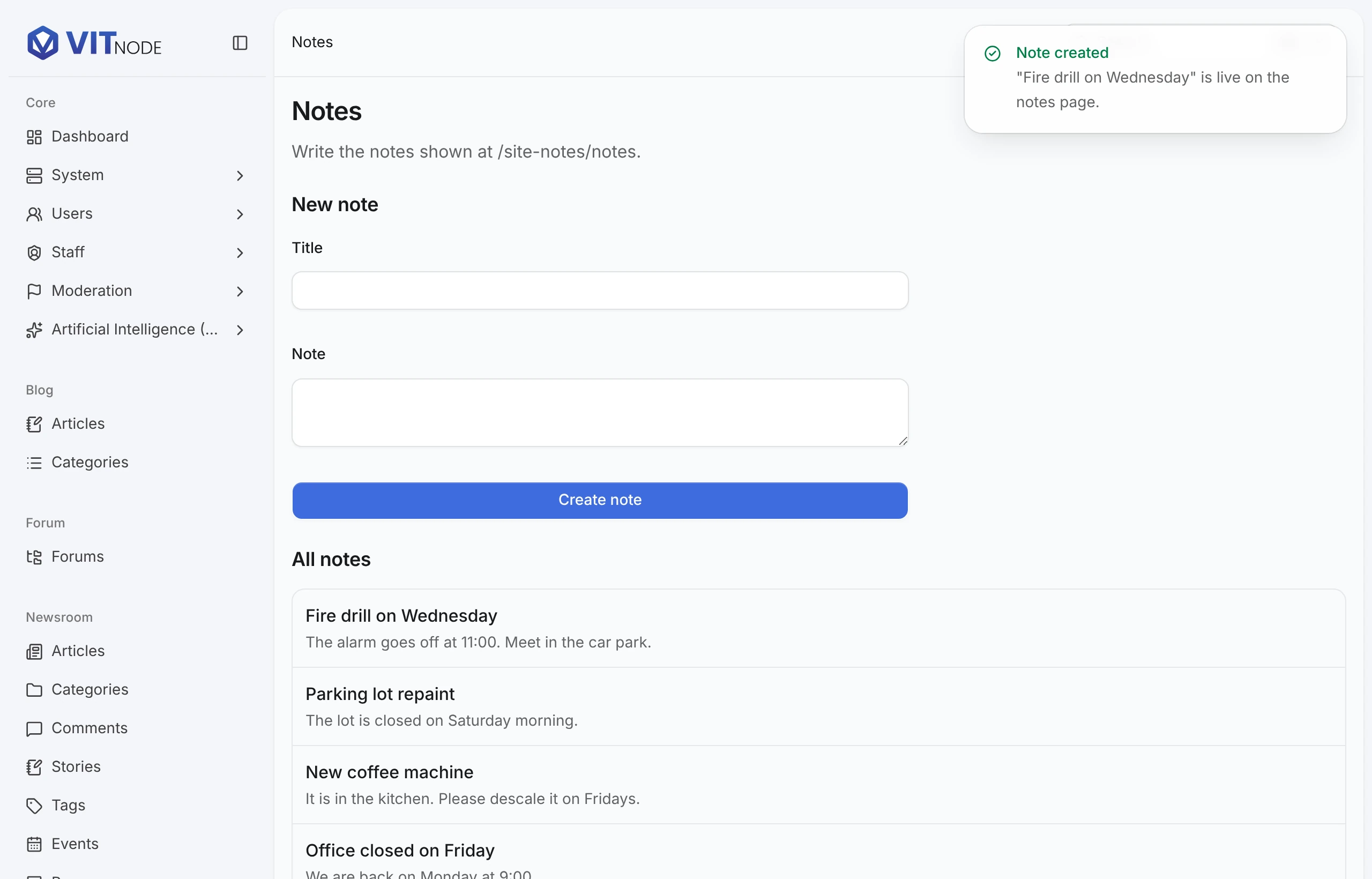
Fire drill on WednesdayandThe alarm goes off at 11:00. Meet in the car park., and choose Create note. A Note created toast appears, the form clears and the note tops All notes. It is also on/site-notes/notes.
- Sign in as the restricted administrator without Create notes. The sidebar has no Site Notes group. Opening
/admin/site-notesdirectly shows the list and the line "creating them needs the Create notes permission" instead of the form. - Grant Create notes to that account, as in the previous lesson. After a reload, the link and the form appear, and creating a note works.
Run pnpm vitnode plugin validate site-notes in apps/web once more. It lists AdminCP navigation among the passing checks.
What you built
site-notes now has a public page backed by PostgreSQL, a validated API, a staff permission enforced on the server and an AdminCP screen. Where to go from here:
- Dashboard widgets: put a summary on the AdminCP dashboard.
- Events: announce
site-noteschanges to other plugins. - Queue: move slow work out of the request.
- Content Engine: generate tables, APIs and AdminCP screens from one definition instead of writing them.