Mentions
Let members @mention each other in VitNode rich text, notify them once they can read the post, and turn mentions off for a field or a role.
Mentions let members type @ and the first three letters of a name in any rich-text editor, pick someone, and notify them. They are on by default: every field.richText() in the Content Engine and every AutoFormEditor supports them without any code. This page explains what notifies whom, how to turn mentions off, and how to use them in your own tables.
How mentions work
Typing @ and a few letters opens a list of members. Arrow keys move through it, Enter or Tab inserts the mention. Members only see the list when they are signed in and one of their roles may mention.
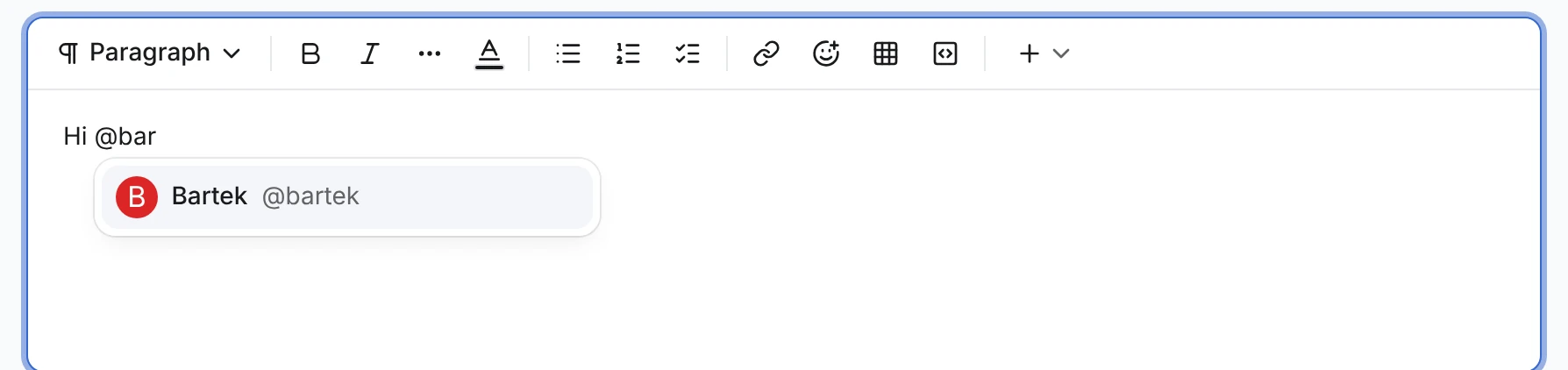
The editor stores a mention node with the member's id and a snapshot of their name:
{ "type": "mention", "attrs": { "id": 3, "label": "Bartek", "nameCode": "bartek" } }RichTextContent renders it as a link to the member's profile with the user preview card. It looks up the member's current name by id, so a renamed member still gets the right link. A deleted member shows as plain @name text. Plain text, excerpts and search use @name too.
A mention notifies the member with Mentions (core.mention) when all of these are true:
- The record is public: published, not hidden, and its thread is public. A draft or a post waiting for approval notifies when it goes live.
- The mentioned member can read the record under its access rules.
- One of the author's roles allows mentioning, and the post hasn't reached that role's cap.
- The member isn't the author, and isn't already told about the same reply by a thread notification (the topic author and the author of the comment being answered).
Editing a post notifies only members who are newly mentioned. Removing a mention takes its notification out of the member's inbox, read or not. Every mention is its own item, so three comments that mention you show up as three notifications. The notification is in-app and sends an email right away by default; members change that in Settings → Notifications.
Turn mentions off for a field
Set mentions: false on the field, and mentions={false} on the editor that edits it. The form can't read the server's field options, so both are needed:
fields: {
  body: field.richText({ required: true, mentions: false }),
},<AutoFormEditor format="json" mentions={false} {...props} />The server option stops notifications. The editor option hides the @ list. If you forget the editor side, members can still insert a mention, but it notifies nobody.
Set who can mention
Open AdminCP → Users → Roles, edit a role and open the Content tab.
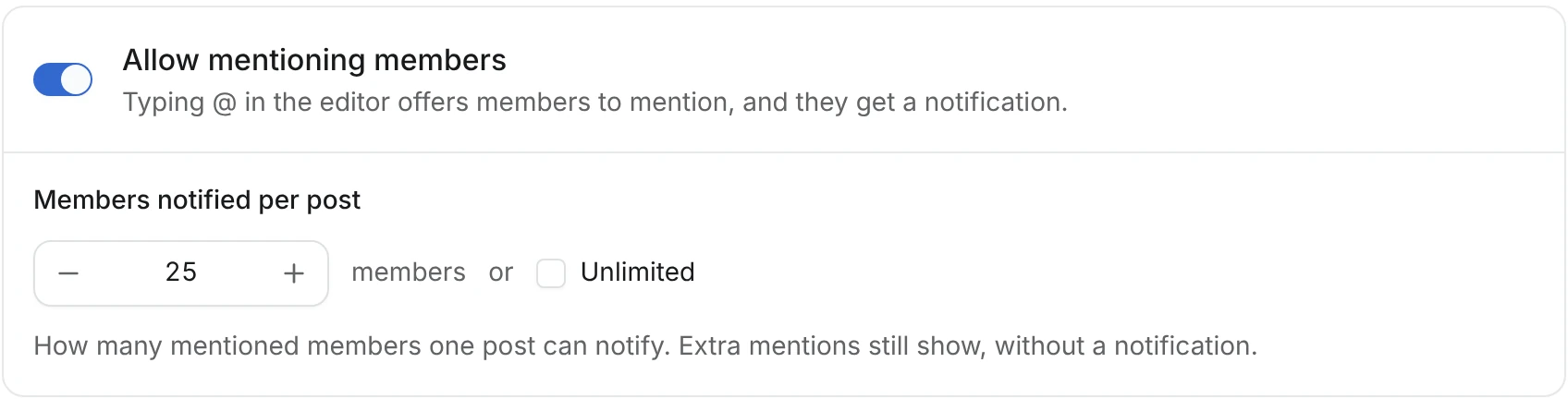
- Allow mentioning members shows the
@list and lets the role's posts notify. It is on for every role except guests. - Members notified per post caps how many members one post notifies, 25 by default, or Unlimited. More mentions still show as links, without a notification.
A member with several roles gets the most generous setting of them all.
Mention from your own tables
Content Engine records need nothing more. For rich text your plugin stores in its own table, register a mention target and call syncMentions after each write. The example below uses a guestbook_entries table with a rich-text body column, readable by everyone.
Define the target
A target tells core who may read an item. Core asks before notifying, before each email and each time an inbox shows the notification:
import { defineMentionTarget } from '@vitnode/api/mentions'

export const guestbookMentionTarget = defineMentionTarget({
  type: 'guestbook.entry',
  // Every member can read the guestbook.
  access: async ({ userIds }) => userIds,
})
access receives { c, id, rootId, userIds } and returns the ids that may read item id. It runs once per batch, never once per member.
Register it
Pass the target to buildApiPlugin in src/config.api.ts:
import { guestbookMentionTarget } from '@/api/lib/mentions'

export const guestbookApiPlugin = () =>
  buildApiPlugin({
    manifest,
    mentions: { targets: [guestbookMentionTarget] },
    // modules, permissions and the rest as before
  })
Sync after every write
In the routes that create and edit an entry, call syncMentions after the write commits. It stores new mentions, notifies them, and retracts the ones the text no longer has. Calling it again with the same text changes nothing:
import { syncMentions } from '@vitnode/api/mentions'

await syncMentions({
  c,
  pluginId: manifest.id,
  target: guestbookMentionTarget,
  id: entry.id,
  actorId: entry.authorId,
  documents: [entry.body],
  title: entry.title,
  url: `/guestbook#entry-${entry.id}`,
})
actorId is the author: their roles decide whether the post notifies. documents takes every rich-text value of the item.
Forget mentions on delete
In the route that deletes an entry, after the delete commits:
import { deleteMentions } from '@vitnode/api/mentions'

await deleteMentions({
  c,
  pluginId: manifest.id,
  targetType: 'guestbook.entry',
  id: entry.id,
})
Check the result
Sign in as one member, post Hi @ plus another member's name, and pick them from the list. Sign in as the other member: the bell shows that you were mentioned, with the post's title, like … mentioned you in "Welcome to the newsroom", and the notification opens the post. Edit the post to remove the mention, and the notification leaves their inbox.
Reference
| Route | Who | Returns |
|---|---|---|
GET /users/mentions?search=&limit= | Signed-in members whose role may mention; 401 for guests, 403 without the role setting | Up to 10 members (6 by default) matching the start of their URL name or name, then names containing it. The member asking is left out. |
GET /users/mentioned?ids=1,2,3 | Everyone | The current name and nameCode of up to 50 members. Deleted members are left out. |
The session (GET /users/session) includes canMention. Mention events are listed in Built-in events.