Logo VitNode

Editorial

Add revision history with restore, version checks against overwrites, signed draft preview links and scheduled publishing to a Content Engine content type.

The editorial block gives a content type the tools an editorial team expects: a history of every save with restore, protection against two people overwriting each other, signed links that show a draft to someone without an AdminCP account, and publishing at a chosen time. It is also what live editing builds on, which you turn on separately with liveEditing: true.

This page uses example.article from the example plugin. It already has drafts and publishing and a public API, which previews and scheduling build on.

Turn on editorial features

Add editorial to the definition:

plugins/example/src/content/article.ts
export const articleContentType = defineContentType({
  id: "example.article",
  tableName: "example_articles",
  publication: true,
  publicApi: {
    path: "articles",
    fields: ["title", "slug", "excerpt"],
  },
  editorial: {
    revisions: { retention: 20 },
    preview: { expiresInMinutes: 30 },
    scheduling: true,
  },
  fields: {
    title: field.text({ required: true, minLength: 3, maxLength: 200 }),
    slug: field.slug({ source: "title" }),
  },
});

Then rebuild the plugin and migrate:

Build plugins and migrate
bun run build:plugins && bun run db:migrate

The migration adds a version column to example_articles. Revisions, schedules, drafts and locks live in shared core tables, so nothing else lands in your schema. Editorial also adds a can_restore staff permission, labelled by the @vitnode/example:article:can_restore key in your plugin's locale file.

preview needs publicApi and scheduling needs publication. Leaving out the partner is a type error, and the definition throws when it loads. Every option and default is in the content type reference.

Revisions

Every create, update, publish, unpublish and restore stores a snapshot in core_content_revisions. revisions.retention keeps the newest snapshots per record, 50 by default and at most 500.

To see them, open the row's More actions menu in the AdminCP list and choose History. Each version shows who saved it and when, and Show changes lists the fields it changed:
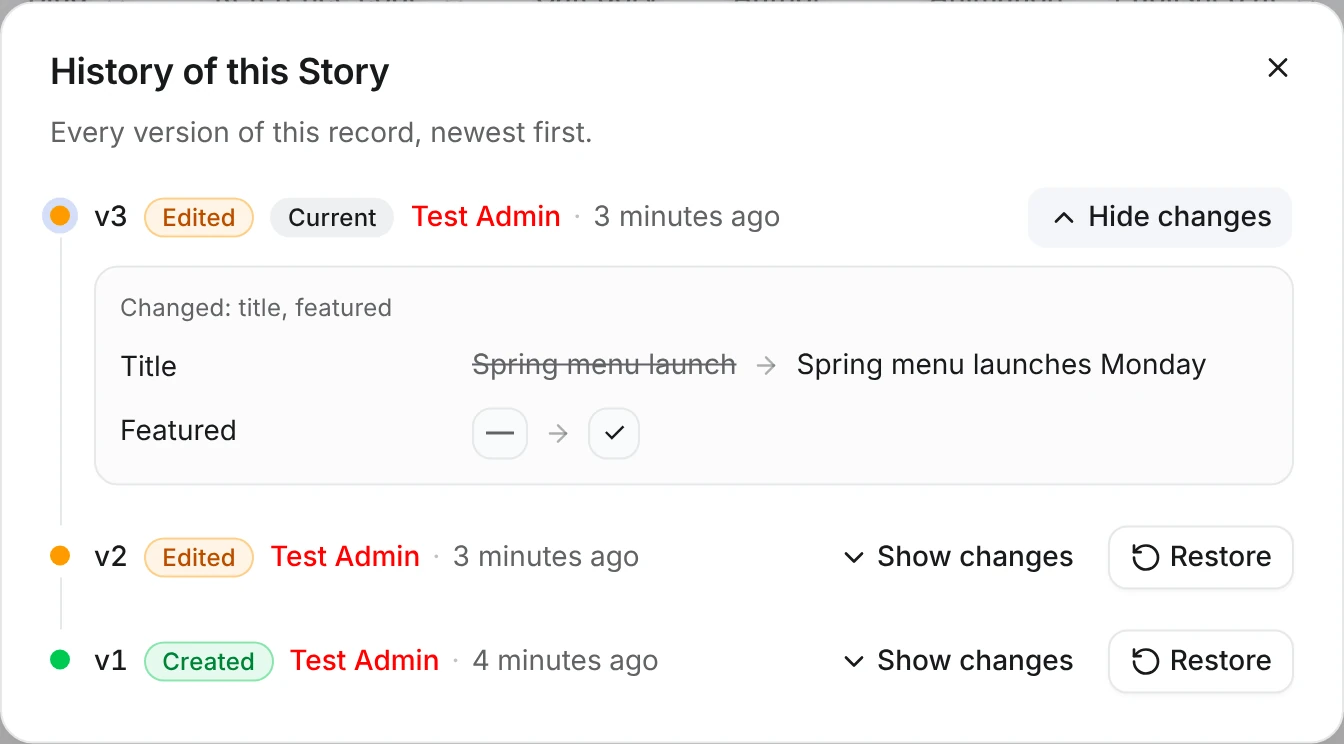
History of this Article dialog: v3 by Tom Becker expanded to show the title change from Spring menu launch to Spring menu launches Monday and Featured switched on, with Restore buttons on v2 and v1

Restore puts that version's field values back as a new version, so nothing in between is lost and the publication status stays as it is. It needs can_restore and emits content.example.article.restored. Anyone with the record open in live editing gets a notice and a reloaded form.

Safe concurrent edits

Each editorial write raises the record's version by one and succeeds only when the version still matches the one the editor loaded. If someone saved in between, the second save fails instead of quietly replacing their work:

PUT /api/@vitnode/example/admin/content/article/2 → 409
{
  "code": "CONTENT_VERSION_CONFLICT",
  "contentTypeId": "example.article",
  "itemId": 2,
  "expectedVersion": 2,
  "currentVersion": 3
}

The AdminCP sends the version for you. Your own calls to the edit routes must send it too: PUT /{id} takes { "expectedVersion": 3, "values": { "title": "…" } } and DELETE /{id} takes { "expectedVersion": 3 }. In server code, articleContent.editorialService does the same check; see the Feature this article example. A translation has its own version and fails with CONTENT_TRANSLATION_VERSION_CONFLICT.

A preview link lets a reviewer read a draft without signing in. In the AdminCP, open More actions and choose Preview. Creating a link needs can_view.

Preview link dialog with a signed link to the Spring menu launches Monday article, a copy button, an Open button and an Expires in 30 minutes note

The link is HMAC-signed, expires after expiresInMinutes (15 by default, 1 to 1440) and cannot be revoked early, so treat it like a password. It is pinned to the last saved version, so it shows what Save committed, not unsaved live editing drafts.

The link points to the first of these that exists:

  1. preview.pathTemplate, such as /preview/articles/{token}, with exactly one {token}.
  2. The record's own page with ?preview=<token>, when the type has delivery.
  3. The public API route GET /api/@vitnode/example/content/articles/preview/{token}.

Every page still has to load the draft from that API route. A page built from Show content on a public page does not read ?preview= on its own, so the example's link opens a 404 until you check for it in your loader:

Read a preview in a page loader
const preview = await fetcher({
  plugin: "@vitnode/example",
  method: "get",
  module: "content/articles",
  path: "/preview/{token}",
  args: { params: { token: encodeURIComponent(token) } },
});

The route returns the record's public fields, and the same 404 for a forged, expired or unknown token. It sends Cache-Control: private, no-store and X-Robots-Tag: noindex, nofollow, so the draft stays out of caches and search results.

Links are built from VITNODE_WEB_URL and VITNODE_API_URL. When either is not an absolute URL, the API logs a warning at startup and the Preview button answers 503.

Schedule publishing

Scheduling publishes or unpublishes a record at a chosen time. Open More actions, choose Schedule, pick Publish or Unpublish and a time, then press Schedule it. Booking or cancelling a schedule needs can_publish.

Schedule this Article dialog with a pending Publish on Oct 12, 7:00 AM booked by Anna Kowalska, a Cancel link and the form for another schedule

A schedule is a queued task, drained by the process-queue cron job once a minute. If nothing triggers your cron endpoint, schedules are saved but never fire. When the install has no cron adapter at all, the dialog says so with a No scheduler is running warning. When a schedule fires, it publishes whatever the record says at that moment, not what it said when you booked it.

A few rules keep schedules sane:

  • A time up to two minutes in the past is accepted. Anything older fails with CONTENT_SCHEDULE_IN_PAST.
  • An unpublish cannot come before a pending publish (CONTENT_SCHEDULE_ORDER).
  • Booking emits content.example.article.scheduled and cancelling emits schedule_cancelled. When the time comes, the usual published or unpublished event carries the scheduleId.

If a separate front end caches pages, Notify a separate front end tells it about the change.