Production
A pre-launch checklist for VitNode Content Engine content types, covering public field allowlists, staff permissions, migrations, scheduled publishing, preview links and content health checks.
A content type that works on your machine needs a few more checks before real editors and visitors use it. Go through this list for every content type you ship.
Expose only what you mean to
- Review
publicApi.fields. It is the allowlist for everything public: the public API, page metadata fromdeliveryand the search index. A field not listed there never leaves the server. Keep internal notes, moderation flags and anything personal out of it. - Keep
publicationon.publicApiandsearchboth refuse to load without it, and new records start as drafts, so nothing is public until someone publishes it. - Treat search as public.
search.titleField,descriptionFieldandcontentFieldsmust be public fields, andsearch.authorFieldshows who wrote a record in search results.
The newsroom story lists eight of its own fields plus publishedAt. code, views and author stay private, because they are not in the list:
publicApi: {
  path: "stories",
  fields: [
    "title",
    "slug",
    "excerpt",
    "featured",
    "category",
    "animation",
    "gallery",
    "noIndex",
    "publishedAt",
  ],
  // ...
},
Grant the right permissions
- Give staff only what they need in AdminCP → Staff. Each content type gets
can_view,can_create,can_editandcan_delete, pluscan_publishwithpublication,can_restorewitheditorialandcan_hidewithvisibility. - Guard your own admin routes. Generated routes check their permissions themselves. A custom route next to them needs its own
adminStaffPermission, as shown in Services.
Ship the migration
- Commit the migration that
pnpm db:migrategenerated together with the content type. - Run
db:migrateas a deploy step. Production never migrates on startup. - Read the generated SQL when you change an existing content type. See Migrations.
Configure what editorial features rely on
- Scheduled publishing is a queue task, and the
process-queuecron job drains the queue every minute. Make sure something calls your cron endpoint in production. - Set
CRON_SECRETto your own random value. The API rejects the built-in default outside development, which stops cron runs and front-end revalidation calls. - Preview links are built from
VITNODE_WEB_URLandVITNODE_API_URL, which default to localhost. Set both to your public URLs. If either is not a valid absolute URL, the API logs a warning at startup and previews stay off. - Integrations send the version they read. With
editorial, a save with an outdatedexpectedVersionfails with409 CONTENT_VERSION_CONFLICTinstead of overwriting someone else's work. - A separate front end that caches public reads is listed in
content.revalidateOriginswith anhttpsURL. See Caching. - Live editing has its own deployment requirements, listed in the Live editing API.
Check content health
Debug Panel → Search in the AdminCP (/admin/core/debug/search) shows how much of each content type is in the search index. Use Reindex on a collection, or Rebuild index, after a bulk import or a failed sync.
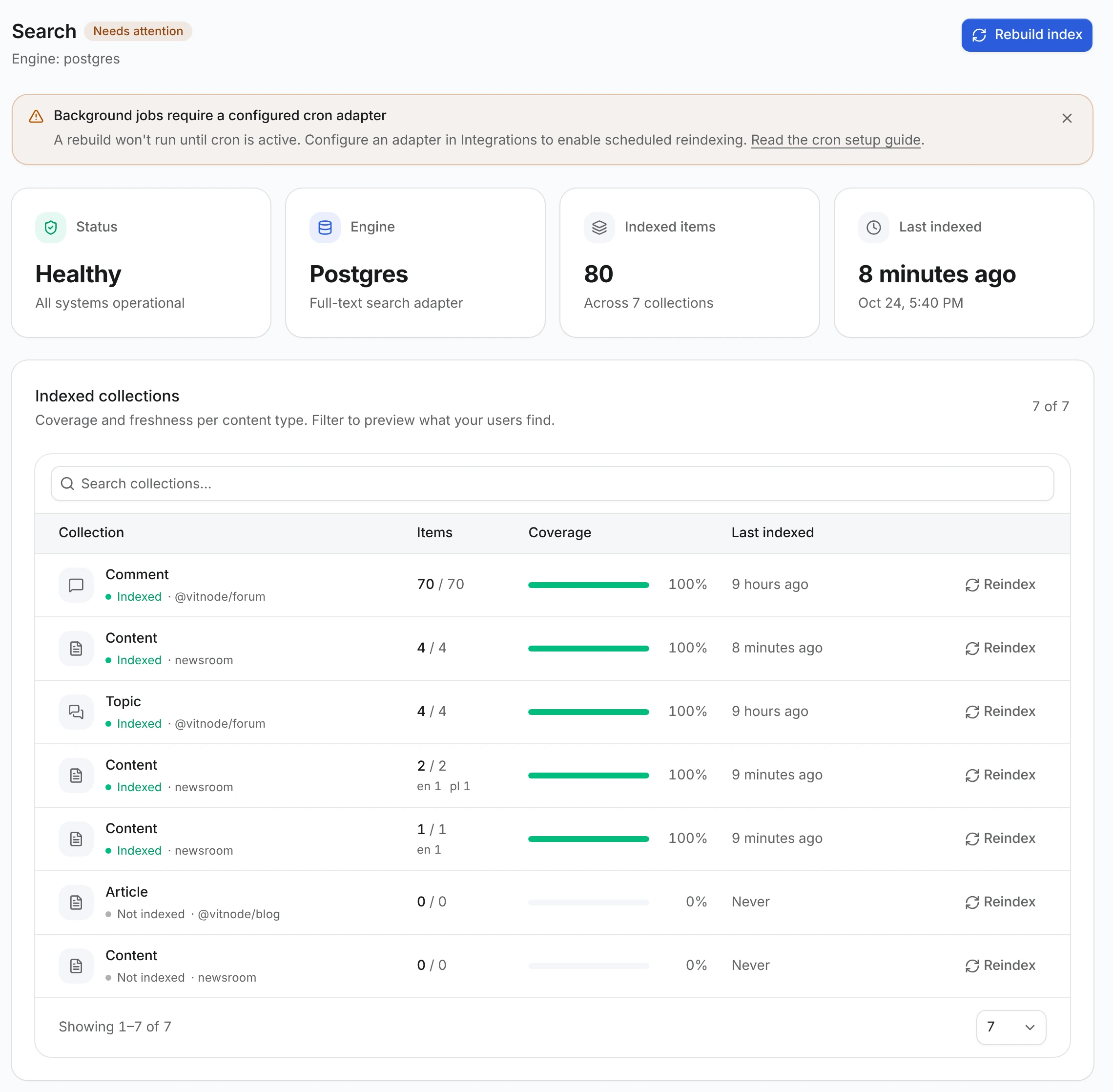
For a monitoring probe, core has a staff-only route that reports every content type, its search drift per language and failed scheduled effects. It needs the can_view permission of the system module:
curl -b "vitnode_auth_admin=<session>" \
http://localhost:8000/api/@vitnode/core/admin/debug/content/status{
"healthy": false,
"searchHealthy": false,
"effectsHealthy": true,
"contentTypes": [
{
"contentTypeId": "newsroom.story",
"pluginId": "newsroom",
"features": {
"editorial": true,
"localization": false,
"publicApi": true,
"publication": true,
"scheduling": true,
"search": true
},
"search": {
"healthy": false,
"expectedTotal": 1,
"canonicalIndexedTotal": 2,
"provider": {
"name": "postgres",
"healthy": false,
"indexedTotal": 2,
"verified": true
}
},
"schedules": { "pending": 0, "withErrors": 0, "failedEffects": 0 }
}
]
}This excerpt shows two indexed documents for one published story, so search is not healthy until you reindex the collection. failedEffects counts scheduled publishes that committed but whose event or search update failed. In your own code, contentEngineDiagnostics(c) from @vitnode/core/content/server returns the same object.
Know the limits
- Content types are defined in code and shipped with migrations. There is no AdminCP screen for creating them at runtime.
- A relation points at one content type. To link to several unrelated types, use one relation field per type.
field.blocks()is not in the generated form by default. Editors change it through widgets or a custom field component.