Comment actions
Let VitNode Content Engine comment authors and moderators edit, delete, hide, restore and report comments in the shared comment section. Each action takes one content-type option and one typed callback, and the server decides who may do what.
This page puts a More actions menu on each comment of the section from Comments: Edit, Delete, Hide or Unhide, and Report. Each action is a content-type option plus one callback in article-comments.tsx. The menu shows an action only where you wired it and the server says this visitor may use it on this comment.
| Action | Required configuration | Server permission | Callback and shared UI |
|---|---|---|---|
| Edit | publicWrite.update | canEdit: the author while their role's edit window is open, or a moderator with Edit | edit: { load, save } adds an inline editor and a conflict alert with revisions |
| Delete | publicWrite | canDelete: the author when their role allows it, or a moderator with Delete | delete adds a confirmation dialog, and a placeholder when the comment has replies |
| Hide and restore | visibility | canHide: a moderator with Hide, or the author when their role allows it | visibility: { hide, unhide } adds a reason prompt and the hidden state |
| Report | reports | canReport: signed-in visitors on other people's comments | report opens the core report dialog, which files to ModCP |
Before you begin
- The working comment section from Comments.
- Two member accounts, and an account that moderates. A root administrator holds every moderator permission. For anyone else, add them in AdminCP → Staff → Moderators, as Configure moderators shows.
Turn on the options
Add visibility, reports and update to the comment type in src/content/comment.ts. This is an excerpt; keep the rest of the file:
  publication: true,
  visibility: true,
  reports: { titleField: "body", snapshotFields: ["body"] },

  publicWrite: {
    ownership: { field: "author" },
    create: { fields: ["body", "article", "parent"], status: "published" },
    update: { fields: ["body"] },
},visibilityaddsPOST /{id}/hideand/unhide, and the columns that remember who hid a comment and why.reportsadds reporting.titleField: "body"gives moderators the first line of the comment as the report's title, so comments need no title field of their own.snapshotFieldskeeps a copy of the text as it was when reported.updateaddsGET /{id}/editandPATCH /{id}. Onlybodyis editable; a comment never moves to another article or parent.GET /permissions, which the menu asks, already exists, becausepublicWritemounts it.
Add the moderation labels next to the other newsroom:comment labels in src/locales/en.json:
{
  "newsroom:comment:can_view_reports": "View comment reports",
  "newsroom:comment:can_manage_reports": "Claim, assign and resolve comment reports",
  "newsroom:comment:can_view_hidden": "Open hidden comments"
}
Then build and migrate from the workspace root:
bun run build:plugins
bun run db:migrate
Ask who may do what
Add permissions to the useContentComments call in src/pages/article-comments.tsx. This is an excerpt; the following steps add to the same call:
  const comments = useContentComments({
    ...articleCommentsThread(articleId),
    create: async ({ body, parentId }) => /* unchanged */,
    permissions: async ids =>
      await fetcher({
        plugin: manifest.id,
        method: "get",
        module: "content/article-comments",
        path: "/permissions",
        args: { query: { ids: ids.join(",") } },
      }),
  });
The section asks once for every comment on screen, in batches of 50, and again for the comments Load more comments adds. A comment whose answer has not arrived, or whose batch failed, shows no actions. The answers belong to the signed-in visitor, so signing in or out asks again.
The server answers from settings, not from your code:
- Authors edit their own comments while their role's Time to edit runs, if Allow editing own content is on (it is, by default). Allow deleting own content and Allow hiding own content are off by default. Turning on
visibilitydoes not turn them on. Roles explains all three. - Moderators act on anyone's comments, at any age, with the comment type's permissions in AdminCP → Staff → Moderators: Edit comments, Delete comments and Hide and unhide comments.
- Reporting is open to every signed-in visitor on other people's comments. Add
selfReport: truetoreportsto let authors report their own.
Connect edit
    edit: {
      load: async id =>
        await fetcher({
          plugin: manifest.id,
          method: "get",
          module: "content/article-comments",
          path: "/{id}/edit",
          args: { params: { id } },
        }),
      // Comments have no editorial revisions, so the last save wins.
      save: async (id, { body }) =>
        await fetcher({
          plugin: manifest.id,
          method: "patch",
          module: "content/article-comments",
          path: "/{id}",
          args: { params: { id }, body: { values: { body } } },
        }),
    },
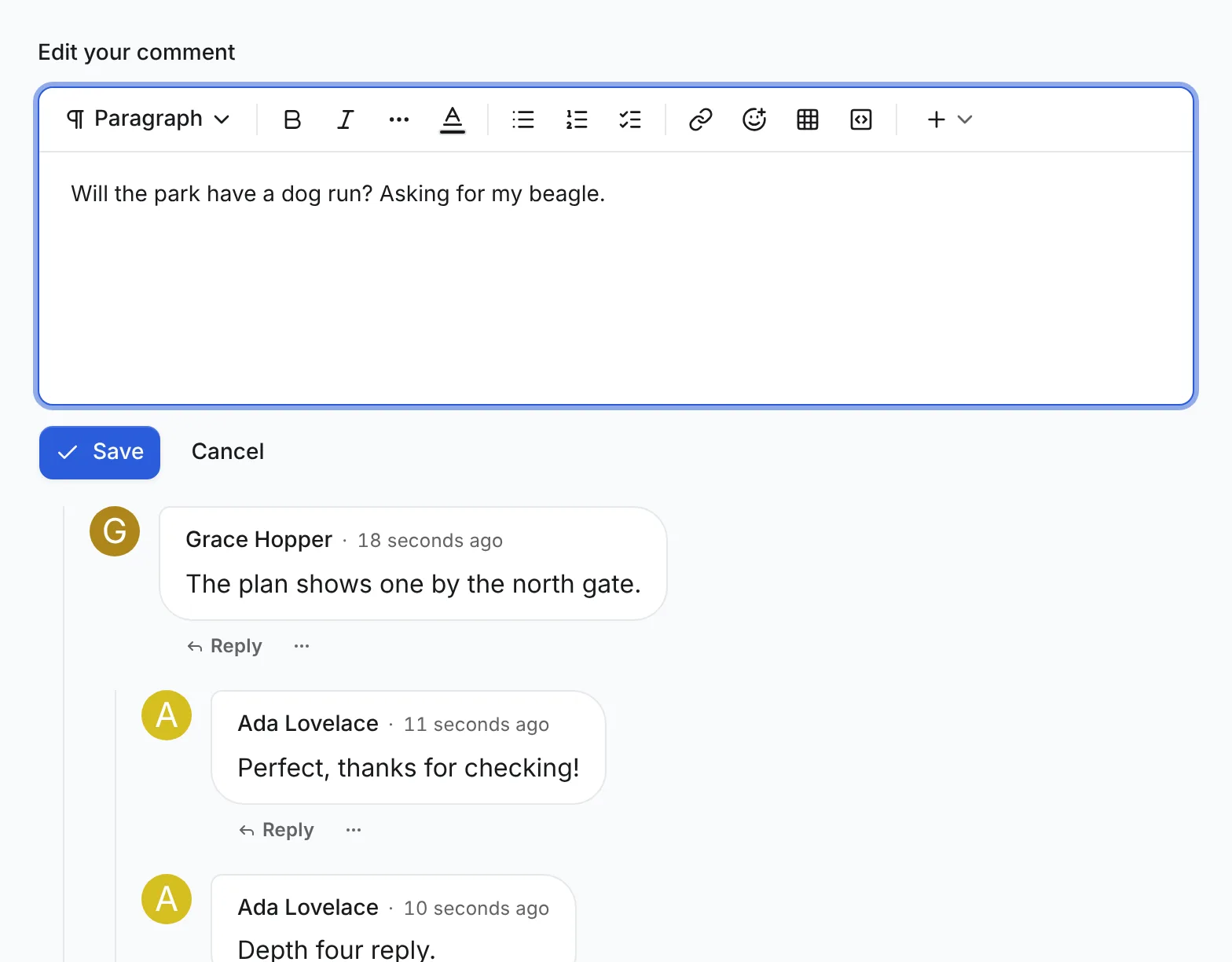
Edit loads the editable text first and opens the editor in place of the comment. After Save, the thread and the form's defaults refresh. If the author's edit waits for a moderator, the editor opens on that proposed text, and saving says it is waiting rather than live.
Newsroom comments have no editorial, so two saves of the same comment both succeed and the last one wins. To refuse a stale save instead, add editorial: true to the comment type, migrate, and send the version:
save: async (id, { body, expectedVersion }) =>
  await fetcher({
    plugin: manifest.id,
    method: "patch",
    module: "content/article-comments",
    path: "/{id}",
    args: { params: { id }, body: { values: { body }, expectedVersion } },
  }),
A stale save then answers 409, and the editor shows Someone else saved in the meantime with Keep my version and Load latest version. The Blog plugin's comments work this way.
Connect delete
    delete: async id =>
      await fetcher({
        plugin: manifest.id,
        method: "post",
        module: "content/article-comments",
        path: "/{id}/delete",
        args: { params: { id } },
      }),
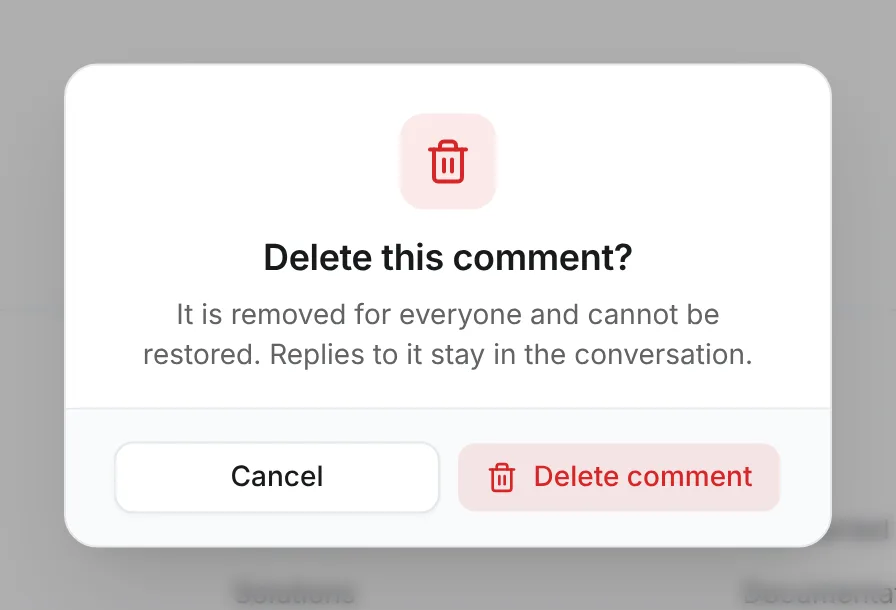
Delete asks for confirmation first. A comment nobody answered is removed. A comment with replies stays in the thread as an anonymous [deleted] placeholder with no text and no author, so its replies keep their place. The placeholder reads "Comment deleted by user" or "Comment removed by a moderator". Deleting the last reply under a placeholder removes the placeholder too. A deleted comment cannot be restored.
Connect hide and restore
    visibility: {
      hide: async (id, { reason }) =>
        await fetcher({
          plugin: manifest.id,
          method: "post",
          module: "content/article-comments",
          path: "/{id}/hide",
          args: { params: { id }, body: reason ? { reason } : {} },
        }),
      unhide: async id =>
        await fetcher({
          plugin: manifest.id,
          method: "post",
          module: "content/article-comments",
          path: "/{id}/unhide",
          args: { params: { id } },
        }),
    },
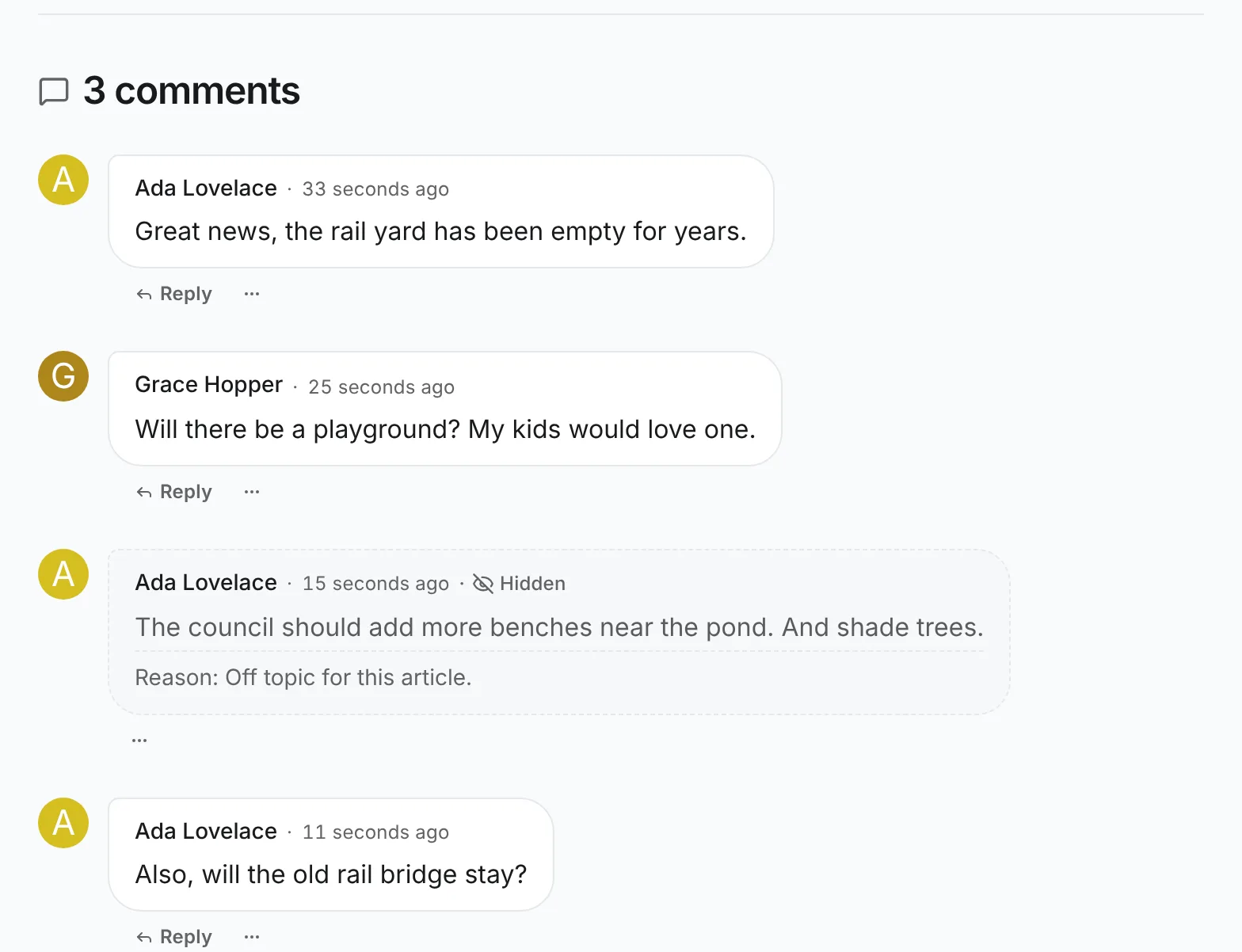
Hide asks for an optional reason of up to 500 characters. A hidden comment disappears for everyone else, but stays visible, marked Hidden with its reason, to its author and to moderators, who get Unhide. Readers who can't see it get the same placeholder as a deleted comment when it has replies, and nothing when it has none. Hiding is not deleting. Unhide brings the comment back unchanged. It is also not unpublishing, which is a staff action in the AdminCP.
Connect reporting
import { contentTarget } from "@vitnode/core/content";

import { commentContentType } from "@/content/comment";

    report: id => contentTarget(manifest.id, commentContentType, id),
Report opens the core report dialog, where the visitor picks a reason. A guest who reaches it is asked to sign in first and comes back to the article. Reports land in ModCP with the comment's first line as their title.
Link reports to the comment
ModCP links each report to its content's public URL, and a comment has none yet. Give it a permalink that redirects to the comment under its article.
Add delivery to the comment type. This is an excerpt:
  delivery: { path: "/news/comments/:slug" },

  thread: { parent: "parent", root: "article", maxDepth: 1 },
Delivery claims the type's publicApi.path across the whole site. That's why this guide picked article-comments. The Blog plugin already delivers comments, and two plugins can't share a path.
The redirect needs the article's slug, and a comment only knows its article's id. Add a small public route that answers it. Create src/api/modules/articles/articles.module.ts:
import { z } from "@hono/zod-openapi";
import { setPageCacheTags } from "@vitnode/core/api/lib/page-cache";
import { contentPublicListTag } from "@vitnode/core/content";
import { HTTPException } from "hono/http-exception";

import { buildModule, buildRoute } from "@/api/builders";
import { articleContent } from "@/database/articles";

const articleSlugRoute = buildRoute({
  route: {
    method: "get",
    path: "/{id}/slug",
    description:
      "The slug of one public article, for turning a comment permalink into the comment under its article",
    request: {
      params: z.object({
        id: z.coerce.number().int().positive().openapi({ example: 1 }),
      }),
    },
    responses: {
      200: {
        content: {
          "application/json": {
            schema: z.object({ id: z.number(), slug: z.string() }),
          },
        },
        description: "The article's slug",
      },
      404: { description: "No public article with this id" },
    },
  },
  handler: async c => {
    const { id } = c.req.valid("param");
    const service = articleContent.publicService?.(c);
    if (!service) {
      throw new HTTPException(500, { message: "Articles have no public API." });
    }

    const article = await service.findById(id);
    if (!article) throw new HTTPException(404, { message: "Article not found." });

    setPageCacheTags(c, [contentPublicListTag(articleContent.definition.id)]);

    return c.json({ id: article.id, slug: article.slug }, 200);
  },
});

export const articlesModule = buildModule({
  name: "articles",
  routes: [articleSlugRoute],
});
Register it in src/config.api.ts. This is an excerpt:
import { articlesModule } from "./api/modules/articles/articles.module";

    modules: [
      helloModule,
      adminModule,
      articlesModule,
The redirect page uses TanStack Query and TanStack Router. Skip this if the plugin already has both; otherwise run this from the workspace root:
bun add @tanstack/react-query @tanstack/react-router --cwd plugins/newsroomCreate src/pages/comment-redirect-page.tsx:
import { queryOptions } from "@tanstack/react-query";
import { redirect } from "@tanstack/react-router";
import { LOADER_DATA_QUERY_META } from "@vitnode/core/lib/query-client";
import { CONTENT_COMMENT_ANCHOR_PREFIX } from "@vitnode/core/tanstack/comments";
import { contentPageItem } from "@vitnode/core/tanstack/content";
import { fetcher } from "@vitnode/core/tanstack/fetcher";
import { localizeHref } from "@vitnode/core/tanstack/i18n";
import { defineRoute } from "@vitnode/core/tanstack/plugin-routes";
import { z } from "zod";

import { manifest } from "@/manifest.gen";

const zodCommentLink = z.object({
  article: z.object({ id: z.number() }),
  id: z.number(),
});

/** Where a comment's permalink leads: its article's slug and the comment's id. */
const commentLinkQueryOptions = (slug: string) =>
  queryOptions({
    meta: LOADER_DATA_QUERY_META,
    queryFn: async () => {
      const comment = await fetcher({
        plugin: manifest.id,
        method: "get",
        module: "content/article-comments",
        path: "/{slug}",
        args: { params: { slug: encodeURIComponent(slug) } },
      });
      if (comment.status === 404) return null;
      if (comment.status !== 200) {
        throw new Error(`Resolving the comment "${slug}" failed.`);
      }

      const record = zodCommentLink.parse(await comment.json());
      const article = await fetcher({
        plugin: manifest.id,
        method: "get",
        module: "articles",
        path: "/{id}/slug",
        args: { params: { id: record.article.id } },
      });
      if (article.status === 404) return null;
      if (article.status !== 200) {
        throw new Error(`Resolving the article of the comment "${slug}" failed.`);
      }

      return { article: (await article.json()).slug, comment: record.id };
    },
    queryKey: [manifest.id, "comment-link", slug],
  });

export const route = defineRoute({
  load: async ({ context, params }) => {
    const { article, comment } = contentPageItem(
      await context.queryClient.query(commentLinkQueryOptions(params.slug)),
    );

    // oxlint-disable-next-line typescript/only-throw-error
    throw redirect({
      href: `${localizeHref(`/news/${article}`, context.locale)}#${CONTENT_COMMENT_ANCHOR_PREFIX}${comment}`,
      statusCode: 302,
    });
  },

  head: () => ({ robots: "noindex, nofollow" }),
});

const CommentRedirectPage = () => null;

export default CommentRedirectPage;contentPageItemturns anullinto the not-found page, for a comment or article that is gone or not public.#comment-{id}is the element id the section gives every comment. The section scrolls to it, loading more pages until it appears, focuses it and rings it.
Declare the page in src/routes.ts:
  page("/news/comments/:slug", {
    component: lazy(() => import("./pages/comment-redirect-page")),
  }),
Build again, so the new route's types and the delivery URL exist:
bun run build:pluginsCheck the result
Open an article with two comments by Ada, a member. Then check each action with the right account:
-
As Ada, open More actions on one of the comments. It offers only Edit, because deleting and hiding your own comments are off by default. Click Edit, change the text and click Save. Comment saved appears and the comment shows the new text, marked edited when you changed it more than a minute after posting.
-
As Grace, another member, the menu on Ada's comment offers Report. Pick Spam and click Send report.
-
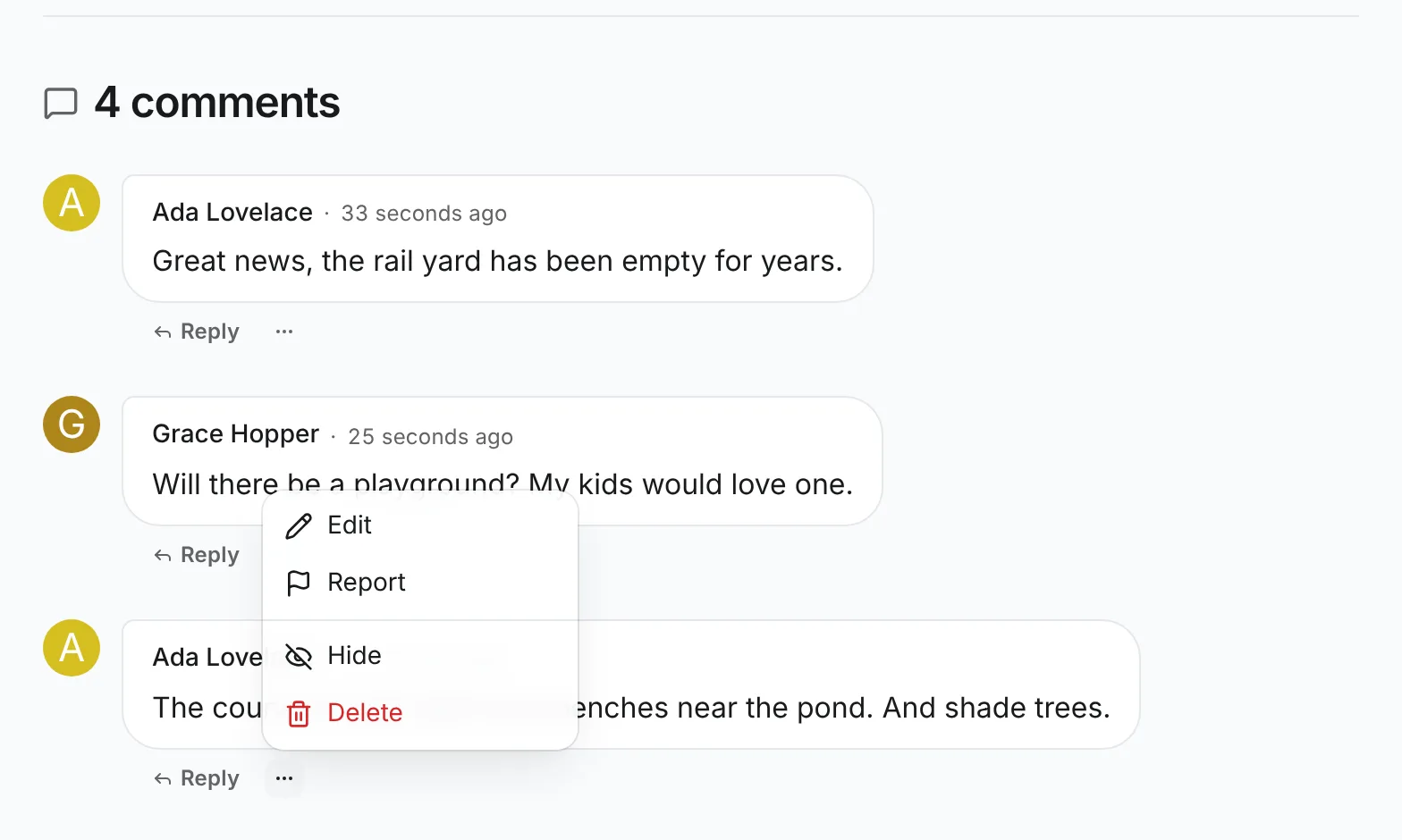
As the moderator, the menu offers Edit, Report, Hide and Delete:
-
Click Hide, type a reason and click Hide. The comment stays visible to you and to Ada, marked Hidden with the reason. Signed out, it is gone, and the count drops by one:
-
Open More actions again and click Unhide. Everyone sees the comment again.
-
Click Delete on Ada's other comment. The section asks first, and the comment is gone after you confirm:
-
In ModCP, open Reports and the report from step 2. Its title is the comment's first line. Open current content opens
/news/comments/{slug}, which lands on the article with the reported comment scrolled into view, focused and outlined: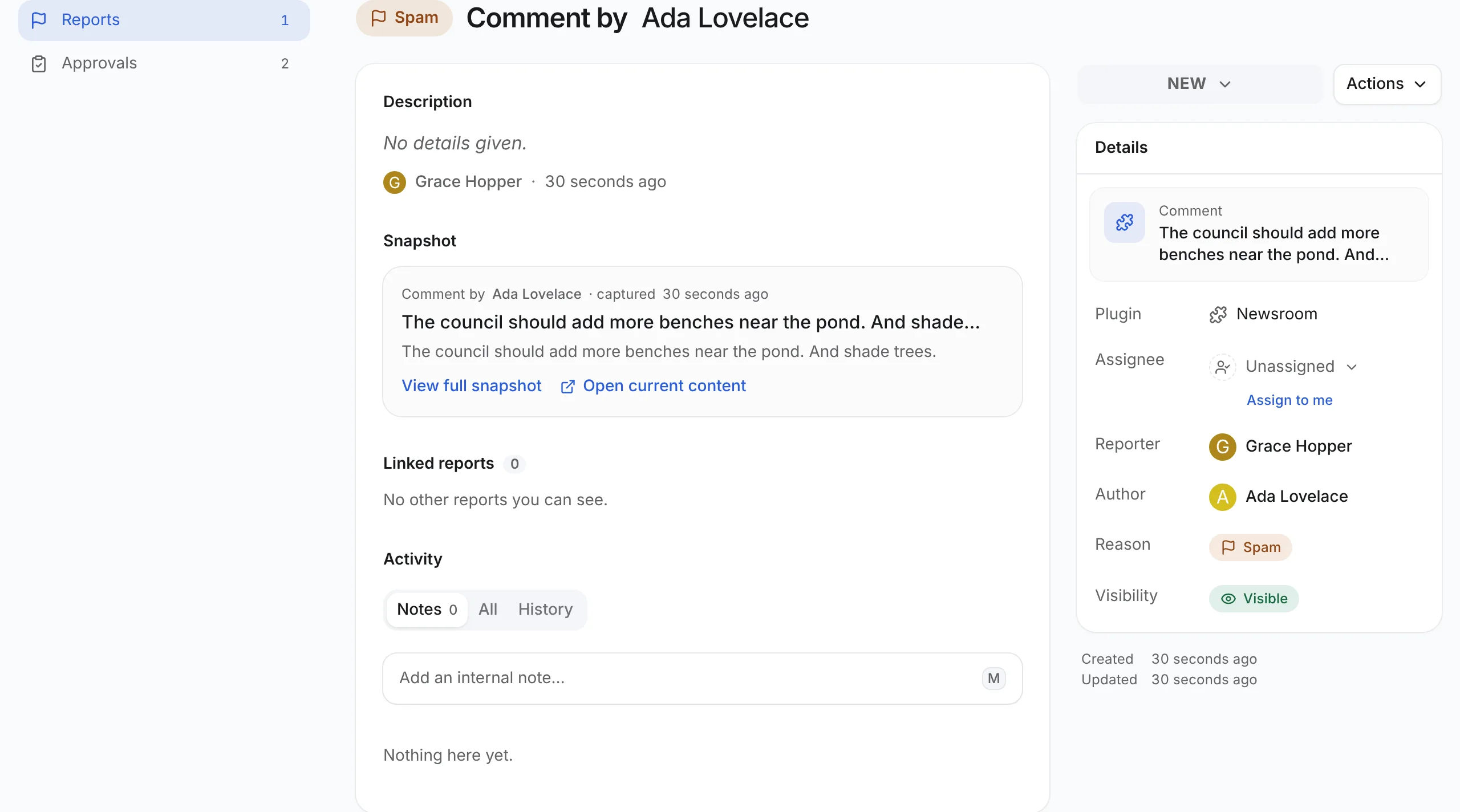
With Replies, a hidden or deleted comment that has answers stays in the thread as a placeholder, so its replies keep their place.
To let members delete or hide their own comments, turn on Allow deleting own content or Allow hiding own content in their role (AdminCP → Core → Users → Roles). Ada's menu then offers Delete or Hide too. With a Time to edit of a few minutes, Edit disappears from Ada's comments once it runs out.
What the server checks
- Every action. The menu only hides buttons; each route checks the permission again and answers
401,403or404when it says no. The section shows one message for it and keeps the comment as it was. - One action at a time. While one action runs, the comment's menu waits, and Post comment, Save and the dialogs' buttons are disabled until the server answers. Nothing is shown as done before it accepts.
- Edit window. A save after the window closed answers
403with theedit_window_closedissue, even from a page loaded before it closed, and the editor says The time to edit this has run out without losing the text. - Hidden comments. Only the author and moderators get
hidden: trueand the reason; everyone else gets a placeholder or nothing.
Related
- Replies: let comments answer each other.
- Comments API: every option and component, and building your own comment layout.
- Reports: report reasons, snapshots and ModCP.