Content list
Build a public VitNode Content Engine list page with pagination using defineContentList, contentListQueryOptions, ContentListResults and ContentListPagination, then add search and sorting.
A content list is a page such as /news that shows published records a page at a time. The Content Engine provides the data, the paging and the list states; your plugin owns the route, the row layout and the words. This tutorial builds /news with article titles, links and page numbers, then adds search and sorting.
This continues the article from Public API, whose public routes live at /api/newsroom/content/news. Publish a few more articles in the AdminCP first, so there is more than one page; this tutorial shows 10 a page.
Declare the list
Create src/pages/article-list.ts. defineContentList names the sorts and the page size once. contentListQueryOptions turns one URL state into TanStack Query options; write the fetcher call inline in fetch, so the route and its response stay typed:
import type { ContentListSearch } from "@vitnode/core/tanstack/content";

import {
  contentListQueryOptions,
  defineContentList,
} from "@vitnode/core/tanstack/content";
import { fetcher } from "@vitnode/core/tanstack/fetcher";

import { manifest } from "@/manifest.gen";

/** `/news`: published articles, newest first, 10 a page. */
export const articleList = defineContentList({
  defaultSort: "newest",
  pageSize: 10,
  sorts: {
    newest: { order: "desc", orderBy: "publishedAt" },
  },
});

export type ArticleListSearch = ContentListSearch<
  (typeof articleList.sorts)[number]
>;

export const articlesQueryOptions = (request: {
  locale: string;
  search: ArticleListSearch;
}) =>
  contentListQueryOptions({
    ...request,
    queryKey: [manifest.id, "articles"],
    fetch: async ({ search }) => {
      const res = await fetcher({
        plugin: manifest.id,
        method: "get",
        module: "content/news",
        path: "/",
        args: { query: articleList.apiQuery(search) },
      });
      if (res.status !== 200) {
        throw new Error(`Loading articles answered ${res.status}.`);
      }

      return await res.json();
    },
});sortsmaps a URL value to the API'sorderByandorder.publishedAtis always orderable.ArticleListSearchis the list's state as the URL holds it:page, and laterqandsort.apiQuery(search)buildsfirst,page,orderByandorderfor the list route.
Add the route
Edit src/routes.ts and add the page. This is an excerpt:
import { articleList } from "./pages/article-list";

export const routes = definePluginRoutes([
  page("/news", {
    component: lazy(() => import("./pages/articles-page")),
    messages: ["newsroom.articles"],
    search: articleList.parseSearch,
  }),
]);
search cleans the query string before the loader sees it, so /news?page=2 becomes { page: 2 } and /news?page=1 the same state as /news. messages loads the newsroom.articles translations for the page and its head.
Write the page
Create src/pages/articles-page.tsx. This is the complete file:
import type { PluginRoutePageProps } from "@vitnode/core/routing";

import { DateFormat } from "@vitnode/core/components/date-format";
import { LOADER_DATA_QUERY_META } from "@vitnode/core/lib/query-client";
import {
  contentListPageHead,
  ContentListPagination,
  ContentListResults,
} from "@vitnode/core/tanstack/content";
import { HrefLink } from "@vitnode/core/tanstack/link";
import {
  defineRoute,
  type RouteLoadContext,
} from "@vitnode/core/tanstack/plugin-routes";
import { useTranslations } from "use-intl";

import type { ArticleListSearch } from "./article-list";

import { articleList, articlesQueryOptions } from "./article-list";

const loadArticles = async (
  { locale, queryClient }: RouteLoadContext,
  search: ArticleListSearch,
) =>
  // A failed list becomes a message on the page, not an error page.
  await queryClient
    .query({
      ...articlesQueryOptions({ locale, search }),
      meta: LOADER_DATA_QUERY_META,
    })
    .catch(() => null);

type ArticlesPageData = Awaited<ReturnType<typeof loadArticles>>;

export const route = defineRoute<ArticlesPageData, ArticleListSearch>({
  load: async ({ context, search }) => await loadArticles(context, search),

  head: ({ search, t }) =>
    contentListPageHead({
      description: t("newsroom.articles.desc"),
      pathname: "/news",
      search,
      title: t("newsroom.articles.title"),
    }),
});

const ArticlesPage = ({
  loaderData: articles,
  search,
}: PluginRoutePageProps<ArticlesPageData, ArticleListSearch>) => {
  const t = useTranslations("newsroom.articles");

  return (
    <div className="container mx-auto flex max-w-3xl flex-col gap-6 px-4 py-8">
      <h1 className="text-3xl font-semibold tracking-tight text-balance">
        {t("title")}
      </h1>

      <ContentListResults
        className="flex flex-col divide-y rounded-lg border"
        empty={<p className="text-muted-foreground">{t("empty")}</p>}
        error={<p className="text-destructive">{t("error")}</p>}
        getKey={article => article.id}
        isError={articles === null}
        isFiltered={articleList.isFiltered(search)}
        itemClassName="flex flex-col gap-1 p-4"
        items={articles?.edges}
        label={t("title")}
        loading={null}
        noResults={<p className="text-muted-foreground">{t("empty")}</p>}
        renderItem={article => (
          <>
            <HrefLink
              className="text-lg font-medium hover:underline"
              href={`/news/${article.slug}`}
            >
              {article.title}
            </HrefLink>
            {article.publishedAt ? (
              <span className="text-muted-foreground text-sm">
                <DateFormat date={article.publishedAt} />
              </span>
            ) : null}
          </>
        )}
      />

      {articles ? (
        <ContentListPagination
          hrefFor={page => articleList.href("/news", { ...search, page })}
          label={t("pagination")}
          pageInfo={articles.pageInfo}
        />
      ) : null}
    </div>
  );
};

export default ArticlesPage;- The loader runs on the server for the first visit and in the browser on later navigations. It warms the query with
queryClient.query, so the page is in the server-rendered HTML.LOADER_DATA_QUERY_METAkeeps the query out of the HTML's cache payload, because the router already sends the loader data. - A failed request becomes
null, andContentListResultsshowserrorinstead of breaking the page. It also decides betweenempty(nothing published) andnoResults(nothing matches a search). ContentListPaginationrenders real links built byarticleList.href, so paging works before hydration and crawlers can follow it. It renders nothing when there is one page.contentListPageHeadsets the title and description. The plain list is indexable; page 2 and later getnoindex, follow.
Add the labels
Add the articles keys to src/locales/en.json, inside newsroom:
{
  "newsroom": {
    "articles": {
      "title": "News",
      "desc": "The latest articles from our team.",
      "empty": "No articles yet. Check back soon.",
      "error": "The articles could not be loaded. Try again in a moment.",
      "pagination": "Article pages"
    }
  }
}
Check the result
Open http://localhost:3000/news:
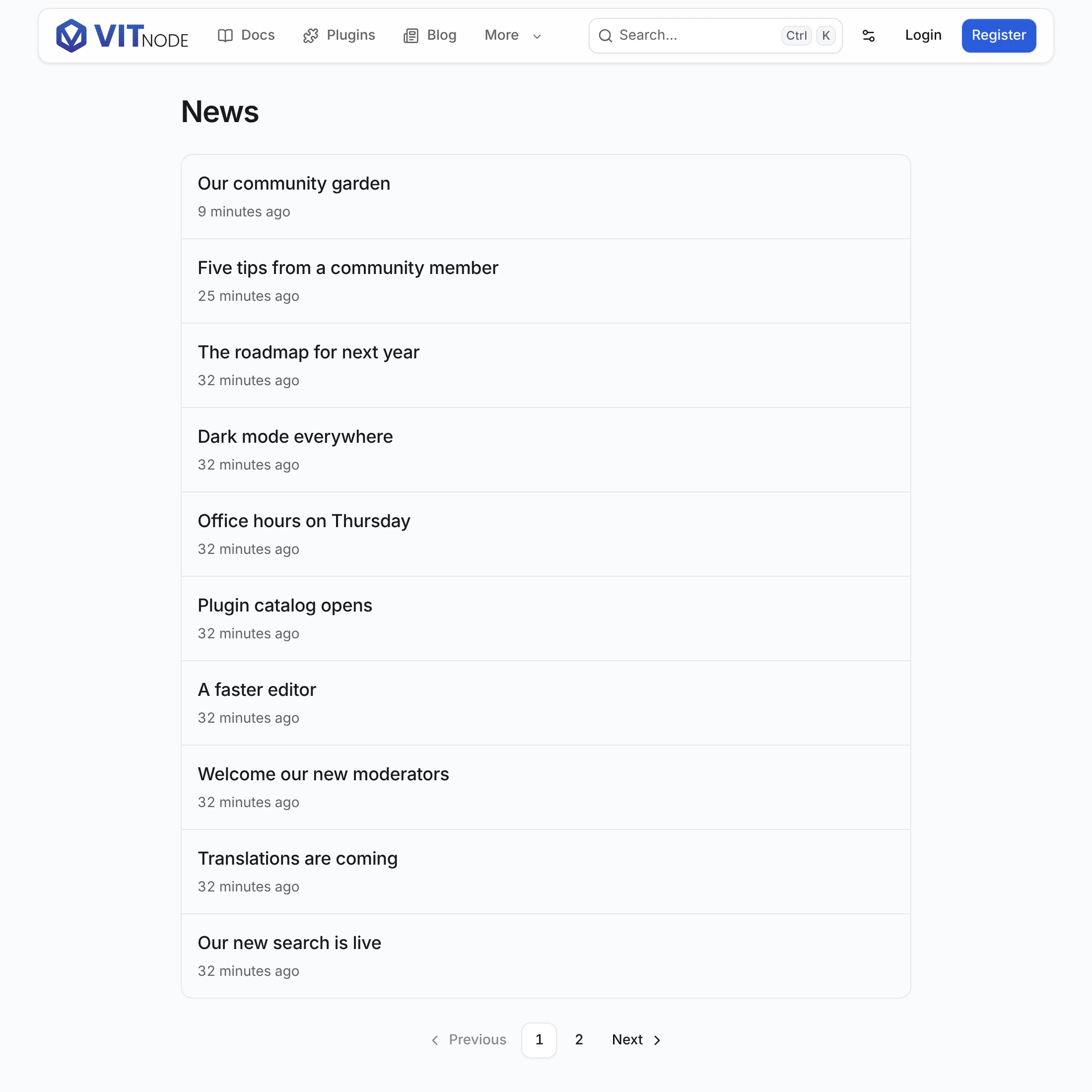
- The newest ten published articles show, newest first.
Release notes for Octoberis a draft, so it never appears. - Click 2. The URL becomes
/news?page=2and the remaining articles show. - Titles link to
/news/{slug}. The next tutorial, Content page, creates that page.
Add search
Searching narrows the list on the server. Add searchableFields to publicApi in src/content/article.ts:
  publicApi: {
    path: "news",
    fields: ["id", "title", "slug", "body", "publishedAt"],
    searchableFields: ["title"],
  },
Then add a search field to the page, in three places in src/pages/articles-page.tsx. First, the imports:
import { Input } from "@vitnode/core/components/ui/input";
import {
  contentListPageHead,
  ContentListPagination,
  ContentListResults,
  useContentListSearchInput,
} from "@vitnode/core/tanstack/content";
import { useTransition } from "react";
Second, the search state at the top of ArticlesPage, which now also reads navigate from its props:
const ArticlesPage = ({
  loaderData: articles,
  navigate,
  search,
}: PluginRoutePageProps<ArticlesPageData, ArticleListSearch>) => {
  const t = useTranslations("newsroom.articles");
  const [isPending, startTransition] = useTransition();
  const update = (patch: Partial<ArticleListSearch>) => {
    startTransition(async () => {
      await navigate({
        resetScroll: false,
        search: articleList.withSearch(search, patch),
      });
    });
  };
  const input = useContentListSearchInput({
    onCommit: q => {
      update({ q });
    },
    value: search.q,
  });
Third, the field below the <h1>, and two props on ContentListResults:
<div className="flex flex-col gap-3 md:flex-row md:items-center" role="search">
  <Input
    aria-label={t("search_label")}
    className="md:flex-1"
    onChange={event => {
      input.setValue(event.target.value);
    }}
    onKeyDown={event => {
      if (event.key === "Enter" && !event.nativeEvent.isComposing) {
        input.commit();
      }
    }}
    placeholder={t("search_label")}
    type="search"
    value={input.value}
  />
</div>

<ContentListResults
  isFetching={isPending}
  noResults={<p className="text-muted-foreground">{t("no_results")}</p>}
  // ...the other props stay as they are
/>useContentListSearchInputwaits until typing pauses, then callsonCommit. Enter commits at once.withSearchwrites?q=and goes back to page 1, because page 4 of the old results says nothing about the new ones.isFetchingkeeps the current results on screen, dimmed and markedaria-busy, while the next ones load.
Add "search_label": "Search articles" and "no_results": "No articles match your search." to the articles labels.
Add sorting
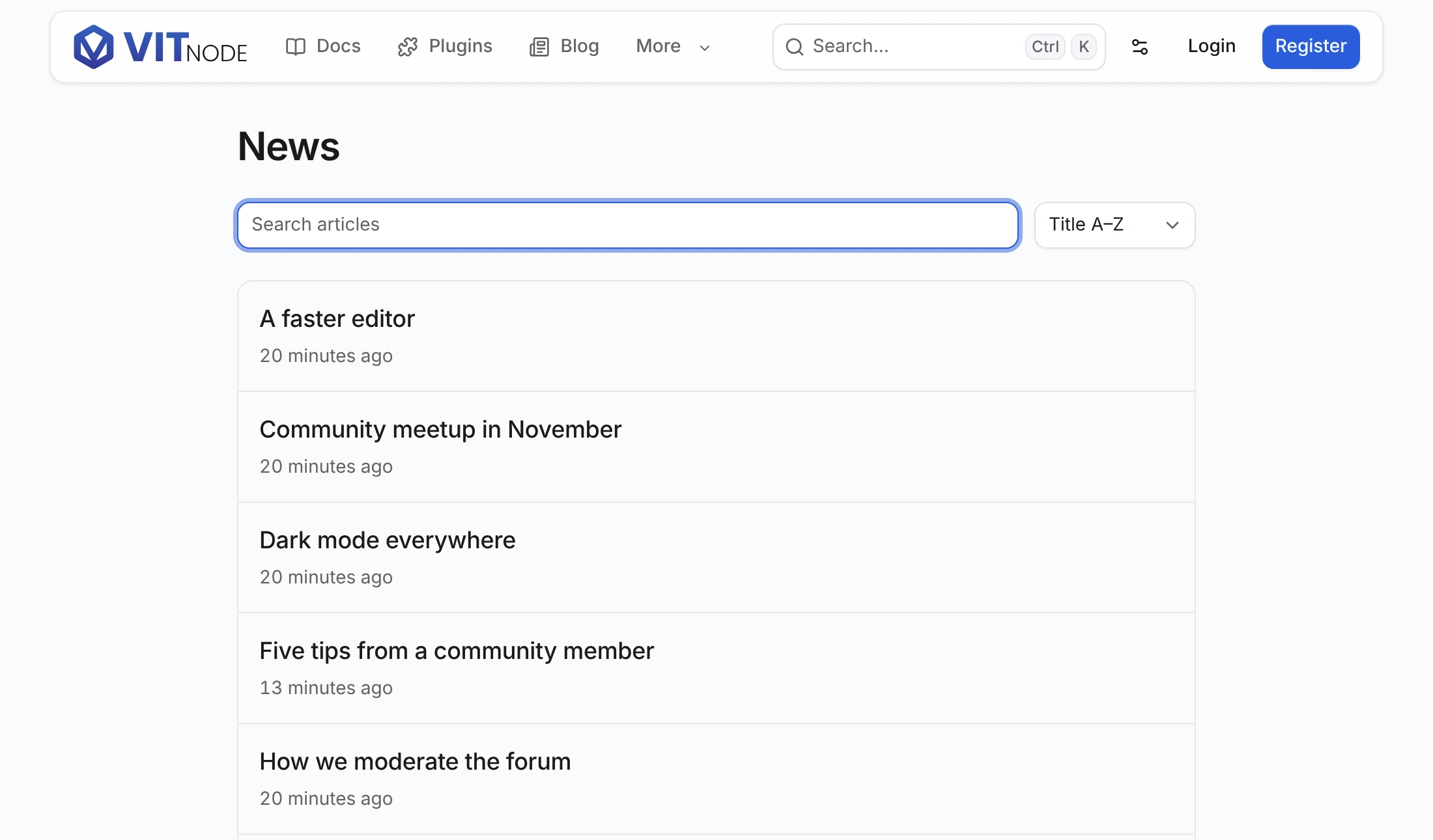
Add orderableFields: ["title"] to publicApi, then more sorts to articleList:
  sorts: {
    newest: { order: "desc", orderBy: "publishedAt" },
    oldest: { order: "asc", orderBy: "publishedAt" },
    title: { order: "asc", orderBy: "title" },
  },
Render a select next to the search field, using the same update function:
import {
  NativeSelect,
  NativeSelectOption,
} from "@vitnode/core/components/ui/native-select";

<NativeSelect
  aria-label={t("sort_label")}
  onChange={event => {
    update({ sort: articleList.sorts.find(sort => sort === event.target.value) });
  }}
  value={search.sort ?? articleList.defaultSort}
>
  {articleList.sorts.map(sort => (
    <NativeSelectOption key={sort} value={sort}>
      {t(`sort.${sort}`)}
    </NativeSelectOption>
  ))}
</NativeSelect>;
Label each sort under articles.sort, such as "sort": { "newest": "Newest first", "oldest": "Oldest first", "title": "Title A–Z" }, and add "sort_label": "Sort articles". The list never writes the default sort to the URL, so /news?sort=newest and /news are the same page.
Keep list rows light
The list returns every field in fields, including each article's body. Name the fields a row needs with listFields; the single-record route still returns all of fields:
  publicApi: {
    path: "news",
    fields: ["id", "title", "slug", "body", "publishedAt"],
    listFields: ["id", "title", "slug", "publishedAt"],
  },
Add a filter
A filter needs a field that publicApi.filterableFields lists, such as a relation, an enum or a container. Add a parser for its URL value in defineContentList({ filters }), and pass the value to the list route in fetch. The newsroom plugin's letters list filters by desk this way in plugins/newsroom/src/pages/letter-list.ts; List API lists the parsers.
How the list URL behaves
- Normalized URLs.
parseSearchdrops unknown keys, invalid values,page=1and the default sort./news?sort=newest&page=1&utm_source=xand/newsare the same state, so they share a query key and a canonical link. - Locales. On a localized content type, pass
localein the query. A record with no translation in that language falls back to the default language when the type usesfallback: "default", and each row says which language it is in underlocale. An unknown?locale=answers404rather than an English list. - Pagination.
ContentListPaginationreadscurrentPage,totalPages,hasNextPageandhasPreviousPagefrompageInfo, and every page is a real link, so it works before hydration. Apagepast the end gets the last page. The list route also acceptscursorfor "Older" and "Newer" links; Container pages uses it. - Caching. The API caches each list read per query and locale, and every publish, edit, unpublish, hide or delete of the content type expires it. TanStack Query keeps its own copy in the browser for
RECORD_STALE_TIME, which is why a page that writes records invalidates its list. - Hidden records. With
visibility, a signed-in author, editor or moderator also gets the hidden records they may see. Those rows carryhidden: true, so mark them, for example withHiddenIconfrom@vitnode/core/components/hidden-icon. That response isprivate, no-storeand skips the API cache. A route with a pagecacheserves signed-in visitors the HTML rendered for guests, so refetch the list in the browser under a key that includes the viewer, like the blog'sblogViewerPostsQueryOptions. For your own counts or queries, combinecontentListHiddenAccessandcontentPublicListConditionfrom@vitnode/core/content/server.
Records reach crawlers through their own pages and the sitemap. The sitemap route lists records, not lists, so add the list's own URL, such as /news, where your app builds /sitemap.xml.
The blog plugin builds /blog and /blog/category/:slug from the same pieces with only pages and a category, in plugins/blog/src/pages/blog-list.ts and blog-queries.ts.
Next, give every article its own page with Content page.