Comments
Add a comment section under each VitNode Content Engine record with a comment content type, the thread option and the shared ContentComments section from @vitnode/core. You write a small typed adapter, not a list and a form.
Comments are records of their own, in a comment content type that points at the article it answers. The thread option gives that type a route that returns an article's comments a page at a time, and the server checks where every comment may go. On the page, useContentComments from @vitnode/core/tanstack/comments connects that route to your plugin with a few typed calls. ContentComments then renders the whole section: the list, the composer, loading, empty and error states, and a sign-in link for guests.
This page adds flat comments under each article. Comment actions adds editing, deleting, hiding and reports to the same section, and Replies nests answers.
Before you begin
You need:
- The article type with its public API and public page, from the beginner path up to Content page. The article itself needs no
authorand nopublicWrite. Staff can keep writing every article in the AdminCP. Members comment through the comment type's ownauthorfield andpublicWrite, which you add below. - Member accounts. Signing in is part of every VitNode app; it does not depend on members writing articles.
There's nothing else to install. The section, its forms and its messages ship with @vitnode/core.
Define the comment type
Create src/content/comment.ts. This is the complete file:
import { defineContentType, field } from "@vitnode/core/content";

import { articleContentType } from "@/content/article";

export const commentContentType = defineContentType({
  id: "newsroom.comment",
  tableName: "newsroom_comments",

  fields: {
    slug: field.slug({ generated: true }),
    body: field.richText({ required: true }),
    author: field.user(),
    article: field.relation({
      target: () => articleContentType,
      required: true,
      onDelete: "cascade",
    }),
    parent: field.relation({
      self: true,
      nullable: true,
      onDelete: "set null",
    }),
  },

  publication: true,

  publicApi: {
    path: "article-comments",
    fields: [
      "id",
      "slug",
      "body",
      "article",
      "parent",
      "publishedAt",
      "createdAt",
      "updatedAt",
    ],
    people: ["author"],
  },

  publicWrite: {
    ownership: { field: "author" },
    create: { fields: ["body", "article", "parent"], status: "published" },
  },

  thread: { parent: "parent", root: "article", maxDepth: 1 },

  admin: { path: "newsroom/comments", titleField: "slug" },
});articleis the comment's root, the record it belongs to. It must be a required relation to another content type.onDelete: "cascade"removes the comments with their article.parentis the comment being answered, ornull.threadrequires it even for flat comments;maxDepth: 1keeps every comment top level until Replies.slugwithgenerated: truegets a random token, because a comment has no title. The public API needs exactly one slug.publicApi.pathis where the comment routes live:/api/newsroom/content/article-comments/.... Pick a path no other plugin on the site uses. A permalink claims it site-wide later, and the Blog plugin already ownscomments.createdAtandupdatedAtin the public fields let the section show when a comment was written and mark it edited.publicWritelets members postbodyunder anarticle, andcreate.status: "published"makes a new comment public at once. A comment's place is fixed when it is written, soparentandarticlenever become editable.
Create the model and register it
Create src/database/comments.ts. This is the complete file; references points the article relation at the articles table:
import { createContentModel } from "@vitnode/core/content/server";

import { commentContentType } from "@/content/comment";

import { newsroom_articles } from "./articles";

export const commentContent = createContentModel(commentContentType, {
  references: { article: () => newsroom_articles.id },
});

export const newsroom_comments = commentContent.table;
Add commentContent next to articleContent in the public module in src/config.api.ts. This is an excerpt:
import { commentContent } from "@/database/comments";

buildContentPublicModule({
  contentTypes: [articleContent, commentContent],
}),
Then give staff the comment list. Add commentContent to buildContentAdminModule in src/api/modules/admin/admin.module.ts, and its link to src/admin/nav.tsx. These are excerpts:
import { commentContent } from "@/database/comments";

buildContentAdminModule({ contentTypes: [articleContent, commentContent] }),import { MessageSquareIcon, NewspaperIcon } from "lucide-react";
import { commentContentType } from "@/content/comment";
contentTypes: [
{ definition: articleContentType, icon: <NewspaperIcon /> },
{ definition: commentContentType, icon: <MessageSquareIcon /> },
],Label, build and migrate
Add the comment type's labels to src/locales/en.json, next to article under newsroom.content, and its permission labels at the top level:
{
  "newsroom": {
    "content": {
      "comment": {
        "label": "{count, plural, one {Comment} other {Comments}}",
        "title": "Comments",
        "desc": "What readers say under the articles.",
        "fields": {
          "slug": "Link",
          "body": "Comment",
          "author": "Author",
          "article": "Article",
          "parent": "Answers"
        }
      }
    }
  },
  "newsroom:comment": "Comments",
  "newsroom:comment:can_view": "View comments",
  "newsroom:comment:can_create": "Create comments",
  "newsroom:comment:can_edit": "Edit comments",
  "newsroom:comment:can_delete": "Delete comments",
  "newsroom:comment:can_publish": "Publish and unpublish comments",
  "newsroom:comment:can_hide": "Hide and unhide comments"
}
Then build and migrate from the workspace root. db:migrate reads your plugin's built files, so build first:
bun run build:plugins
bun run db:migrate
The migration creates newsroom_comments with a foreign key to newsroom_articles. The build also regenerates the plugin's route types, which the next step relies on. The thread route now answers:
curl "http://localhost:3000/api/newsroom/content/article-comments/thread?root=1"{ "items": [], "pageInfo": { "endCursor": null, "hasNextPage": false, "totalCount": 0 }, "replyCount": 0, "truncated": false }Connect the comment routes
Create src/pages/article-comments.tsx. This is the complete file:
import {
  ContentComments,
  contentCommentsQueryOptions,
  useContentComments,
} from "@vitnode/core/tanstack/comments";
import { fetcher } from "@vitnode/core/tanstack/fetcher";

import { manifest } from "@/manifest.gen";

/** The thread under one article, shared by the page's loader and its section. */
const articleCommentsThread = (articleId: number) => ({
  queryKey: [manifest.id, "comments", articleId],
  thread: async ({ after, first }: { after: null | string; first: number }) =>
    await fetcher({
      plugin: manifest.id,
      method: "get",
      module: "content/article-comments",
      path: "/thread",
      args: {
        query: { root: String(articleId), first, ...(after ? { after } : {}) },
      },
    }),
});

/** Warms the first page of comments in the article page's loader. */
export const articleCommentsQueryOptions = (articleId: number) =>
  contentCommentsQueryOptions(articleCommentsThread(articleId));

export const ArticleComments = ({ articleId }: { articleId: number }) => {
  const comments = useContentComments({
    ...articleCommentsThread(articleId),
    create: async ({ body, parentId }) =>
      await fetcher({
        plugin: manifest.id,
        method: "post",
        module: "content/article-comments",
        path: "/",
        args: {
          body: { values: { article: articleId, body, parent: parentId } },
        },
      }),
  });

  return <ContentComments className="border-t pt-8" comments={comments} />;
};- Each callback is one inline
fetchercall and returns its response unchanged. The module, path, arguments and answer stay typed from your routes, so a typo is a compile error. queryKeynames this article's thread in the TanStack Query cache. Every write refreshes it, and the same key loads the first page in the loader below.threadgets the cursor and page size from the section and reads one page. Load more comments asks for the next one.creategets the text andparentId, which is alwaysnullfor flat comments. Leavecreateout, and the section shows the conversation without a composer.ContentCommentsrenders everything else. It loads its own messages, posts through the write form helpers, keeps the text when the server refuses it, and tells published, draft and pending comments apart.
Show it below the article
Edit src/pages/article-page.tsx. The loader warms the first page of comments, which needs the query client from defineRoute. This is an excerpt:
import { defineRoute } from "@vitnode/core/tanstack/plugin-routes";

import { ArticleComments, articleCommentsQueryOptions } from "./article-comments";

export const route = defineRoute({
  load: async ({ context, params }) => {
    const page = await loadArticle(params.slug);
    // The first page of comments arrives with the article's HTML. A failure
    // leaves the section to show its own error instead of breaking the page.
    await context.queryClient
      .infiniteQuery(articleCommentsQueryOptions(page.item.id))
      .catch(() => null);

    return page;
  },

  head: ({ loaderData }) =>
    contentDeliveryPageHead(loaderData?.metadata, {
      title: loaderData?.item.title,
    }),
});- If the route still uses
definePluginRoutefrom Content page, switch todefineRouteas shown;definePluginRoutehas no query client. - If Embedded list already warms Latest articles here, run both with
Promise.all, so neither waits for the other.
Render the section at the end of <article>, after the body:
      <RichTextContent
        className="leading-relaxed text-pretty"
        content={item.body}
      />

      <ArticleComments articleId={item.id} /> {}
    </article>
Finally, load the section's messages with the page, so they arrive with its HTML instead of right after. In src/routes.ts:
  page("/news/:slug", {
    component: lazy(() => import("./pages/article-page")),
    messages: ["newsroom.articles", "core.comments"],
  }),
Check the result
Open /news/welcome-to-the-newsroom, the article staff created in First content type and published in Drafts & publishing:
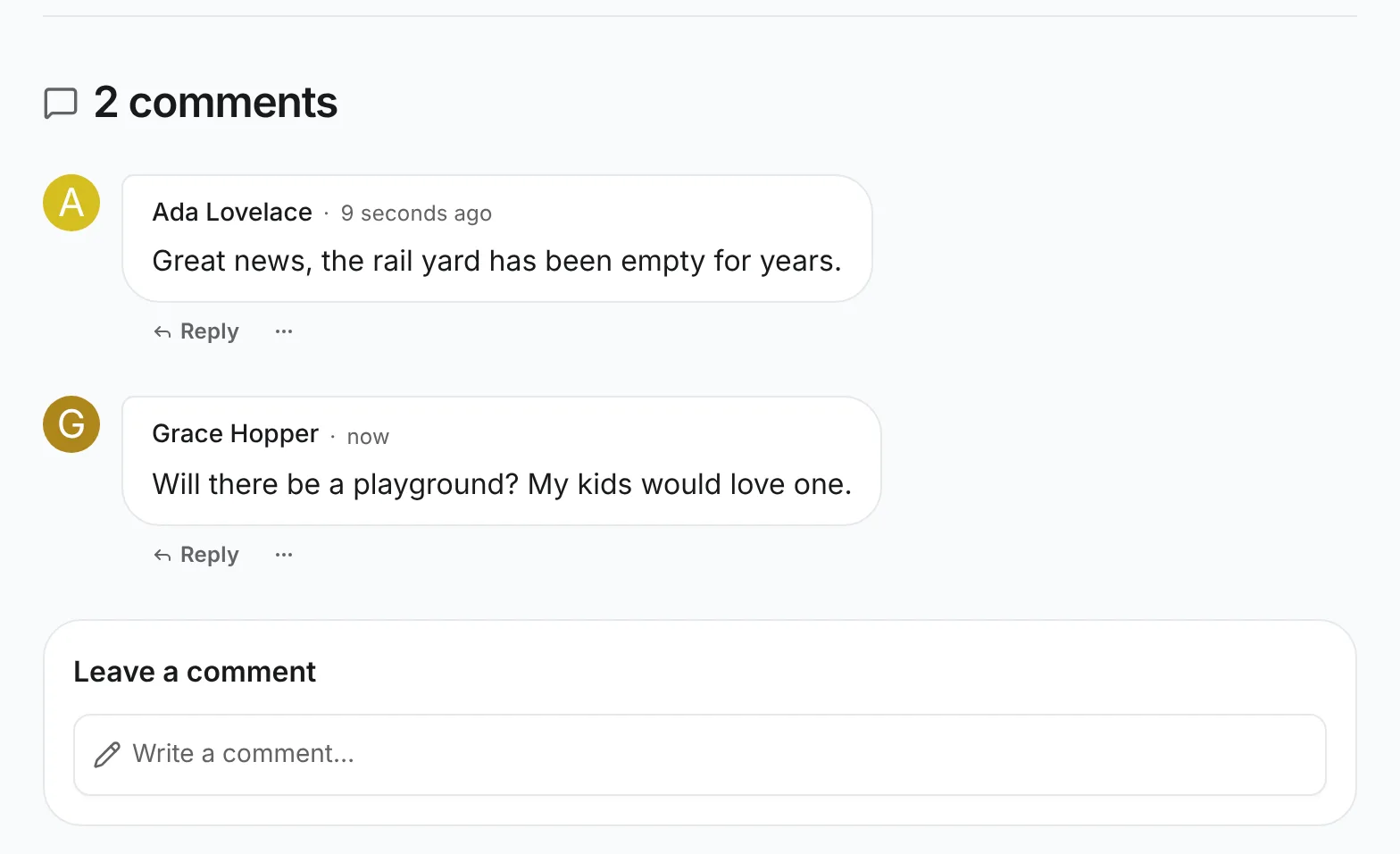
- Signed out, the section shows No comments yet and Sign in to comment. The link brings you back to the article after signing in.
- Sign in as a member, click Write a comment…, write something and click Post comment. Comment posted appears, the comment shows with your name, the heading reads 1 comment, and the editor is empty again.
- Reload the page. The comment is still there, which proves it came from the server and not from the form's memory.
- Sign in as another member and comment too. The heading reads 2 comments.
To try a draft, set create.status to "draft" in src/content/comment.ts, rebuild and post again. Comment saved as a draft appears, and the list and the count stay as they were, because a draft is not public. Set it back to "published" afterwards.
What a new comment can become
POST /article-comments answers 201 with the stored comment. The section reads its status and approval and never calls a comment posted unless it is public:
status | approval | When | What the section says |
|---|---|---|---|
"published" | null | create.status: "published", as here | Comment posted, and the thread refreshes |
"draft" | null | create.status: "draft" | Comment saved as a draft; staff publish it in the AdminCP |
"draft" | { status: "pending" } | The article sits in a container that holds new comments for approval | Your comment is waiting for a moderator |
A Newsroom comment is never pending, because articles are not filed in a container. Pending comments need two more settings: mark the root relation container: true, and give its target a field.container() whose definition has policies. The Forum plugin's comments are set up this way:
topic: field.relation({
  target: () => topicContentType,
  required: true,
  container: true, // the comment follows its topic's forum and its rules
  onDelete: "cascade",
}),
A moderator then sets New posts to Wait for approval for comments in a forum's publishing rules. Approvals explains the difference between a draft and a pending submission.
What the server checks
- Signed out.
POST /article-commentsanswers401; the section offers guests a sign-in link instead of the composer. - Placement. The article must be public (or hidden, for a reader allowed to see it), the parent must belong to the same article, and nothing may nest deeper than
maxDepth. A broken rule answers400, and the section shows why without losing the text. - Hidden articles. A comment is only as public as its article. Once the article is unpublished, its comments drop out of the thread and their own routes answer
404. A hidden article keeps its conversation going for the people who can still see it, which means its authors, editors and moderators. Their response is never cached, and everybody else gets404. - Repeated clicks. Post comment is disabled while the request runs, so one click sends one comment.
Related
- Comment actions: edit, delete, hide and report comments in the same section.
- Comments API: every option of
useContentCommentsand the shared components.