Notifications
Tell VitNode members about replies to their comments, and article authors about new comments, with buildContentNotifications. The notifications are sent by the server, so they work with the shared comment section, a custom layout or the AdminCP.
When someone answers a comment, its author should hear about it, and when someone comments on an article, the article's author should too. buildContentNotifications sets that up for a threaded content type: you name the author fields, the texts and the link, and VitNode sends the notifications through the core notification system, with its bell, inbox, preferences and email.
The server sends them when a comment becomes public, whoever wrote it and however: the shared comment section, your own layout, the public API or the AdminCP. Your React components send nothing, so there is nothing to change in them.
Before you begin
You need:
- The newsroom comments, from Comments. The comment type has
author: field.user()andthread: { parent: "parent", root: "article" }. - Replies, to have replies to notify about. Comment actions is not needed.
- Two member accounts, to see a notification arrive. Nobody is notified about their own comment.
Choose a setup
| Setup | Who is told | The article needs |
|---|---|---|
| A: replies only | The author of the comment being answered | Nothing |
| B: comments and replies | Setup A, plus the article's author about every new comment | A to-one, shared field.user() author |
Pick A when your articles have no single author, for example when staff write them without one or when the author field lists several people. The Blog plugin is in that case: its articles have authorId: field.user({ multiple: true }), so Blog uses setup A. Adding an author field only for notifications is never required.
Give articles an author (setup B only)
Skip this step for setup A.
The newsroom article already has author: field.user() if you followed Create form. If you did not, add the field to src/content/article.ts. This is an excerpt:
  fields: {
    title: field.text({ required: true, minLength: 3, maxLength: 200 }),
    // ...
    author: field.user(),
  },
Then build and migrate from the workspace root. The migration adds a nullable author column, so existing articles have no author until you set one:
bun run build:plugins
bun run db:migrate
An article gets its author in one of two ways:
- In the AdminCP. Open AdminCP → Newsroom → Articles and click Create Article, or Edit on an existing one. Pick a member in Author, then save (Save changes when editing). The AdminCP shows a user picker for every
field.user(), so no member forms are involved. - From the site. With Create form,
publicWrite.ownershipsets the member who writes the article as its author.
Declare the notifications
Create src/api/lib/notifications.ts. It is server-only, so only config.api.ts imports it, never a page.
import { buildContentNotifications } from "@vitnode/core/content/server";

import { articleContentType } from "@/content/article";
import { commentContentType } from "@/content/comment";

export const commentNotifications = buildContentNotifications({
  content: commentContentType,
  root: articleContentType,
  rules: {
    replies: {
      id: "newsroom.comment_reply",
      preset: "threadReply",
      recipients: { authorField: "author" },
      messages: {
        label: "newsroom.notifications.comment_reply.label",
        description: "newsroom.notifications.comment_reply.description",
        comment: "newsroom.notifications.comment_reply.comment",
        reply: "newsroom.notifications.comment_reply.reply",
      },
      target: ({ root, content }) =>
        `/news/${root.slug}#comment-${content.id}`,
      defaults: { inApp: true, email: "none" },
      email: true,
    },
  },
});idis the notification type's id, stored with every notification and every member's preference. Keep it forever, and start it with your plugin's name. The keyrepliesis only a name in your code.preset: "threadReply"notifies the author of the comment being answered (replytext). WithrootAuthorField, it also tells the article's author about every new comment (commenttext).commentis required either way; in setup A nobody receives it.recipientsnames author fields. Both are type-checked. A field that is not a to-one, sharedfield.user()does not compile, which is why a multi-author field cannot be therootAuthorField.targetis where the notification leads.rootis the article andcontentthe new comment, both typed.defaultsis what members get before they choose: the bell on, email off.email: truestill lets them turn email on.
Register it with the plugin
Pass the result to buildApiPlugin in src/config.api.ts, next to the API messages the next step adds:
import { commentNotifications } from "@/api/lib/notifications";
import messages from "@/locales/api";

export const newsroomApiPlugin = () =>
  buildApiPlugin({
    manifest,
    contentNotifications: [commentNotifications],
    messages,
    modules: [
      // ...unchanged
    ],
  });
The notification type is registered with the plugin, so it shows up on members' preferences page and on the AdminCP notifications page without more code.
Add the texts
Notification texts are translated on the API, in the recipient's language, so they live in the plugin's API messages, not in the frontend locales/en.json. Create both files:
{
  "newsroom": {
    "notifications": {
      "comment_reply": {
        "label": "Comments and replies",
        "description": "Someone comments on your article or replies to your comment.",
        "comment": "{actor} commented on \"{title}\"",
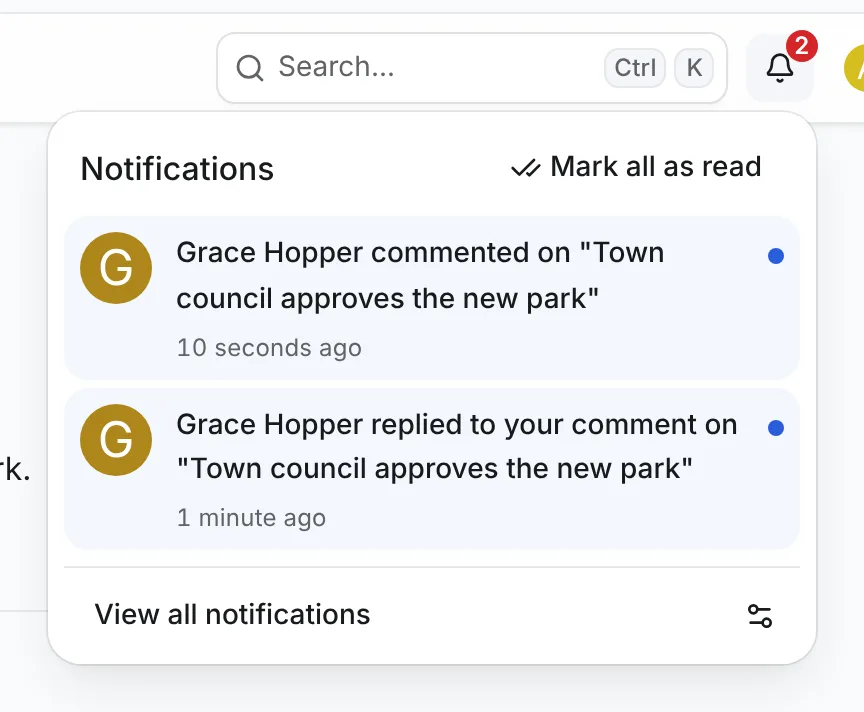
        "reply": "{actor} replied to your comment on \"{title}\""
      }
    }
  }
}import type { LocaleMessagesMap } from "@vitnode/core/lib/i18n/types";
const messages: LocaleMessagesMap = {
en: async () => await import("./en.json", { with: { type: "json" } }),
};
export default messages;{actor} is the comment's author (or "Someone" for a deleted account) and {title} the article's admin.titleField. Both are plain text, and the inbox never renders them as HTML. For setup A, write the label and description about replies only.
A localized title field is not on the article's own row, so {title} would be empty. The Blog plugin's titles are localized, and its texts leave {title} out: "{actor} replied to your comment".
Make the link land on the comment
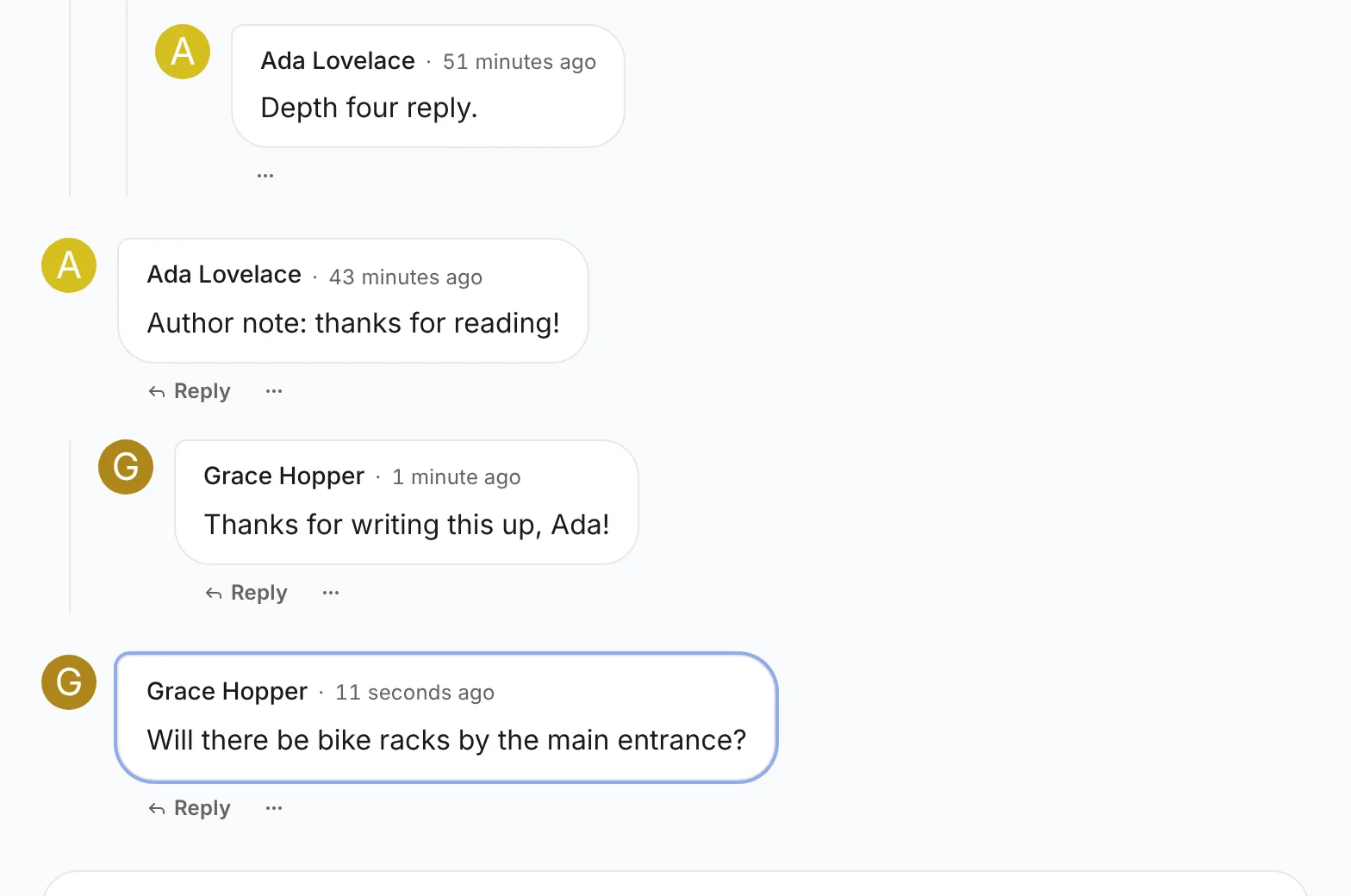
The link ends in #comment-{id}, and the shared section from Comments gives every comment that element id. When the URL has such a hash, ContentComments loads more pages until the comment is on screen, scrolls it into view, focuses it and outlines it. If it is gone or hidden from the reader, the section says The comment this link points to is no longer available. There is nothing to add.
A custom layout built on ContentCommentsRoot does the same with useRevealHashTarget from @vitnode/core/hooks/use-reveal-hash-target, as the Comments API describes. If your comment type has a permalink route, point target there instead. The Blog plugin uses its existing /blog/comments/:slug route, which redirects to #comment-{slug} under the article in the reader's language, and answers 404 for a comment that is hidden or gone:
target: ({ content }) => `/blog/comments/${encodeURIComponent(content.slug)}`,Rebuild the plugin
Run pnpm build:plugins from the workspace root, then restart pnpm dev. Nothing needs migrating for the notifications themselves, because they use core tables that already exist.
Who gets notified
Ada writes the article, Bob and Cleo are members, and Max is a moderator. Recipients are read from the comment, the comment it answers and the article when the notification is sent, never from anyone's session.
| What happens | Setup A | Setup B | Why |
|---|---|---|---|
| Bob comments on Ada's article | Nobody | Ada (comment) | Ada is the article's author |
| Ada comments on her own article | Nobody | Nobody | A comment's author is never notified about it |
| Cleo replies to Bob's comment | Bob (reply) | Bob (reply), Ada (comment) | Bob wrote the parent, Ada the article |
| Ada replies to Bob's comment on her article | Bob (reply) | Bob (reply) | Ada wrote the reply, so she is left out |
| Cleo replies to Ada's comment on Ada's article | Ada (reply) | Ada once (reply) | Someone who is both authors gets one notification, worded as a reply |
| Bob replies to his own comment on Ada's article | Nobody | Ada (comment) | Bob is left out; Ada still hears about a new comment in her article |
| The article or the parent comment has no author | Nobody for that one | Nobody for that one | An empty author field, including a deleted account, is skipped; the other recipient still gets theirs |
| The new comment has no author | As above | As above | Recipients still get it, and {actor} reads "Someone" |
| Max approves Bob's pending comment | As if Bob posted it | As if Bob posted it, minus Max | Bob is the actor shown. Whoever made the comment public is skipped, so Max hears nothing even when he wrote the article or the parent |
Core then drops deleted accounts, members who turned the type off and anyone who may no longer see the comment.
When it fires
A comment notifies once, the first time it becomes public. VitNode tells that moment apart by the comment's publishedAt, which is set once and never rewritten. A notification already in an inbox is checked again each time the inbox loads and before each email, so it follows what happens to the comment later.
| What happens to the comment | Notification |
|---|---|
Posted with create.status: "published" | Sent a moment later |
| Saved as a draft | Nothing yet. Sent when the draft is first published |
| Waiting for approval, then approved | Sent once, at approval |
| Rejected | None about the comment. A moderationDecision rule can tell its author |
| Edited, or an edit approved | No new one |
| Hidden, then shown again | Shows "This notification is no longer available." while hidden, then comes back. A comment hidden before the notification went out is never announced |
| Unpublished, then published again | Unavailable meanwhile, then back. No new one |
| Deleted without replies | Removed from inboxes |
| Deleted while it has replies | It stays as a placeholder in the thread, and its notification is unavailable. Notifications about its replies stay |
| Its article unpublished, hidden or deleted | Unavailable while the article is not public; removed with a deleted article |
Comments that were already public before you added the rules never notify, so deploying them doesn't bury every author under a year of old news.
The notification is stored in the same database transaction as the comment, and a background task sends it a moment after the response. If the comment's transaction rolls back, nothing is sent. If the task fails, the queue retries it without ever creating a second notification. Notifications API has the details.
Tell authors about moderation decisions
When comments go through approval, add a moderationDecision rule to tell the person who submitted a comment what a moderator decided. Newsroom comments are never pending, so this example comes from the Forum plugin, whose forums have publishing policies:
decisions: {
  id: "forum.comment_decision",
  preset: "moderationDecision",
  messages: {
    label: "@vitnode/forum.notifications.comment_decision.label",
    approved: "@vitnode/forum.notifications.comment_decision.approved",
    rejected: "@vitnode/forum.notifications.comment_decision.rejected",
  },
  target: ({ content, decision }) =>
    decision.status === "approved"
      ? commentPermalink(content.slug)
      : FORUM_PENDING_HREF,
},
Each decision notifies the submitter once, so a resubmitted comment that is rejected again gets a second notification. A rejected comment is a draft that readers cannot open, so target sends its author to their pending list instead of an anchor the topic page does not have. The texts receive {title}, {kind} (create or edit) and {reason}.
Tell moderators what waits for approval
The approvalPending preset notifies the moderators who could decide a pending comment or edit, and links to it in the Moderator CP. Add it next to the decisions rule:
pending: {
  id: "forum.comment_pending",
  preset: "approvalPending",
  messages: {
    label: "@vitnode/forum.notifications.comment_pending.label",
    pending: "@vitnode/forum.notifications.comment_pending.pending",
  },
},"comment_pending": {
"label": "Comments awaiting approval",
"pending": "{kind, select, edit {An edit to a comment is waiting for approval in {container}} other {A new comment is waiting for approval in {container}}}"
}Only moderators whose can_approve covers the comment's forum receive it, and it leaves their inboxes once someone decides. Get notified describes it from the moderator's side, and the Notifications API lists the options.
Preferences and email
Each rule is an ordinary notification type. Members find Comments and replies under Settings → Notifications and can turn the notification list, push or email on and off for it. Administrators can change the defaults or switch the type off on the AdminCP notifications page. Email needs an email adapter and email: true (or a defaults.email other than "none"); immediate emails and daily or weekly digests then work like every other type.
Check the result
You need two members, Ada and Grace. For setup B, first make Ada the author of a published article, as in Give articles an author. For setup A, any published article works.
- Sign in as Grace in another browser and comment on the article. With setup B, Ada's bell shows a new notification within a few seconds:
- As Ada, open the notification. The article opens with Grace's comment highlighted, even when it is on a later page of comments:
- As Ada, reply to Grace's comment. Grace gets "replied to your comment" and Ada gets nothing. Open it as Grace, and the reply is highlighted below Grace's comment.
- As Grace, open Settings → Notifications, expand Comments and replies and turn Notification list off. Have Ada reply again. Nothing new arrives. Turn it back on.
- As a moderator, hide Grace's comment. Ada's notification now says it is no longer available. Show the comment again and the notification comes back.
- Delete the article. Both notifications disappear from the inboxes.
Related
- Notifications API: every option, custom rules, access and retries.
- Notification types: what a type controls in the core notification system.
- Approvals: when comments wait for a moderator.