Widgets
First widget
Build a VitNode widget end to end. Define it, register it for the browser and the API, store it in a blocks() field, publish a record and render it on a public page.
A widget is a small, configurable piece of a page: a callout, a hero, a list of features. Editors place widgets in an ordered list stored on a record, and your page renders that list. This tutorial follows one callout widget through the whole path in the newsroom plugin from the Content Engine lessons. The newsroom plugin in the VitNode repository holds a finished version, plus a second widget you do not need here.
widget → widgets module → API → blocks() field → table → record → publish → public API → pageBefore you begin
- The
newsroomplugin from Create a content type and Public API: its@/api/builders, an admin content module and a public content module registeringarticleContent, and anadmin/nav.tsx. Any plugin with the same setup works. pnpm devrunning, and an AdminCP account with permission to create and publish the content type. The first account has both.
Define the widget
A widget is a React component plus the fields an editor fills in. Create src/widgets/callout.tsx:
import type { WidgetComponentProps, WidgetData } from "@vitnode/core/widgets";

import { field } from "@vitnode/core/content/fields";
import { defineWidget } from "@vitnode/core/widgets";
import { InfoIcon } from "lucide-react";

const calloutFields = {
  body: field.textarea({ maxLength: 600, minLength: 1, required: true }),
  title: field.text({ maxLength: 120, minLength: 1, required: true }),
  tone: field.enum({
    defaultValue: "info",
    values: ["info", "success", "warning"],
  }),
};

type CalloutData = WidgetData<typeof calloutFields>;

const tones: Record<string, string> = {
  info: "border-primary/40 bg-primary/5",
  success: "border-success/40 bg-success/5",
  warning: "border-destructive/40 bg-destructive/5",
};

const Callout = ({ data }: WidgetComponentProps<CalloutData>) => (
  <aside
    className={`flex flex-col gap-2 rounded-lg border p-4 md:p-6 ${tones[data.tone ?? "info"]}`}
  >
    <h2 className="text-base font-semibold text-balance md:text-lg">{data.title}</h2>
    <p className="text-sm leading-relaxed text-pretty md:text-base">{data.body}</p>
  </aside>
);

export const calloutWidget = defineWidget({
  component: Callout,
  description: "A short highlighted note in one of three tones.",
  fields: calloutFields,
  icon: InfoIcon,
  id: "callout",
  name: "Callout",
});fieldsuse the samefield.*builders as content types. They validate what is stored and describe the editor's form.WidgetData<typeof calloutFields>is the type ofdatathe component receives.idis bare. The registry adds the plugin's namespace, so this widget is stored asnewsroom:callout.- The component only renders
data. It runs in the browser and during SSR, so keep server-only code, such as database access, out of it.
Export the plugin's widgets
Create src/widgets.tsx, exporting the plugin's widget list as blocks:
import type { WidgetPluginSource } from "@vitnode/core/widgets";

import { manifest } from "@/manifest.gen";

import { calloutWidget } from "./widgets/callout";

export const widgets = {
  pluginId: manifest.id,
  blocks: [calloutWidget],
} satisfies WidgetPluginSource;

export const blocks = widgets;
The file name and the blocks export are the registration. VitNode's Vite plugin looks for each configured plugin's widgets module (src/blocks.tsx in older plugins), imports blocks from it and writes src/blocks.gen.ts in the app. That file exports blocksRegistry, the registry of core's and every plugin's widgets. Add later widgets to the same blocks array.
Give the API the same list
The API validates every write, so it needs the same definitions. Pass the same object to buildApiPlugin in src/config.api.ts:
import { widgets } from "./widgets";

export const newsroomApiPlugin = () =>
  buildApiPlugin({
    manifest,
    blocks: widgets,
    // ...
  });
Passing another plugin's object is an error, because the API and the browser must namespace a widget the same way.
Add a blocks() field to a content type
Share the list of widgets a page may hold in src/content/page-blocks.ts, so the field and the page that renders it agree:
export const PAGE_BLOCKS_ALLOWED = ["core:*", "newsroom:callout"] as const;Then add a blocks() field to the content type, here a new newsroom.page:
import { defineContentType, field } from "@vitnode/core/content";

import { PAGE_BLOCKS_ALLOWED } from "./page-blocks";

export const pageContentType = defineContentType({
  id: "newsroom.page",
  tableName: "newsroom_pages",

  fields: {
    title: field.text({ required: true, minLength: 3, maxLength: 200 }),
    slug: field.slug({ source: "title" }),

    content: field.blocks({
      allowed: PAGE_BLOCKS_ALLOWED,
      max: 50,
    }),
  },

  publication: true,

  publicApi: {
    path: "pages",
    fields: ["title", "slug", "content", "publishedAt"],
  },

  admin: {
    titleField: "title",
    list: {
      orderableFields: ["title"],
      searchableFields: ["title"],
    },
  },
});allowedis enforced on every write.core:*admits core's built-in widgets, such as thecore:herothis tutorial places above the callout, andnewsroom:calloutadmits yours.publication: truegives records a draft and a published state. New records are drafts.publicApi.pathmakes the public routecontent/pages, returning the listed fields.
Create the model
Create src/database/pages.ts. The model is what the API modules and the migration generator read:
import { createContentModel } from "@vitnode/core/content/server";

import { pageContentType } from "@/content/page";

export const pageContent = createContentModel(pageContentType);

export const newsroom_pages = pageContent.table;
The newsroom_pages export must stay, since tables reach the migration only as named exports of files in src/database/.
Register the admin and public modules
Add pageContent to the plugin's admin content module, which creates the AdminCP routes (create, update, publish...). Keep the content types you already registered, such as articleContent:
import { pageContent } from "@/database/pages";

export const adminModule = buildModule({
  name: "admin",
  routes: [],
  modules: [
    buildContentAdminModule({
      contentTypes: [
        articleContent,
        pageContent,
      ],
    }),
  ],
});
And add it next to articleContent in the public content module in src/config.api.ts, which creates GET /api/newsroom/content/pages/{slug}:
    modules: [
      adminModule,
      buildContentPublicModule({
        contentTypes: [
          articleContent,
          pageContent,
        ],
      }),
    ],
Add the AdminCP screen
Add the content type to src/admin/nav.tsx, after the articles entry, and add LayoutTemplateIcon to the existing lucide-react import, so staff get a Pages screen to find, publish and delete records:
import { LayoutTemplateIcon, NewspaperIcon } from "lucide-react";

import { pageContentType } from "@/content/page";

export const adminNav = {
  pluginId: manifest.id,
  contentTypes: [
    { definition: articleContentType, icon: <NewspaperIcon /> },
    { definition: pageContentType, icon: <LayoutTemplateIcon /> },
  ],
};
Then name the content type in src/locales/en.json: a page entry next to content.article, and its permission labels at the root, next to the article ones. Keep the keys you already have:
{
  "newsroom": {
    "content": {
      "page": {
        "label": "{count, plural, one {Page} other {Pages}}",
        "title": "Pages",
        "desc": "Pages built from widgets.",
        "fields": { "title": "Title", "slug": "Slug", "content": "Content" }
      }
    }
  },
  "newsroom:page": "Pages",
  "newsroom:page:can_view": "View pages",
  "newsroom:page:can_create": "Create pages",
  "newsroom:page:can_edit": "Edit pages",
  "newsroom:page:can_delete": "Delete pages",
  "newsroom:page:can_publish": "Publish and unpublish pages"
}
The generated form edits title and slug only. You fill a blocks() field through the API, as in the next steps, or through a visual editor you build for it.
Build and migrate
The migration generator reads the plugin's build output, so build the plugin first, then migrate from the workspace root:
bun run build:plugins && bun run db:migrateThe new table stores the widget list in one JSONB column:
CREATE TABLE "newsroom_pages" (
	"id" serial PRIMARY KEY,
	"createdAt" timestamp DEFAULT now() NOT NULL,
	"updatedAt" timestamp DEFAULT now() NOT NULL,
	"publishedAt" timestamp,
	"status" varchar(32) DEFAULT 'draft' NOT NULL,
	"title" varchar(200) NOT NULL,
	"slug" varchar(160) NOT NULL,
	"content" jsonb DEFAULT '[]' NOT NULL
);
Create a record with widgets
The content type's admin routes are generated, so there is no route type for fetcher to infer. Call them with rawFetcher, the untyped twin with the same transport. Add a temporary component that creates a page with two widgets and publishes it. Create src/pages/check-create-page.tsx:
import { Button } from "@vitnode/core/components/ui/button";
import { rawFetcher } from "@vitnode/core/tanstack/fetcher";
import { useState } from "react";

import { manifest } from "@/manifest.gen";

export const CheckCreatePage = () => {
  const [result, setResult] = useState("");
  const [isPending, setIsPending] = useState(false);

  const onClick = async () => {
    setIsPending(true);
    try {
      const created = await rawFetcher({
        pluginId: manifest.id,
        method: "post",
        module: "admin/content/page",
        path: "/",
        body: {
          title: "About the newsroom",
          content: [
            {
              id: crypto.randomUUID(),
              type: "core:hero",
              data: {
                title: "Local news, written by neighbours",
                description: "Stories, events and letters from the people who live here.",
              },
            },
            {
              id: crypto.randomUUID(),
              type: "newsroom:callout",
              data: {
                title: "Heads up",
                body: "Widgets are validated before they are stored.",
                tone: "info",
              },
            },
          ],
        },
      });
      if (!created.ok) {
        setResult(`Create answered ${created.status}: ${await created.text()}`);

        return;
      }
      const page: { id: number; slug: string } = await created.json();

      const published = await rawFetcher({
        pluginId: manifest.id,
        method: "post",
        module: "admin/content/page",
        path: "/{id}/publish",
        params: { id: page.id },
      });
      setResult(`Page ${page.id} (${page.slug}): publish answered ${published.status}`);
    } finally {
      setIsPending(false);
    }
  };

  return (
    <div className="flex flex-col gap-3">
      <Button isLoading={isPending} onClick={onClick}>
        Create a test page
      </Button>
      {result ? <output>{result}</output> : null}
    </div>
  );
};
Render <CheckCreatePage /> on any newsroom page, sign in to the AdminCP in the same browser (the routes need an AdminCP session and the content type's create and publish permissions) and press the button. It shows Page 2 (about-the-newsroom): publish answered 200. Remove the component when you are done.
Each widget instance is { id, type, data }. The id is any unique string of letters, digits, - and _, and stays with the widget when it is moved. In server code, createBlockInstance("newsroom:callout", data) from @vitnode/core/widgets builds one with a fresh id.
The write is all or nothing. A widget the field does not allow, data that breaks a widget's fields or two instances with the same id return 400, with a message naming the widget's position, and nothing is stored.
The record starts as a draft, and the public API does not serve drafts, which is why the component publishes it. You can also publish it from Newsroom → Pages in the AdminCP.
Fetch it from the public API
The public route is typed from the content type, so fetcher infers the response, content included:
import { fetcher } from "@vitnode/core/tanstack/fetcher";

const response = await fetcher({
  plugin: "newsroom",
  method: "get",
  module: "content/pages",
  path: "/{slug}",
  args: { params: { slug: "about-the-newsroom" } },
});
module is content/ plus the publicApi.path. A draft, or a slug that does not exist, answers 404. The widgets come back as stored, in order; nothing re-validates them.
Render it on a page
Create src/pages/site-page.tsx. It loads the record by slug and renders its widgets in a ContentZone:
import { definePluginRoute, type PluginRoutePageProps } from "@vitnode/core/routing";
import { contentPageItem } from "@vitnode/core/tanstack/content";
import { fetcher } from "@vitnode/core/tanstack/fetcher";
import { createBlockRegistry } from "@vitnode/core/widgets";
import { blocks as coreBlocks } from "@vitnode/core/widgets/built-in";
import { ContentZone } from "@vitnode/core/widgets/zone";

import { PAGE_BLOCKS_ALLOWED } from "@/content/page-blocks";
import { manifest } from "@/manifest.gen";
import { widgets } from "@/widgets";

const blocksRegistry = createBlockRegistry([coreBlocks, widgets]);

const loadSitePage = async (slug: string) => {
  const response = await fetcher({
    plugin: manifest.id,
    method: "get",
    module: "content/pages",
    path: "/{slug}",
    args: { params: { slug: encodeURIComponent(slug) } },
  });

  return contentPageItem(response.ok ? await response.json() : null);
};

type SitePageData = Awaited<ReturnType<typeof loadSitePage>>;

export const route = definePluginRoute({
  load: async ({ params }) => await loadSitePage(params.slug),

  head: ({ loaderData }) => ({ title: loaderData?.title }),
});

const SitePage = ({ loaderData: page }: PluginRoutePageProps<SitePageData>) => (
  <article className="container mx-auto flex max-w-3xl flex-col gap-8 px-4 py-8 md:py-12">
    <h1 className="text-foreground text-3xl font-semibold tracking-tight text-balance md:text-4xl">
      {page.title}
    </h1>

    <ContentZone
      allowedBlocks={PAGE_BLOCKS_ALLOWED}
      blocks={page.content}
      id="content"
      registry={blocksRegistry}
    />
  </article>
);

export default SitePage;
Register it in src/routes.ts:
  page("/newsroom/pages/:slug", {
    component: lazy(() => import("./pages/site-page")),
}),contentPageItemturns a missing record into the app's 404 page.- The registry. A plugin page cannot import the app's
src/blocks.gen.ts, so it builds a registry from core's widgets and its own withcreateBlockRegistry. A page that lives in the app passes the generatedblocksRegistryinstead. ContentZonerenders the widgets and names the place, so a visual editor can find it later.ContentRendererfrom@vitnode/core/widgets/rendererrenders the same list without a name.
Check the result
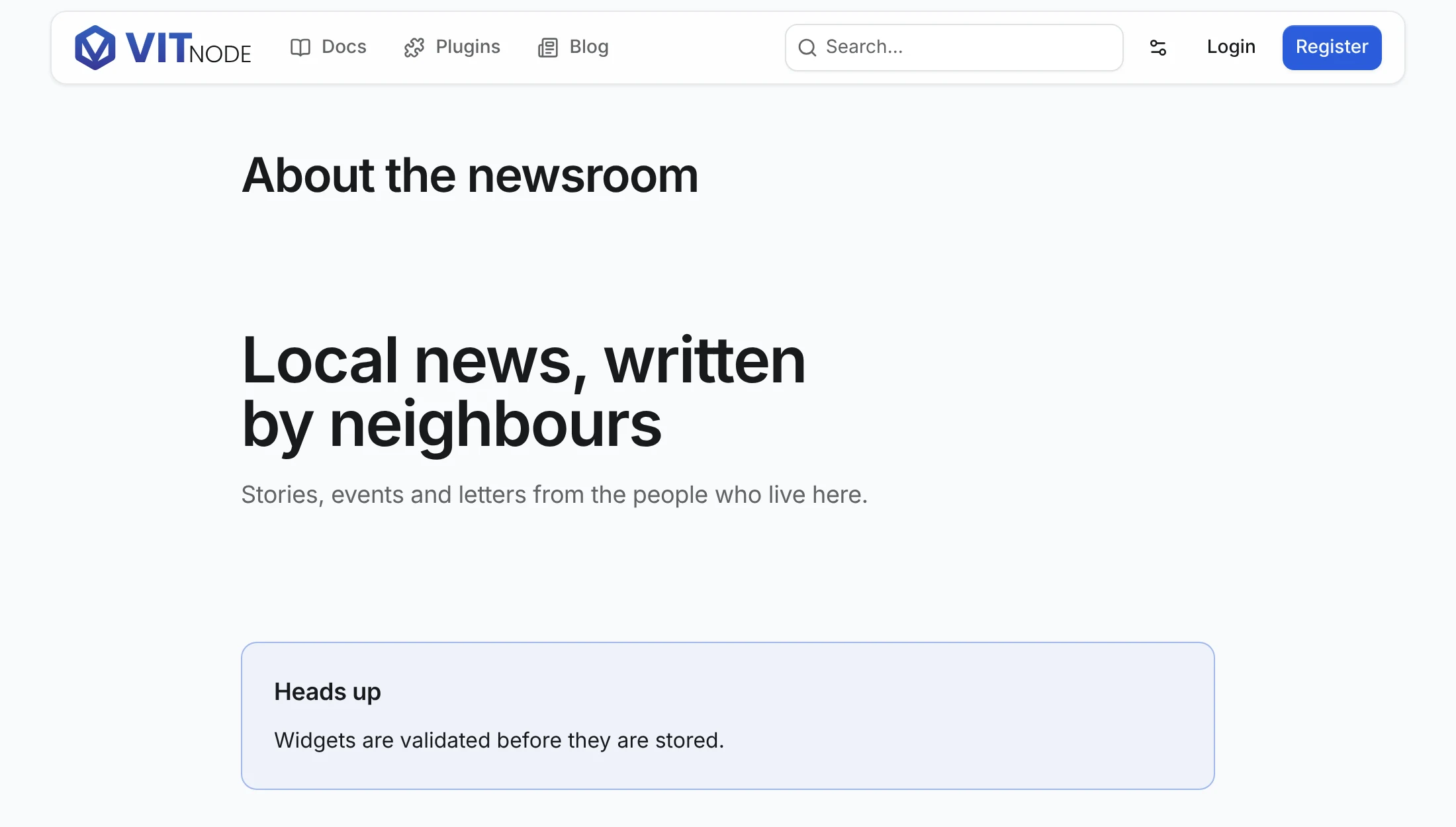
Open http://localhost:3000/newsroom/pages/about-the-newsroom. The page shows the title, the core hero and the callout:
/newsroom/pages/does-not-exist returns the 404 page, and so does a page you unpublish in Newsroom → Pages.
Related
- Variants (optional): give the callout several looks, or add a second widget to the same
blocksarray. - Content zones: several named zones on one page, and what they render when empty.
- Editable pages: let moderators place widgets on a page in the browser, with storage and saving handled by core.
- Custom editor host: edit a record's own
blocks()field, like this page'scontent, in the visual editor. That isn't built in, so you write the adapter and save route.