AI
Automatic translation
Turn on automatic translation of public posts in VitNode, set its budget and languages, and learn what readers, guests, edits and deletions do to stored translations.
Automatic translation shows public posts, such as forum topics, blog articles and comments, in each reader's language. A translation is made once per post version and language, stored in PostgreSQL and shared by every reader, so the second reader of a translated reply costs nothing. It turns on by itself as soon as a model that can translate is connected, and each member can switch it off in their settings.
Before you begin
-
A model with
textandstructured-output, with pricing. VitNode never sends a translation to a model whose cost it cannot bound. See Model pricing. A small, cheap model is enough. -
A content type that opted in. The first-party plugins do:
Plugin What is translated @vitnode/forumTopic bodies, replies @vitnode/blogArticle bodies, comments @vitnode/newsroomArticle, letter and event bodies, comments Other plugins add the
autoTranslateoption. -
At least two site languages. Translations only go between languages in your
i18n.locales.
Turn it on
Open the settings
Connect a model from Before you begin and you are done. The site switch is on by default, and translations run while AI is on, the Translate content action is enabled, and the model it uses has text, structured-output and pricing. No model, no translations, no surprise bill.
To change languages or limits, or to switch it off, go to Artificial Intelligence (AI) → Overview in the AdminCP and click Automatic translation.
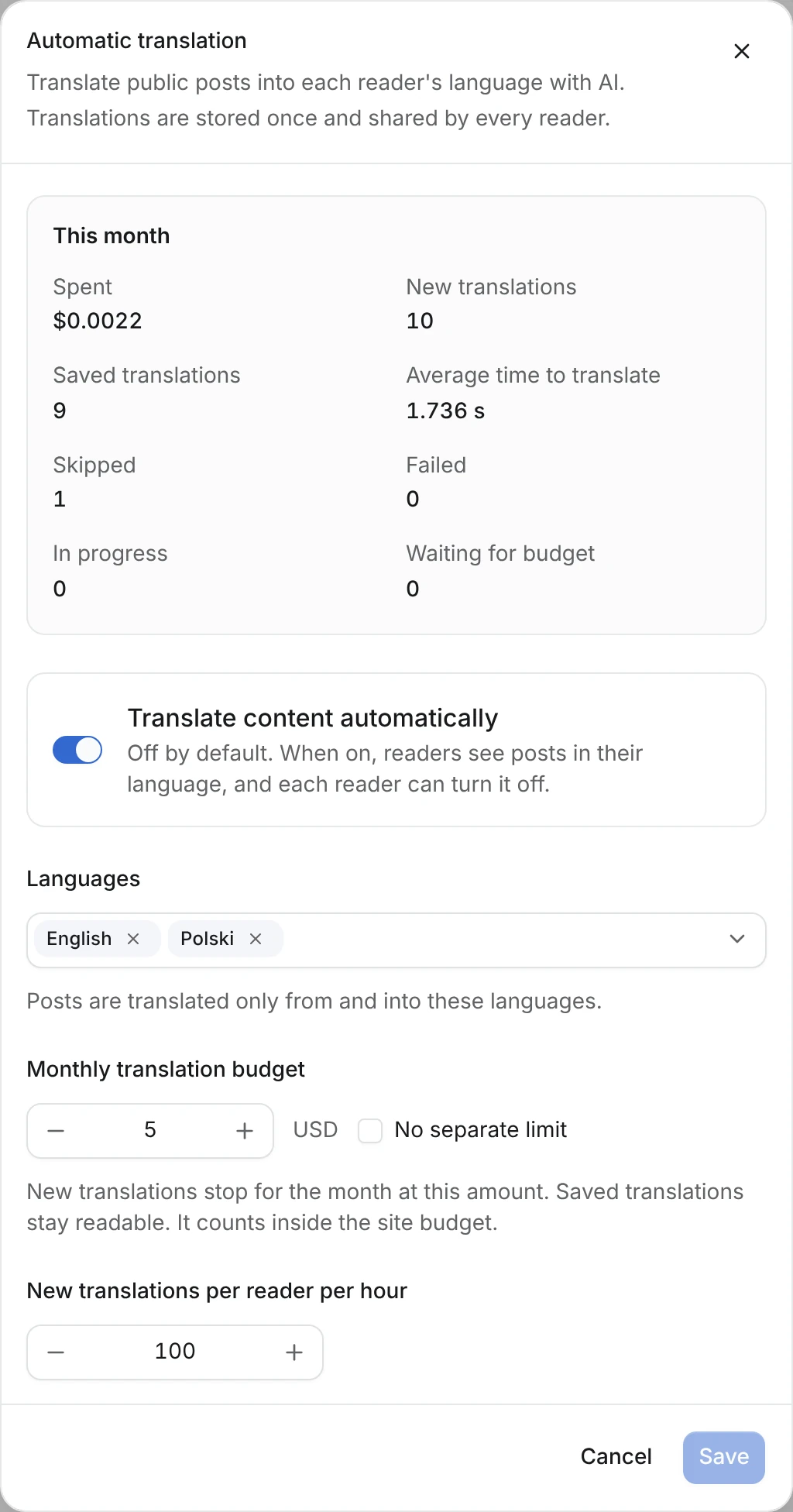
Choose languages and limits
| Setting | Default | What it does |
|---|---|---|
| Translate content automatically | On | The site switch. Off hides every translation control and serves no translations. |
| Languages | English, Polski | Posts are translated only from and into these languages. Others are skipped. |
| Monthly translation budget | 5 USD | New translations stop for the month at this amount. Counts inside the site budget. |
| New translations per reader per hour | 100 | Fields one signed-in reader may send for translation in an hour. |
| Keep outdated translations | 30 days | How long a translation of an edited post is kept, in case the edit is undone. |
Choose No separate limit to leave only the site and background jobs budgets in charge. Pick the model on Artificial Intelligence (AI) → Actions → Translate content, where you can also add instructions such as a glossary.
Make sure the worker runs
Translations run on core's ai queue. Right after a reader asks, VitNode starts the job after the response: in-process on a long-lived Node server, through waitUntil on serverless and Cloudflare Workers. The ai-queue cron (every minute) picks up anything that did not finish, so the host must also run VitNode's cron. The cron alone works, but translations then appear up to a minute later.
What readers see
A reader with automatic translation on sees posts already translated, from the first render. VitNode translates a post into every allowed language as soon as it is published or edited, so by the time someone reads it the translation is usually waiting. Comment threads load each page together with its translations, so text never flips from the original to the translation while someone reads.
Only rich-text content (a post's body, a comment) is translated; titles and other plain text always stay as written. A post with no translation yet (older content, or one written seconds ago) keeps its original for this visit, with a Translate button under it for a reader who doesn't want to wait. It is translated in the background either way, and the next visit shows it translated automatically. Nothing on the page polls for it. Automatically translated from English · Show original sits under each translated post, and Show original sticks while the reader stays on the page.
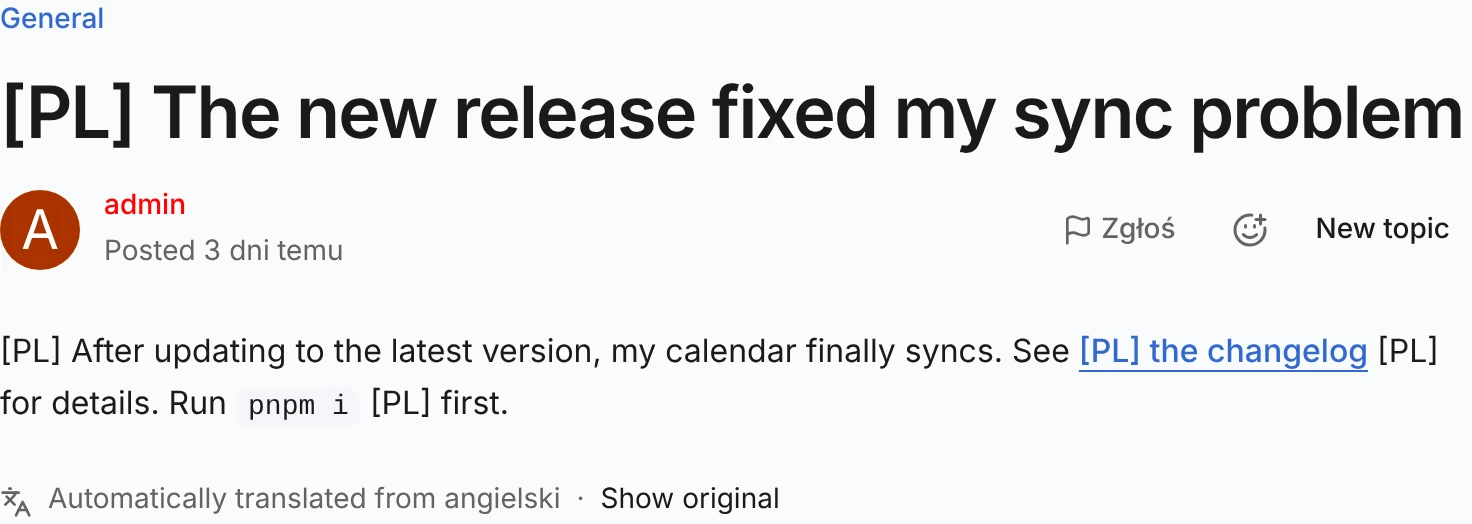
The screenshot uses a test model that prefixes [PL]; links, mentions and code stay exactly as written.
Members turn it off in Settings → Overview → Translation with the Automatically translate content switch, which is saved on their account and applies on every device. The switch appears only while the site has the feature on. Off, pages show originals, stop sending posts and ignore answers that arrive late. A Translate button stays on each post and reuses a saved translation when there is one. Everyone starts with it on, in their interface language; guests have no settings page, so they use Show original on a post instead.
What gets translated
No AI decides what to translate. VitNode detects the language of each field with a small built-in detector and skips:
| Text | Automatic | Translate button |
|---|---|---|
| Empty, emoji only, a bare link or mention | Skipped | Skipped |
A whole acknowledgment: OK!, lol, +1, thanks | Skipped | Skipped |
A single word, such as Kubernetes | Skipped | Translated |
| A language the detector is unsure of | Skipped | Translated |
| Already in the reader's language, or not an allowed language | Skipped | Skipped |
"OK, the update broke login" is a sentence, so it is translated. Each body and reply is detected on its own. Multilingual content needs no detection: its text is in the language the site served it in.
Guests, privacy and visibility
- Guests read, members generate. Guests get every saved translation, also through Translate, but only signed-in readers start new ones.
- Only public content. A post is translated or served only while every guest may read it: published, not hidden, not awaiting approval, and in a forum anyone can read. A saved translation of a post that is later hidden or moved to a members-only forum is not served. A request for a draft, a hidden reply or a restricted forum answers like a post that does not exist.
- Editorial translations come first. Multilingual content, such as a blog article or a newsroom bulletin, can have a translation written by an editor in each language. A reader whose language has one always gets it, never a machine translation. Without one, the site serves the default language in its place, and that text is what gets translated automatically. See Translations.
Edits, deletions and budget
| Event | What happens |
|---|---|
| The body is edited | The body is translated again right after the edit. |
| Only the title is edited | Nothing; titles are never translated. |
| Tags, reactions or other metadata change | Nothing; every translation is reused. |
| An edit is undone | The earlier translation is served again while it is kept. |
| An editor adds a translation in the reader's language | The editor's translation is shown from then on; the machine one is no longer served. |
| The post is edited during a translation | The result is stored for the old version only and never shown for the new text. |
| The post is hidden or deleted mid-job | The result is discarded. |
| The post is deleted for good | Its translations are purged by the hourly content-translation-cleanup cron. |
| The monthly budget is used up | New translations wait for the next month. Saved translations stay readable. |
A job makes at most three attempts at a failed provider call, with growing waits and never immediately, because a timeout may still have been billed. Every attempt counts against the same budget. Unusable model output is not retried for a day; readers keep the original.
Check the result
- Turn the feature on and sign in as a member whose language is Polish.
- Open an English forum topic. If it has no translation yet, click Translate under the body; reload and the body renders in Polish straight away with Automatically translated from English. The title stays in English.
- Open the same topic as a guest in Polish. The saved translation shows on the first render.
- On Automatic translation, This month counts the new translations, the spend and the average time to translate.
Related
- Automatic translation for content types opts a plugin in and adds the controls to its pages.
- Costs and budgets explains reservations and the site budget.