Threaded replies
Add nested replies, such as comments under a forum topic, with the VitNode Content Engine thread option, from the content type to a comment section with replying, editing, tombstones and reporting.
The thread option turns a content type into replies that answer each other under one record, like comments under a forum topic. The server keeps the tree valid and returns it a page at a time; your page draws it. This guide follows the Forum plugin's comments: the content type first, then the comment section in plugins/forum/src/pages/.
You need the root content type, here forum.topic, with a public API and a page. For members to reply, read Public write too.
Define the reply
import { defineContentType, field } from "@vitnode/core/content";

import { topicContentType } from "@/content/topic";

export const commentContentType = defineContentType({
  id: "forum.comment",
  tableName: "forum_comments",

  fields: {
    slug: field.slug({ generated: true }),
    body: field.richText({ required: true }),
    author: field.user(),
    topic: field.relation({
      target: () => topicContentType,
      required: true,
      container: true,
      onDelete: "cascade",
    }),
    parent: field.relation({ self: true, nullable: true, onDelete: "set null" }),
  },

  publication: true,
  visibility: true,
  reports: { snapshotFields: ["body"] },

  publicApi: {
    path: "comments",
    fields: ["id", "slug", "body", "topic", "parent", "publishedAt", "createdAt"],
    people: ["author"],
  },

  publicWrite: {
    ownership: { field: "author" },
    create: { fields: ["body", "topic", "parent"], status: "published" },
    update: { fields: ["body"] },
  },

  thread: { parent: "parent", root: "topic", maxDepth: 6 },
});parentis the reply being answered, ornullfor a direct answer to the topic.topicis the root.container: trueputs the comment in the topic's forum, so the forum's publishing policies and moderators apply to comments too.slugwithgenerated: truegets a random token such ask3v9q2m7xa, because a comment has no title.- A comment's place is fixed when it is written.
parentandtopiccannot be edited.
Create the model and migrate
import { createContentModel } from "@vitnode/core/content/server";

import { commentContentType } from "@/content/comment";

import { forum_topics } from "./topics";

export const commentContent = createContentModel(commentContentType, {
  references: { topic: () => forum_topics.id },
});

export const forum_comments = commentContent.table;
Add commentContent to buildContentPublicModule next to the topics, then migrate:
bun run db:migrateRead the thread
GET /comments/thread?root={topicId} returns a page of top-level replies, oldest first, each followed by every public answer below it:
const res = await fetcher({
  plugin: manifest.id,
  method: "get",
  module: "content/comments",
  path: "/thread",
  args: { query: { root: String(topicId), first: 20, ...(after ? { after } : {}) } },
});
The answer is flat, so a parent always comes before its replies:
{
  "items": [
    { "depth": 1, "id": 17, "parentId": null, "removed": false, "record": { "id": 17, "body": {}, "author": {} } },
    { "depth": 2, "id": 18, "parentId": 17, "removed": true, "record": null },
    { "depth": 3, "id": 21, "parentId": 18, "removed": false, "record": { "id": 21 } }
  ],
  "pageInfo": { "endCursor": "WyIyMDI2...", "hasNextPage": false, "totalCount": 1 },
  "replyCount": 2,
  "truncated": false
}
Warm the first page in the topic page's loader, so comments are in the server-rendered HTML.
Draw the tree
Turn the flat list into a tree in one pass, then render nested <ol> lists:
const buildThreadTree = (items: ThreadNode[]) => {
  const nodes = new Map<number, ThreadTreeNode>();
  const roots: ThreadTreeNode[] = [];
  for (const item of items) {
    const node = { ...item, children: [] };
    nodes.set(item.id, node);
    const parent = item.parentId === null ? undefined : nodes.get(item.parentId);
    if (parent) parent.children.push(node);
    else roots.push(node);
  }

  return roots;
};

const ThreadNodeView = ({ node }: { node: ThreadTreeNode }) => (
  <li>
    {node.record ? (
      <CommentBody comment={node.record} />
    ) : (
      <p className="text-muted-foreground italic">{t("removed")}</p>
    )}
    {node.children.length > 0 ? (
      <ol className="border-l-2 pl-3 md:pl-6">
        {node.children.map(child => <ThreadNodeView key={child.id} node={child} />)}
      </ol>
    ) : null}
  </li>
);
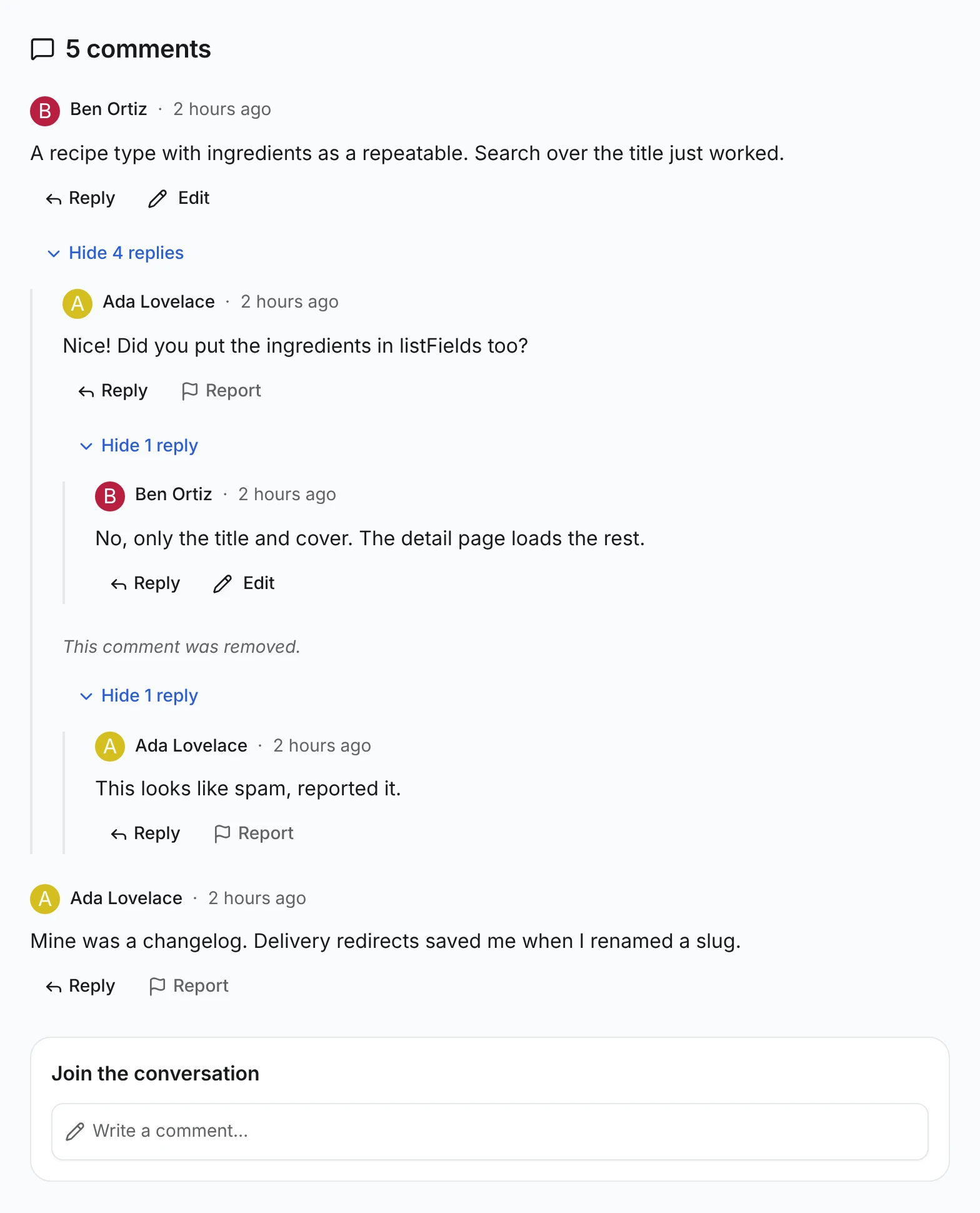
Tombstones. removed: true is a reply readers can't see, such as a hidden one, that still has public answers. Show a short placeholder and keep its children, so the conversation keeps its shape. A hidden reply with no answers is left out.
Load more pages
Keep the pages you loaded and pass the last endCursor as after:
{last.pageInfo.hasNextPage ? (
  <Button onClick={loadMore} variant="outline">{t("load_more")}</Button>
) : null}
{last.truncated ? <p>{t("truncated")}</p> : null}
One answer holds at most 500 replies. truncated: true means some deep answers did not fit; say so instead of pretending the thread ends there. replyCount counts every public reply, the number for a "5 comments" heading.
Reply, edit and report
Ask what the visitor may do with every reply on screen, in one request:
const permissions = useCommentPermissions(
  items.flatMap(item => (item.record ? [item.id] : [])),
);

const { canEdit, canReport } = permissions.of(comment.id);
useCommentPermissions wraps useContentPermissions with the content/comments route, like useDiscussionPermissions. Then:
- Reply posts
{ values: { body, parent: comment.id, topic: topicId } }withuseContentPublicWrite, like the create form. Show it to signed-in members while the reply sits abovemaxDepth. - Edit appears when
canEdit. It loadsGET /comments/{id}/editand saves withPATCH, like the edit form. - Report appears when
canReport, withcontentTarget(manifest.id, commentContentType, comment.id). See Report content.
When the forum's policy holds new comments for a moderator, the post answers approval.status: "pending". Tell the author it is waiting; the comment appears in the thread after approval.
What the server checks
Every reply is placed on the server, in the AdminCP too. A broken rule answers 400 with an issue on the field:
| Rule | Message |
|---|---|
| The parent exists and is public | The reply you are answering does not exist. |
| The parent is under the same topic | The reply you are answering belongs to another conversation. |
| A reply never answers itself or one of its answers | A reply cannot answer itself or one of its answers. |
Nothing sits deeper than maxDepth | Replies nest at most 6 levels deep. Answer a reply higher up. |
A missing, draft or hidden topic makes GET /thread answer 404. Every option is in the thread reference.
Use it in another plugin
The forum's thread-data.ts, thread.tsx and comment-composer.tsx are a reference to copy, not an export. Change the module to content/ plus your reply type's path, topic to your thread.root field, and the depth limit to your maxDepth. The tree, tombstones, paging and buttons need nothing else.
Check the result
Open a topic with replies, such as /forum/topics/show-us-your-first-content-engine-type. Replies nest under the one they answer, a hidden reply leaves This comment was removed. with its answer still below it, your own replies show Edit, and the others show Report.