Public lists
Build a public VitNode Content Engine list page with search, filters, sorting and pagination kept in the URL, using listFields, defineContentList and the ContentList components.
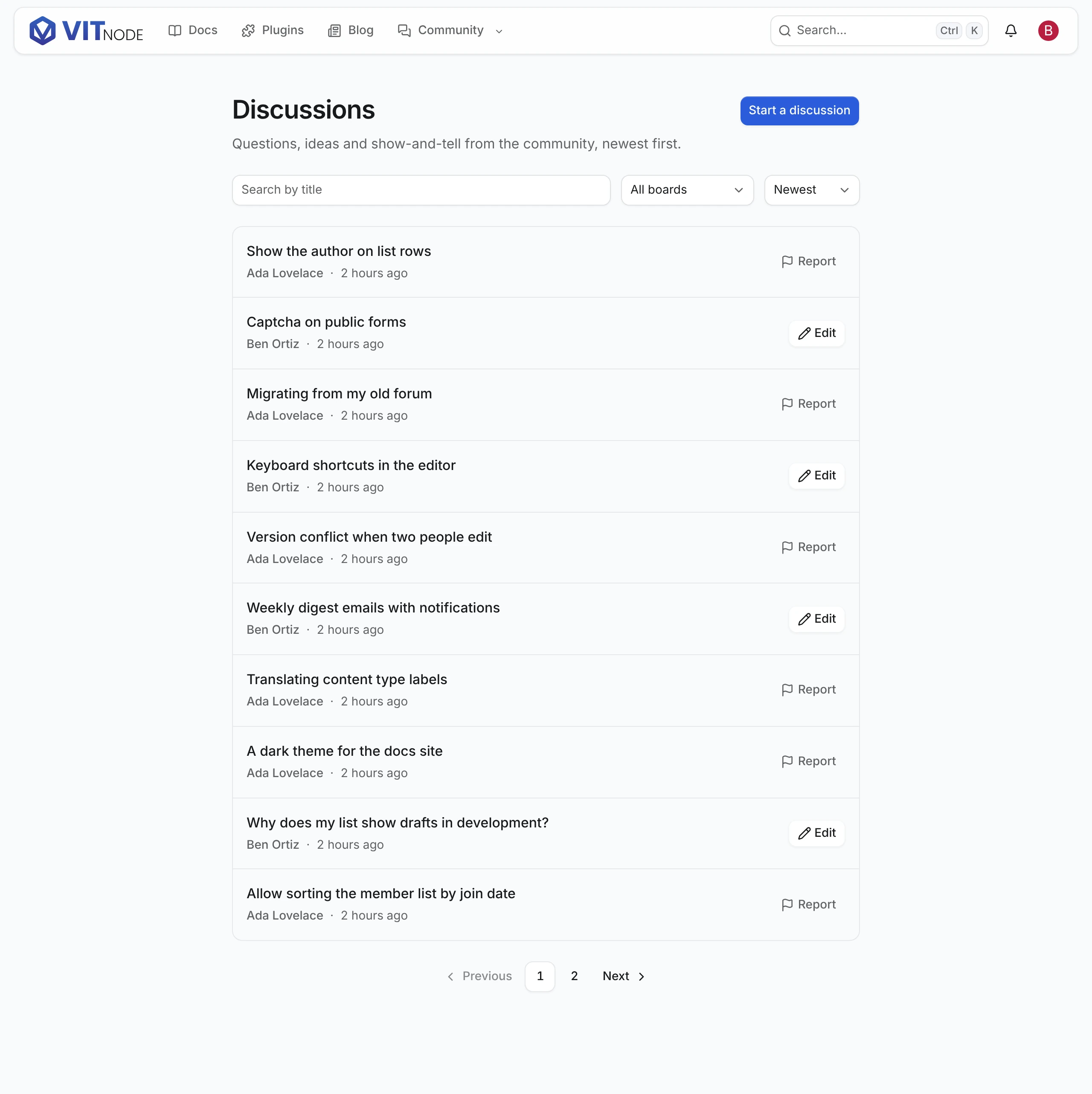
A public list is a page such as /discussions that shows published records a page at a time, with search, filters and sorting in its URL. The Content Engine provides the data and the list behavior; your plugin defines the route, the item layout and the words. This guide builds the example plugin's discussion list: search by title, a board filter, three sorts, ten discussions a page, and links to each discussion.
| The Content Engine provides | Your plugin defines |
|---|---|
The list route GET /content/{publicApi.path} with paging, search, filters, locale fallback, caching and cache tags | The page() route and where it lives |
| Only published, already-live records. Drafts and scheduled records never appear, and hidden ones only for their authors and editors | Which sorts and filters the URL accepts |
defineContentList, contentListQueryOptions, contentListPageHead | The fetcher call and the item layout |
ContentListResults, ContentListPagination, useContentListSearchInput | The search field, the selects and every label |
The Content Engine never creates list pages on its own, and it ships no sort or filter controls. You add a list where it belongs and draw the controls you want.
Before you begin
You need a content type with a public API and pages for its records, such as public pages. This guide uses example.discussion from the example plugin, which members write through public write.
Choose what the list can read
Tell the public API which fields a list row carries and what readers may search, sort and filter by:
publicApi: {
  path: "discussions",
  fields: ["id", "title", "slug", "body", "board", "publishedAt"],
  listFields: ["id", "title", "slug", "board", "publishedAt"],
  filterableFields: ["board"],
  searchableFields: ["title"],
  orderableFields: ["title"],
  people: ["author"],
},listFieldsmust be a subset offields. The list route selects only these, so a page of ten discussions never loads ten rich text bodies. The detail route still returns every field infields.searchableFieldstakes text, textarea and slug fields.orderableFieldsadds sorts;publishedAtis always orderable.filterableFieldsadds one query parameter per field. A container field such asboardalso acceptsincludeDescendants=true.people: ["author"]adds a small public profile of each discussion's author to every row. A user field never appears throughfields.
These options change the API, not the table, so there is nothing to migrate. Every option is in the publicApi reference.
Declare the list and its query
Create src/pages/discussion-list.ts. defineContentList from @vitnode/core/tanstack/content names the sorts, the URL filters and the page size once. contentListQueryOptions turns one URL state into TanStack Query options. Write the fetcher call inline in fetch, so the route stays typed:
import type { QueryClient } from "@tanstack/react-query";
import type { ContentListSearch } from "@vitnode/core/tanstack/content";

import {
  contentListIdFilter,
  contentListQueryOptions,
  defineContentList,
} from "@vitnode/core/tanstack/content";
import { fetcher } from "@vitnode/core/tanstack/fetcher";

import { manifest } from "@/manifest.gen";

export const DISCUSSIONS_HREF = "/discussions";

export const discussionList = defineContentList({
  defaultSort: "newest",
  filters: { board: contentListIdFilter },
  pageSize: 10,
  sorts: {
    newest: { order: "desc", orderBy: "publishedAt" },
    oldest: { order: "asc", orderBy: "publishedAt" },
    title: { order: "asc", orderBy: "title" },
  },
});

export type DiscussionListSearch = ContentListSearch<
  (typeof discussionList.sorts)[number],
  { board: typeof contentListIdFilter }
>;

export const discussionListSearch = (
  input: Record<string, unknown>,
): DiscussionListSearch => discussionList.parseSearch(input);

const discussionQueryKeys = {
  all: [manifest.id, "discussions"] as const,
};

export const discussionsQueryOptions = (request: {
  locale: string;
  search: DiscussionListSearch;
}) =>
  contentListQueryOptions({
    ...request,
    queryKey: discussionQueryKeys.all,
    fetch: async ({ search }) => {
      const res = await fetcher({
        plugin: manifest.id,
        method: "get",
        module: "content/discussions",
        path: "/",
        args: {
          query: {
            ...discussionList.apiQuery(search),
            ...(search.board === undefined
              ? {}
              : { board: String(search.board), includeDescendants: "true" }),
          },
        },
      });
      if (res.status !== 200) {
        throw new Error(`Loading discussions answered ${res.status}.`);
      }

      return await res.json();
    },
  });

export const invalidateDiscussionLists = async (queryClient: QueryClient) => {
  await queryClient.invalidateQueries({ queryKey: discussionQueryKeys.all });
};- The URL keys are
q,sort,pageand one per filter, hereboard. EachorderBymust be inpublicApi.orderableFieldsor bepublishedAt. apiQueryturns the URL state intofirst,page,order,orderByandsearch. Filters are yours to map, because a URL name and an API name can differ.- The response is typed from the content type. Each row carries exactly
listFieldsplusauthor, with dates as ISO strings. There is nothing to re-validate. invalidateDiscussionListsexpires every cached page of the list. The create and edit pages call it after a save. See Public create form.
A localized content type also passes locale in the query, so each language gets its own response and cache entry. Discussions are not localized, so the locale only keys the cache.
Add the route
Register the page with the list's search validator and a skeleton for the first load:
import { FeedPendingSkeleton } from "@vitnode/core/tanstack/pending";

import { discussionListSearch } from "./pages/discussion-list";

export const routes = definePluginRoutes([
  page("/discussions", {
    component: lazy(() => import("./pages/discussions-page")),
    messages: ["@vitnode/example.discussions"],
    pendingComponent: FeedPendingSkeleton,
    search: discussionListSearch,
  }),
]);
messages loads the @vitnode/example.discussions namespace for the page, its head and every component inside it. pendingComponent shows while the loader runs on a client-side navigation. A server render waits for the loader instead.
Load the page and build its head
Create src/pages/discussions-page.tsx. The loader warms the query, so the server renders the list and the browser starts with it:
import { LOADER_DATA_QUERY_META } from "@vitnode/core/lib/query-client";
import { contentListPageHead } from "@vitnode/core/tanstack/content";
import {
  defineRoute,
  type RouteLoadContext,
} from "@vitnode/core/tanstack/plugin-routes";

import {
  DISCUSSIONS_HREF,
  type DiscussionListSearch,
  discussionsQueryOptions,
} from "./discussion-list";
import { boardsQueryOptions } from "./example-queries";

const loadDiscussions = async (
  queryClient: RouteLoadContext["queryClient"],
  { locale, search }: { locale: string; search: DiscussionListSearch },
) => {
  // A failed list is an error state on the page, not an error page.
  const [discussions, boards] = await Promise.all([
    queryClient
      .query({
        ...discussionsQueryOptions({ locale, search }),
        meta: LOADER_DATA_QUERY_META,
      })
      .catch(() => null),
    queryClient.query(boardsQueryOptions()).catch(() => []),
  ]);

  return { boards, discussions };
};

type DiscussionsPageData = Awaited<ReturnType<typeof loadDiscussions>>;

export const route = defineRoute<DiscussionsPageData, DiscussionListSearch>({
  load: async ({ context, search }) =>
    await loadDiscussions(context.queryClient, {
      locale: context.locale,
      search,
    }),

  head: ({ search, t }) =>
    contentListPageHead({
      description: t("@vitnode/example.discussions.list.desc"),
      pathname: DISCUSSIONS_HREF,
      search,
      title: t("@vitnode/example.discussions.list.title"),
    }),
});LOADER_DATA_QUERY_METAkeeps the result out of the dehydrated cache, because the loader data already carries it to the browser..catch(() => null)turns a failed request into the list's error state instead of the app's error page.contentListPageHeadgives the plain listindex, followand a canonical link, and every searched, filtered, sorted or paged viewnoindex, follow.boardsQueryOptionsis the example's own query for the board picker. It is not part of the list.
Render the controls and the results
Add the component to the same file. ContentListResults decides between the loading, error, empty, no-results and item states. ContentListPagination renders page links from pageInfo:
const DiscussionsPage = ({
  loaderData: { boards, discussions },
  navigate,
  search,
}: PluginRoutePageProps<DiscussionsPageData, DiscussionListSearch>) => {
  const t = useTranslations("@vitnode/example.discussions.list");
  const [isPending, startTransition] = React.useTransition();
  const update = (patch: Partial<DiscussionListSearch>) => {
    startTransition(async () => {
      await navigate({
        resetScroll: false,
        search: discussionList.withSearch(search, patch),
      });
    });
  };
  const input = useContentListSearchInput({
    onCommit: q => {
      update({ q });
    },
    value: search.q,
  });

  return (
    <div className="container mx-auto flex max-w-3xl flex-col gap-6 px-4 py-8">
      <div className="flex flex-col gap-3 md:flex-row" role="search">
        <Input
          aria-label={t("search_label")}
          onChange={event => {
            input.setValue(event.target.value);
          }}
          onKeyDown={event => {
            if (event.key === "Enter") input.commit();
          }}
          placeholder={t("search_placeholder")}
          type="search"
          value={input.value}
        />
        <NativeSelect
          aria-label={t("board_label")}
          onChange={event => {
            const board = Number(event.target.value);
            update({ board: board > 0 ? board : undefined });
          }}
          value={String(search.board ?? "")}
        >
          <NativeSelectOption value="">{t("all_boards")}</NativeSelectOption>
          {boards.map(board => (
            <NativeSelectOption key={board.id} value={String(board.id)}>
              {board.name}
            </NativeSelectOption>
          ))}
        </NativeSelect>
        <NativeSelect
          aria-label={t("sort_label")}
          onChange={event => {
            update({
              sort: discussionList.sorts.find(
                sort => sort === event.target.value,
              ),
            });
          }}
          value={search.sort ?? discussionList.defaultSort}
        >
          {discussionList.sorts.map(sort => (
            <NativeSelectOption key={sort} value={sort}>
              {t(`sort.${sort}`)}
            </NativeSelectOption>
          ))}
        </NativeSelect>
      </div>

      <ContentListResults
        className="flex flex-col divide-y rounded-lg border"
        empty={<ListState title={t("empty.title")} />}
        error={<ListState title={t("error.title")} />}
        getKey={discussion => discussion.id}
        isError={discussions === null}
        isFetching={isPending}
        isFiltered={discussionList.isFiltered(search)}
        itemClassName="flex flex-col gap-2 p-4 md:flex-row md:justify-between"
        items={discussions?.edges}
        label={t("title")}
        loading={null}
        noResults={
          <ListState
            action={<HrefLink href={DISCUSSIONS_HREF}>{t("no_results.clear")}</HrefLink>}
            title={t("no_results.title")}
          />
        }
        renderItem={discussion =>
          discussion.slug === null ? (
            <span>{discussion.title}</span>
          ) : (
            <HrefLink href={discussionHref(discussion.slug)}>
              {discussion.title}
            </HrefLink>
          )
        }
      />

      {discussions ? (
        <ContentListPagination
          hrefFor={page =>
            discussionList.href(DISCUSSIONS_HREF, { ...search, page })
          }
          label={t("pagination")}
          pageInfo={discussions.pageInfo}
        />
      ) : null}
    </div>
  );
};

export default DiscussionsPage;
The excerpt trims styling, the author line and the per-row actions. ListState is a small wrapper around the Empty components from @vitnode/core/components/ui/empty. The full file is plugins/example/src/pages/discussions-page.tsx.
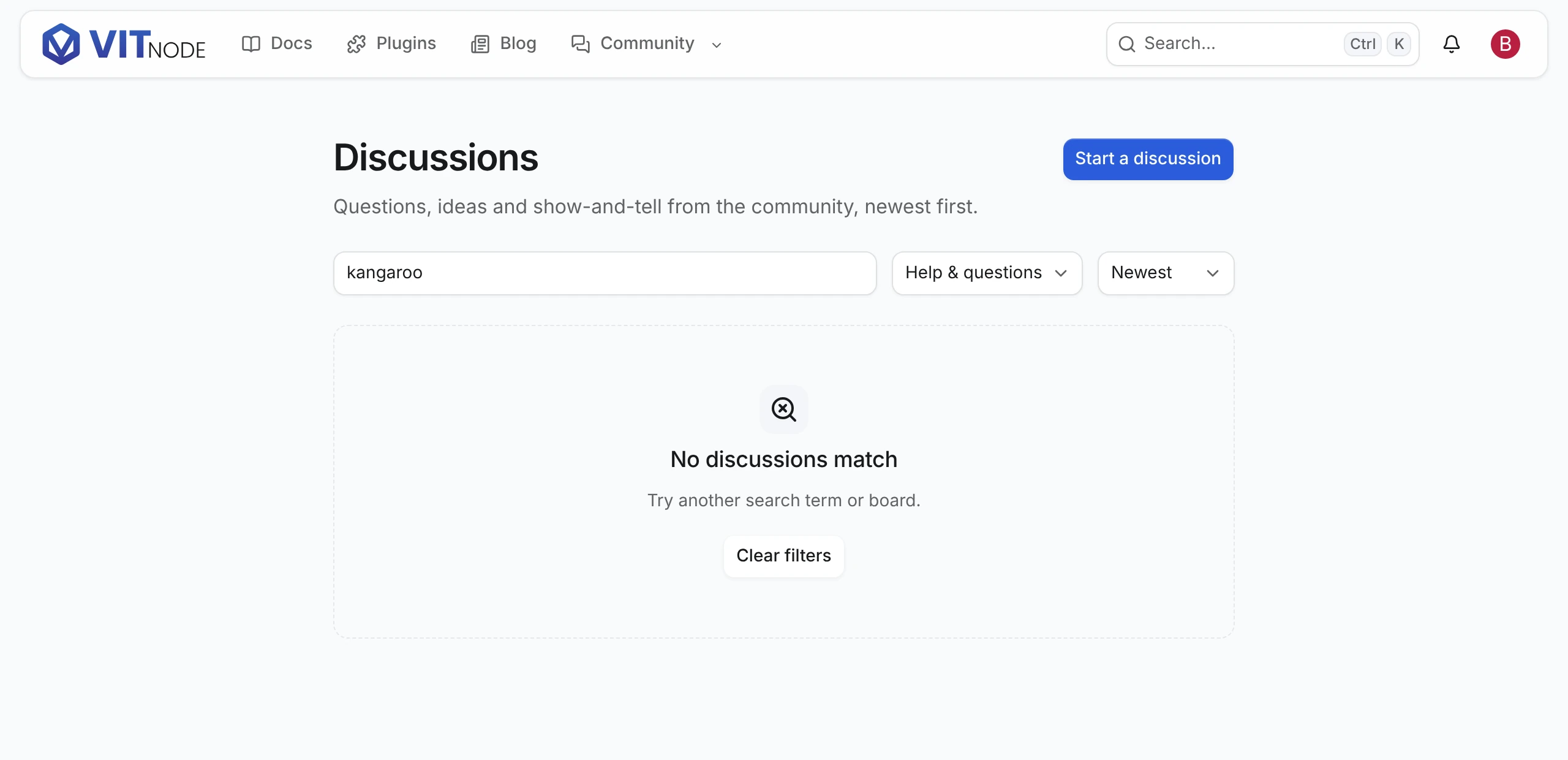
withSearchreturns the new URL state and dropspagewhen anything else changes, because page 2 of the old results says nothing about the new ones.useContentListSearchInputwaits 500 ms after the last keystroke before it navigates, commits at once on Enter, and follows the URL when the reader goes back or forward.navigateinsidestartTransitionkeeps the current rows on screen, dimmed andaria-busy, while the next page loads.emptyshows when nothing is published andnoResultswhen a search or filter matches nothing, so only the second one offers Clear filters.loadingrenders whileitemsisundefined. This page always has data from its loader, so it passesnull; a list that fetches in the browser shows a skeleton there.- Link each row to its record's page with the same helper that page's route uses, here
discussionHref(slug). A row whoseslugisnullhas no page to link to.
To put Edit and Report buttons on each row, see Public edit form and Report content.
Add the messages
Every label lives in the plugin's locale file, under the namespace the route loads:
{
  "@vitnode/example": {
    "discussions": {
      "list": {
        "title": "Discussions",
        "desc": "Questions, ideas and show-and-tell from the community, newest first.",
        "search_label": "Search discussions",
        "search_placeholder": "Search by title",
        "board_label": "Board",
        "all_boards": "All boards",
        "sort_label": "Sort by",
        "sort": { "newest": "Newest", "oldest": "Oldest", "title": "Title (A-Z)" },
        "pagination": "Discussion pages",
        "empty": { "title": "No discussions yet" },
        "no_results": { "title": "No discussions match", "clear": "Clear filters" },
        "error": { "title": "Couldn't load discussions" }
      }
    }
  }
}
How URL parameters, locales and pagination interact
- Normalized URLs.
parseSearchdrops unknown keys, invalid values,page=1and the default sort./discussions?sort=newest&page=1&utm_source=xand/discussionsare the same state, so they share a query key and a canonical link. - Locales. On a localized content type, pass
localein the query. A record with no translation in that language falls back to the default language when the type usesfallback: "default", and each row says which language it is in underlocale. An unknown?locale=answers404rather than an English list. - Pagination.
ContentListPaginationreadscurrentPage,totalPages,hasNextPageandhasPreviousPagefrompageInfo, and every page is a real link, so it works before hydration. Apagepast the end gets the last page. The list route also acceptscursorfor "Older" and "Newer" links; Containers on the frontend uses it. - Caching. The API caches each list read per query and locale, and every publish, edit, unpublish, hide or delete of the content type expires it. TanStack Query keeps its own copy in the browser for
RECORD_STALE_TIME, which is why a page that writes records invalidates its list. - Hidden records. With
visibility, a signed-in author, editor or moderator also gets the hidden records they may see. Those rows carryhidden: true, so mark them, for example withHiddenIconfrom@vitnode/core/components/hidden-icon. That response isprivate, no-storeand skips the API cache. A route with a pagecacheserves signed-in visitors the HTML rendered for guests, so refetch the list in the browser under a key that includes the viewer, like the blog'sblogViewerPostsQueryOptions. For your own counts or queries, combinecontentListHiddenAccessandcontentPublicListConditionfrom@vitnode/core/content/server.
Records reach crawlers through their own pages and the sitemap. The sitemap route lists records, not lists, so add the list's own URL, such as /discussions, where your app builds /sitemap.xml.
The blog plugin builds /blog and /blog/category/:slug from the same pieces with only pages and a category, in plugins/blog/src/pages/blog-list.ts and blog-queries.ts.
Check the result
Open http://localhost:3000/discussions:
- Type a word from a title. After half a second the URL gets
?q=...and the list narrows. - Pick a board, then Title (A-Z). The URL keeps both, and the list jumps back to page 1.
- Search for a word no title contains. No discussions match shows with Clear filters.
- Move to page 2, refresh, then press back. Each view comes back exactly as the URL describes it.
The plain list is the indexable one; every other state stays out of the index but keeps its links followable:
curl -s http://localhost:3000/discussions | grep -oE '<meta content="[^"]*" name="robots"/>'
curl -s "http://localhost:3000/discussions?board=1" | grep -oE '<meta content="[^"]*" name="robots"/>'<meta content="index, follow" name="robots" />
<meta content="noindex, follow" name="robots" />