Public create form
Build a page where members create Content Engine records with one AutoForm, one fetcher call and useContentPublicWrite, which shows server errors for you.
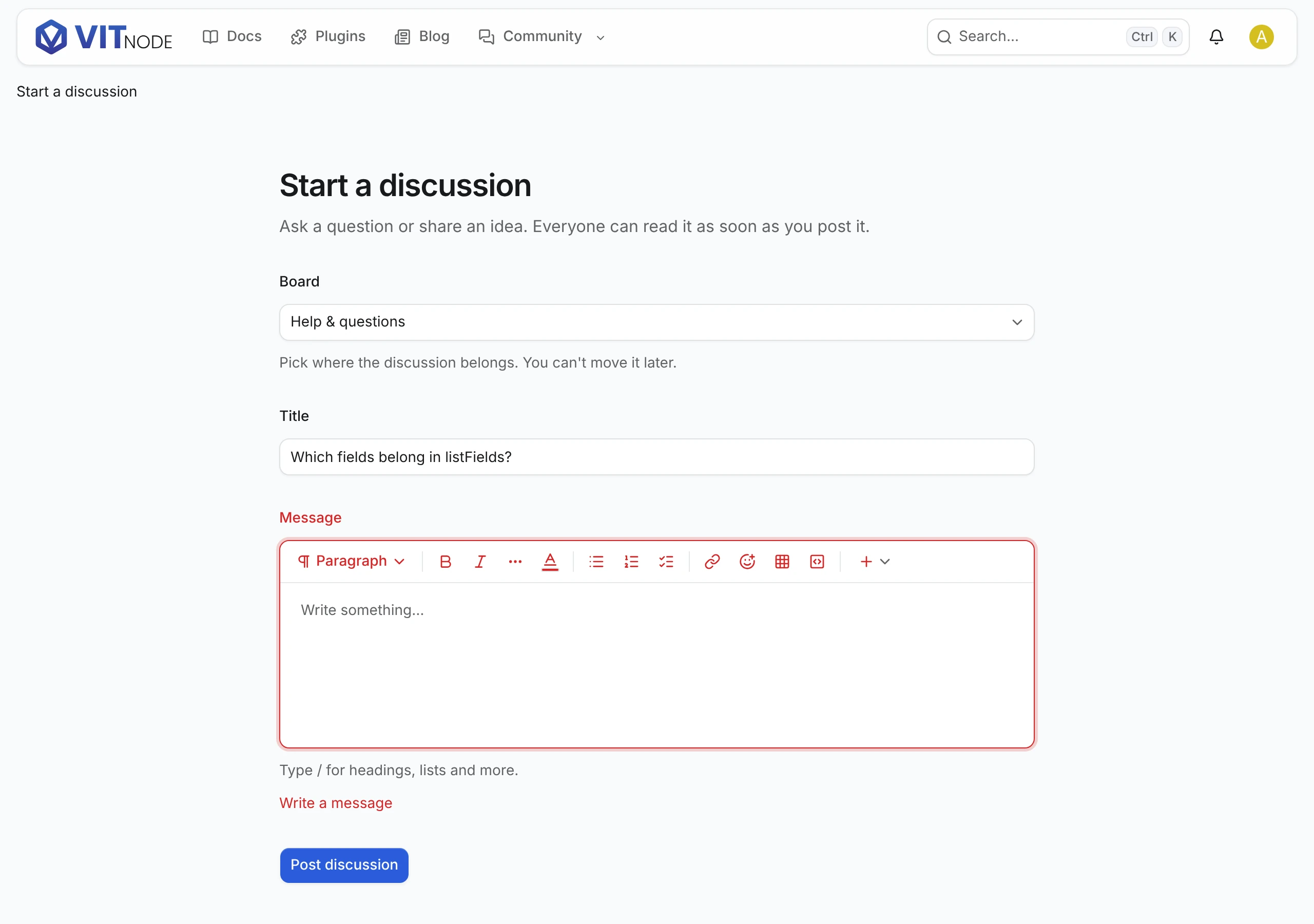
This guide builds /discussions/new, where members start a discussion. It takes one form and one request. When the server says no, useContentPublicWrite from core deals with it: field errors land under their fields, and the rest become translated toasts.
You need a content type with public write turned on.
Add the route
page("/discussions/new", {
  component: lazy(() => import("./pages/discussion-new-page")),
  messages: ["@vitnode/example.discussions"],
  requires: "authenticated",
}),
requires: "authenticated" sends guests to the sign-in page and brings them back afterwards. messages loads the labels below.
Write the page
import { useQueryClient } from "@tanstack/react-query";
import {
  AutoForm,
  type AutoFormOnSubmit,
} from "@vitnode/core/components/form/auto-form";
import { AutoFormEditor } from "@vitnode/core/components/form/fields/editor";
import { AutoFormInput } from "@vitnode/core/components/form/fields/input";
import {
  emptyRichTextDocument,
  isRichTextEmpty,
  zodRichTextDocument,
} from "@vitnode/core/content";
import { useContentPublicWrite } from "@vitnode/core/tanstack/content";
import { fetcher } from "@vitnode/core/tanstack/fetcher";
import { useHrefNavigate } from "@vitnode/core/tanstack/link";
import { useTranslations } from "use-intl";
import { z } from "zod";

import { manifest } from "@/manifest.gen";

import { invalidateDiscussionLists } from "./discussion-list";

const formSchema = z.object({
  title: z.string().trim().min(3).max(200).default(""),
  body: zodRichTextDocument
    .refine(doc => !isRichTextEmpty(doc))
    .default(emptyRichTextDocument()),
});

const DiscussionNewPage = () => {
  const t = useTranslations("@vitnode/example.discussions");
  const navigate = useHrefNavigate();
  const queryClient = useQueryClient();
  const write = useContentPublicWrite({
    fields: ["title", "body"],
    uniqueField: "title",
  });

  const onSubmit: AutoFormOnSubmit<typeof formSchema> = async (values, form) => {
    const record = await write.submit(form, async () =>
      await fetcher({
        plugin: manifest.id,
        method: "post",
        module: "content/discussions",
        path: "/",
        args: { body: { values } },
      }),
    );
    if (!record) return;

    await invalidateDiscussionLists(queryClient);
    await navigate(`/discussions/${record.slug}?created=true`);
  };

  return (
    <AutoForm
      fields={[
        {
          id: "title",
          component: props => <AutoFormInput {...props} label={t("form.title.label")} />,
        },
        {
          id: "body",
          component: props => (
            <AutoFormEditor {...props} format="json" label={t("form.body.label")} />
          ),
        },
      ]}
      formSchema={formSchema}
      onSubmit={onSubmit}
      submitButtonProps={{ children: t("new.submit") }}
    />
  );
};

export default DiscussionNewPage;
That is the whole page. Here is what each part does:
formSchemachecks the values in the browser first. Copy the server's limits, such asminLength: 3, so members see mistakes before they submit.write.submitsends the request and returns the new record, ornullwhen the server said no. It already showed the reason: a server issue ontitleappears under the title, a taken title too (uniqueField), and anything else, such as an expired session, is a toast. You write no error handling.- The owner is set by the server.
valuesnever includes the author. - Double posts cannot happen, because
AutoFormdisables the button whileonSubmitruns. invalidateDiscussionListsrefreshes the cached discussion list, so the new discussion shows up there at once.format="json"makes the editor produce the document a rich text field stores.
This page fits the discussion type from Public write. The example plugin's own discussions also live in boards, so its page in plugins/example/src/pages/ adds a board select and sends board in values; any container field in create.fields works the same way.
Add the labels
{
  "@vitnode/example": {
    "discussions": {
      "new": { "submit": "Post discussion" },
      "form": {
        "title": { "label": "Title" },
        "body": { "label": "Message" }
      }
    }
  }
}
Error messages come from core and follow the reader's language, so the plugin needs none.
When a post waits for a moderator
In a container with publishing policies that ask for approval, a create still succeeds but the record is not public yet. record.approval?.status is "pending" and its page answers 404. Send the author somewhere that says so:
if (record.approval?.status === "pending") {
  await navigate(`/discussions/${record.id}/edit`);

  return;
}
The edit page shows the waiting notice, as Approvals explains.
Captcha
With create.captcha: true, pass the captcha config to the form and forward the token it hands to onSubmit:
const { data: config } = useMiddlewareConfigQuery(); // from @vitnode/core/tanstack/auth

const onSubmit: AutoFormOnSubmit<typeof formSchema> = async (values, form, { captchaToken }) => {
  const record = await write.submit(form, async () =>
    await fetcher({
      plugin: manifest.id,
      method: "post",
      module: "content/discussions",
      path: "/",
      captchaToken,
      args: { body: { values } },
    }),
  );
};

<AutoForm captcha={config?.captcha} /* ... */ />;
Check the result
Sign in as a member and open /discussions/new:
- Leave the message empty and submit. The form says so without sending anything.
- Use the title of an existing discussion. This is already taken appears under the title.
- Write a new title and a message, then click Post discussion. You land on the new discussion, and it tops
/discussions.