Approvals
How the VitNode Content Engine approval workflow works. New records wait as drafts, edits of live records wait as proposals, moderators approve or reject them, and authors follow their submissions through the approval field and /moderation/approvals/mine.
When a container's publishing policy says publish: "approve" or edits: "approve", a member's post does not go live straight away. The server stores a submission, a moderator decides, and only an approval changes what readers see. This page explains what waits where, what the author sees, and what a decision does. The moderator's side is in Review approvals.
What waits, and where
The server decides from the effective policy of the record's container. The client never sends a status.
| The author | What is stored |
|---|---|
Creates a topic in an approve forum | A draft row plus a create submission. Nothing public can reach a draft |
Edits a published topic, with edits: "approve" | An edit submission holding the proposed values. The live row and its version do not change |
| Edits again while that proposal is pending | A new proposal. The old one becomes superseded, so a record never has more than one pending submission |
| Edits a draft whose create is pending | The draft is updated in place, and the pending submission follows it |
| Edits a draft whose create was rejected | The draft is updated, and a new create submission opens: a resubmission |
A proposal is validated like a normal edit before it is stored, so a moderator never reviews something that could not be saved.
Some people skip the queue. A moderator holding can_approve in the container publishes and edits their own posts immediately, and so does a root role. A moderator editing through can_edit always applies the edit at once, even to someone else's record. Those permissions are scoped to containers.
AdminCP staff work outside this flow: their edits apply directly, as always.
What the author sees
Every public write response carries approval. It is null when nothing waits, and otherwise describes the submission:
{
  "approval": {
    "id": 12,
    "kind": "edit",
    "reason": null,
    "status": "pending",
    "submittedAt": "2026-10-13T10:02:11.004Z",
    "values": { "title": "The editor forgets my draft on Safari", "body": { "type": "doc", "content": [] } }
  },
  "id": 42,
  "slug": "the-editor-forgets-my-draft",
  "status": "published",
  "publishedAt": "2026-10-13T09:40:02.118Z",
  "version": 3,
  "values": { "title": "The editor forgets my draft", "body": { "type": "doc", "content": [] } }
}
For a proposal, values is still the live record and approval.values holds what the author asked for, so an edit page can show both.
Prop
Type
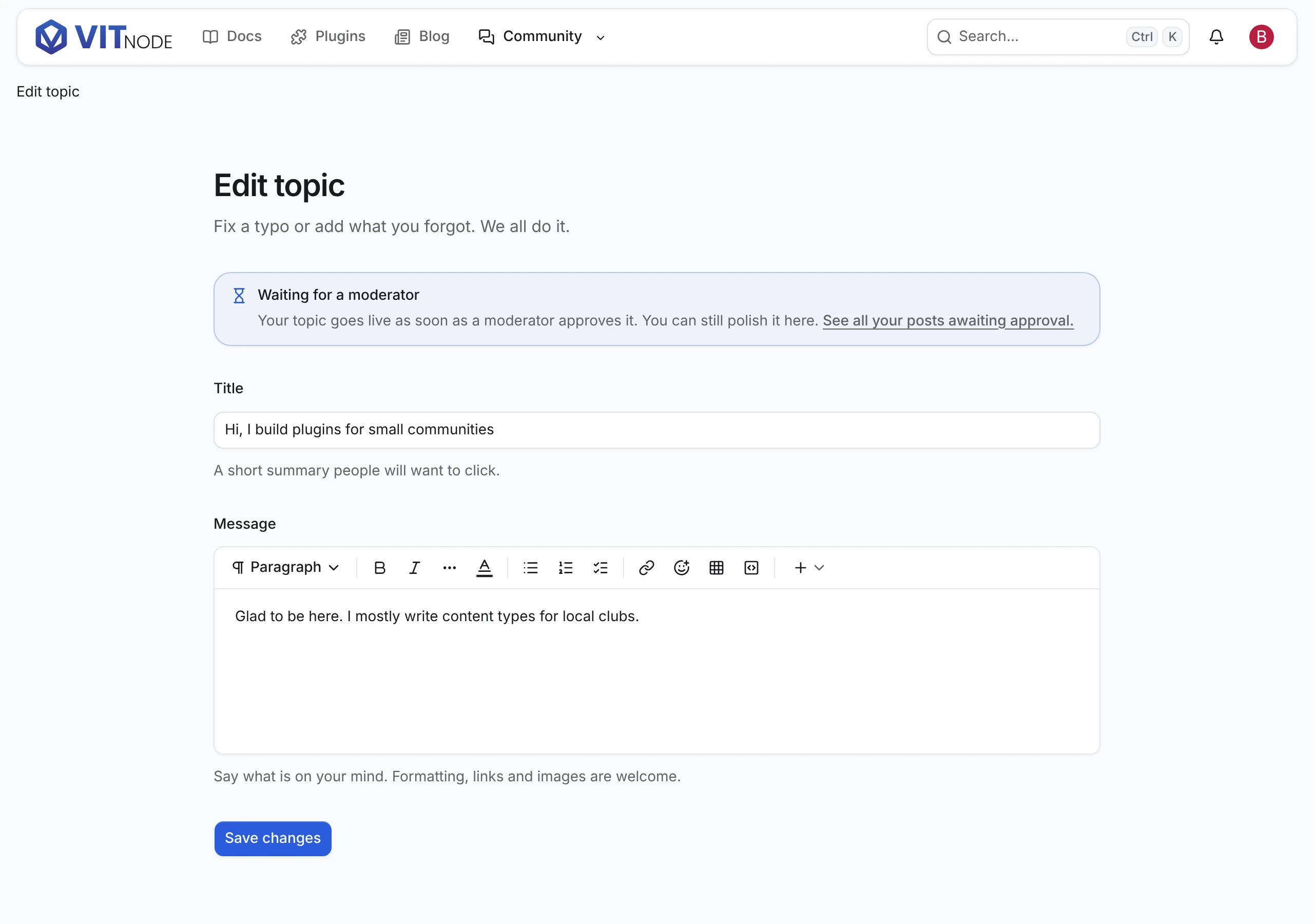
GET /{id}/edit returns the record's latest submission when it is pending, or rejected and not replaced yet, so the author's edit page can say "waiting for a moderator" or show the reason. The shape is zodContentApprovalState from @vitnode/core/content.
To list everything an author sent, call the core moderation module. It returns pending, approved and rejected submissions, newest first, for the signed-in member. Pass pluginId to keep only your plugin's submissions. The filter runs before the page is cut, so every page is full and total counts only yours:
import { fetcher } from "@vitnode/core/tanstack/fetcher";

export const fetchMySubmissions = async (page: number) => {
  const res = await fetcher({
    plugin: "@vitnode/core",
    method: "get",
    module: "moderation",
    path: "/approvals/mine",
    args: { query: { page, pluginId: "@vitnode/forum" } },
  });
  if (!res.ok) throw new Error("Could not load your submissions.");

  return await res.json();
};
Each item has kind, status, title, contentTypeId, itemId, the container, reason and the dates. A guest gets 401. The Forum plugin's pending-page.tsx renders this list at /forum/me/pending.
Show it on your pages
Readers never see a pending record, so the author needs to hear what happened. Three places cover it, all from the approval object:
- After posting. When
record.approval?.status === "pending", send the author to the record's edit page instead of its public page, which answers404until approval. See Public create form. - On the edit page.
GET /{id}/editreturns the pending or rejected submission. Show a notice above the form. The Forum plugin'stopic-edit-page.tsxdoes it like this:
const ApprovalNotice = ({ approval, status }: { approval: ContentApprovalState | null; status: string }) => {
  const t = useTranslations("@vitnode/forum.topics.approval");

  if (approval?.status === "rejected") {
    return (
      <Alert variant="destructive">
        <AlertTitle>{t("rejected.title")}</AlertTitle>
        <AlertDescription>
          {approval.reason ? t("rejected.reason", { reason: approval.reason }) : t("rejected.desc")}
        </AlertDescription>
      </Alert>
    );
  }

  if (approval?.status === "pending" && approval.kind === "edit") {
    return <Alert variant="info"><AlertTitle>{t("pending_edit.title")}</AlertTitle></Alert>;
  }

  if (status === "draft" && approval?.status === "pending") {
    return <Alert variant="info"><AlertTitle>{t("pending_create.title")}</AlertTitle></Alert>;
  }

  return null;
};- In a "my submissions" list.
GET /moderation/approvals/mine, shown above, lists everything the author sent. The forum renders it at/forum/me/pending.
For a pending edit, open the form on approval.values, the proposal, instead of the live text, so the author keeps editing what they sent.
What a decision does
A moderator approves or rejects from the ModCP or through the approval routes.
- Approving a create publishes the draft, which emits the content type's
publishedevent once. A record a moderator hid stays hidden. - Approving an edit applies the proposal as an ordinary update against the version it was made from. That emits one
updatedevent and, on an editorial content type, writes one revision. - Rejecting changes nothing on the record. A new topic stays a draft, a published one keeps its live version, and the optional reason is stored for the author.
Each decision locks the submission first, so two moderators clicking at once get one success. It then locks the record and resolves its container again from the row, so a topic moved to another forum since it was submitted is checked against where it lives now. If the decision cannot go through, the route answers with one of these codes:
| Code | Status | What happened |
|---|---|---|
decided | 409 | The submission is no longer pending. Someone else decided first, or the author replaced it |
stale | 409 | The record changed after the proposal was made, or the proposal no longer validates. Reject it, and the author can resubmit |
gone | 409 | The record was deleted. The submission is marked cancelled |
forbidden | 403 | The record now lives in a container where this moderator has no can_approve |
notFound | 404 | No such submission, or one outside the moderator's scope |
Deleting a record cancels its pending submission, from the AdminCP or anywhere else. If staff publish a pending draft from the AdminCP first, approving it later only closes the submission. Changing a container's policy never touches submissions that are already waiting.
Events
Opening a submission emits content.approval.submitted, and a decision emits content.approval.approved or content.approval.rejected. They carry the submission id, the content type, the record id, the container, the author and, for decisions, the reviewer. The record's own events are not duplicated: a pending create emits created but not published until it is approved. Payloads are in Built-in events.
A listener on content.approval.rejected is a good place to tell the author why their post did not make it, gently.
Check the result
In the AdminCP, set a forum's policy to Approve for new topics, as in Publishing policies. Sign in as a member and start a topic there. You land on the topic's edit page with the waiting notice, and the topic stays out of the forum until a moderator approves it in the ModCP.