Users
User Presence
How VitNode decides whether a member is online, when they were last seen, and who may see it when they browse anonymously.
User presence tells you whether a signed-in member is online right now and when they were last seen. VitNode tracks it for every signed-in member out of the box, shows it on public profiles and in the AdminCP, and lets members hide it with Browse anonymously.
To show presence in your own plugin, see Show presence in a plugin.
Where members see it
The public profile shows the status next to the username: Online now, or Last seen 5 minutes ago.

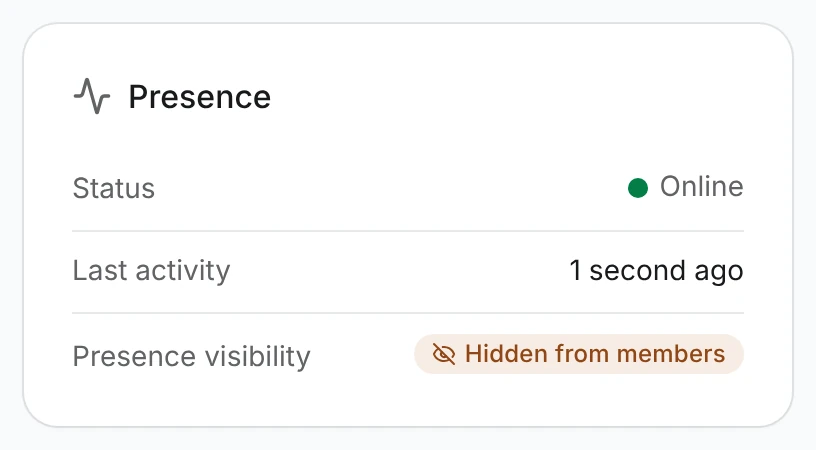
The AdminCP user page (/admin/core/users/[id]) has a Presence card with the status, the last activity and whether the member hides it from other members.
How online and offline work
Every signed-in session holds its own short lease, a "still here" note that expires on its own:
- An open, visible tab sends a heartbeat (
POST /users/presence/heartbeat) every 60 seconds. - Each heartbeat keeps that session online for 150 seconds. Miss two beats and the lease runs out.
- A member is online while at least one of their leases is alive.
So presence follows tabs, not clicks. Only the heartbeat counts as activity: navigation, prefetching and background queries never do. A hidden tab pauses its heartbeat and sends one right away when you come back to it. Tabs of the same browser share one heartbeat through localStorage, so ten open tabs still cost one request a minute.
The leases live in the cache, in a Redis sorted set per member (presence:user:{id}). The member of the set is a one-way hash of the session, never the session token itself.
Several tabs, browsers and devices
Each session expires on its own. A member with a laptop and a phone stays online while either one has a visible tab. Signing out, or revoking a device in Settings → Devices, ends only that session's lease, so the phone stays online after the laptop signs out.
Last seen
core_users.lastSeenAt stores the last activity. A heartbeat moves it forward at most once every 60 seconds per member, and never backwards, so a busy member costs one database write a minute, not one per tab.
Browse anonymously
Members who'd rather lurk in peace open Settings → Overview (/settings) and turn on Browse anonymously under Privacy, as long as their roles allow it.
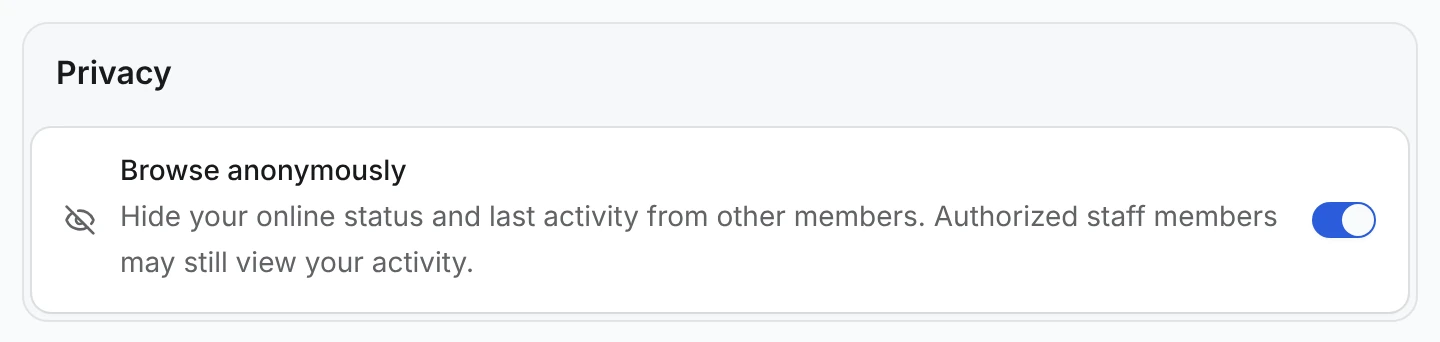
The switch saves core_users.hideOnlineStatus through PUT /users/me/privacy and takes effect on the next presence read. Everybody else then gets { "status": "hidden" }, with no timestamp at all, and the profile shows Activity hidden.
Tracking does not stop. Anonymous mode changes who may see presence, not what is recorded. Two viewers still get the real answer, flagged with isHidden: true:
- the member themselves;
- staff with the
users:can_view_hidden_presencepermission.
Role settings
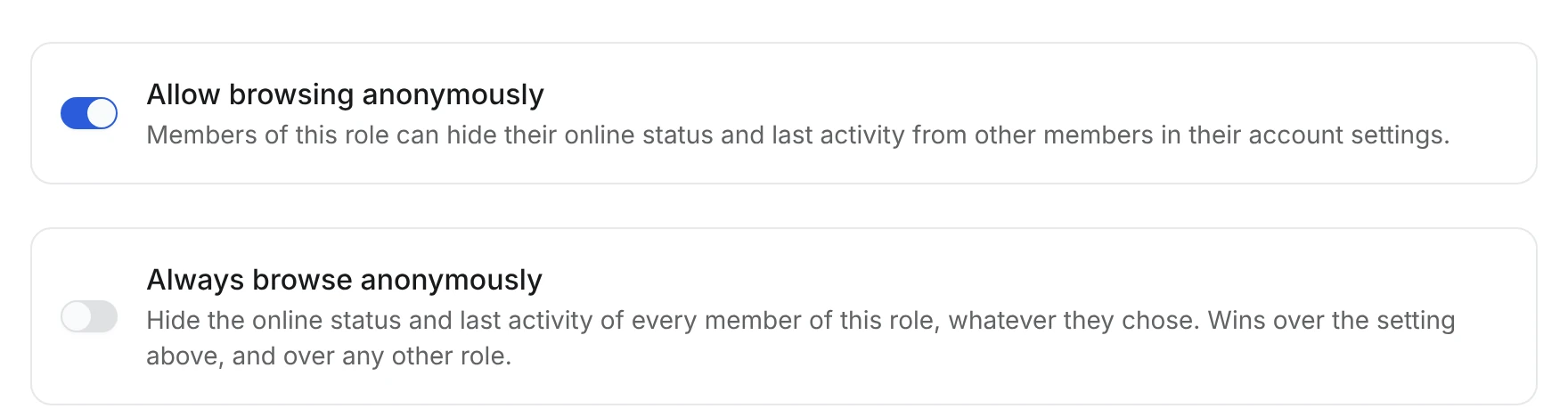
Two switches on the role dialog's Profile tab decide whether members of a role choose for themselves. Open AdminCP → Core → Users → Roles (/admin/core/users/roles) and edit a role:
| Setting | Default | Effect |
|---|---|---|
| Allow browsing anonymously | On | Members may turn Browse anonymously on. Off, they stay visible even if they turned it on earlier |
| Always browse anonymously | Off | Members are hidden from other members, whatever they chose |
They are stored as allowBrowseAnonymously and forceBrowseAnonymously on core_roles.
Every role a member holds counts, primary and secondary. One role with Always browse anonymously hides the member, even if another role doesn't allow it. Otherwise every role has to allow it, like the other self-service allowances. Presence reads the roles on every request, so saving a role changes what other members see on their next refresh.
When the roles decide, the member still sees the switch, but disabled: on under a forcing role, off under a role that doesn't allow it. Hovering or focusing it explains why, for example "Your group always browses anonymously, so this can't be turned off."

The API enforces the same rule: PUT /users/me/privacy answers 403 while the roles decide, so an old tab can't get around the disabled switch. Staff with the permission below still see forced members, flagged isHidden: true.
Staff permission
users:can_view_hidden_presence (See the online status and last activity of members who browse anonymously) is declared for both kinds of staff, and each side of the site checks its own:
| Where | Session | Grant it in |
|---|---|---|
| Public site (profiles, plugin pages, batch) | The member's session | Staff → Moderators, module Users |
AdminCP (/admin/core/users/[id]) | The AdminCP session | Staff → Administrators, module Users (needs View users list) |
Root roles and Unrestricted staff have it automatically, like every other staff permission. See Staff Permissions for how grants work.
The UserPresence shape
Every presence read returns one of three shapes, typed as UserPresence in @vitnode/core/lib/user-presence:
type UserPresence =
  | { status: 'online'; lastSeenAt: string; isHidden?: true }
  | { status: 'offline'; lastSeenAt: string | null; isHidden?: true }
  | { status: 'hidden' }
lastSeenAt is an ISO date, or null for a member who has never sent a heartbeat. isHidden: true means "you can see this, other members can't".
API endpoints
All paths start with /api/@vitnode/core. Every presence read sends Cache-Control: private, no-store, because the answer depends on who is asking.
| Method | Path | Who | Does |
|---|---|---|---|
POST | /users/presence/heartbeat | Signed-in member | Keeps the current session online. 204, or 401 when signed out |
GET | /users/{id}/presence | Anyone | One member's UserPresence. 404 for an unknown member |
POST | /users/presence/batch | Anyone | Body { userIds: number[] } (1-100). Returns { presences: { userId, presence }[] } |
PUT | /users/me/privacy | Signed-in member | Body { hideOnlineStatus: boolean }. Emits user.updated. 403 while the member's roles decide |
GET | /users/me/policy | Signed-in member | Includes browseAnonymously: allowed, forced or disallowed |
GET | /admin/users/{id}/presence | Staff with users:can_view | One member's UserPresence, checked against admin permissions |
The heartbeat reads the member and the session from the session cookie. It never accepts a user ID in the body, so nobody can keep somebody else online. The batch route leaves unknown IDs out of the result.
Limitations
- Presence is approximate. Online means "has a visible tab", not "is looking at the screen". A member who makes a sandwich with the tab still open stays online until they close it or switch away.
- Without Redis, there are no leases. With no
REDIS_URL, a member counts as online whenlastSeenAtis within the last 150 seconds, and signing out cannot end presence early: it simply expires. - When Redis fails, nobody is reported online. Presence errs towards "offline" rather than inventing activity.
- Offline takes up to 150 seconds. Closing the last tab does not send a goodbye, so the lease has to run out.