Payments
Plugin checkout
Charge a signed-in member a fixed, server-side price from your VitNode plugin, send them to a hosted checkout with the typed fetcher, and show a payment only once the provider confirmed it.
This guide walks through the payments-demo plugin in the VitNode repository
(plugins/payments-demo). It sells one $5.00 sticker pack, and every step below
is code from that plugin. Copy the pattern for your own item.
Before you begin
- A provider instance in
payments.providers, for example Stripe. - A plugin with an API module and a page. New to that? Start with create a plugin.
Build the purchase flow
Keep the price on the server
The browser sends an item id, never an amount. Amounts are integers in the
currency's smallest unit: 500 cents is $5.00, and 500 yen is ¥500.
export const DEMO_ITEMS = {
  'sticker-pack': {
    amount: 500,
    currency: 'usd',
    title: 'payments-demo.items.sticker_pack.title',
  },
} as const

/** The payment reference of a purchase: what core stores as `reference`. */
export const purchaseReference = (purchaseId: number) =>
  `purchase:${purchaseId}`
The reference is your plugin's own id for what is being paid for. Core keeps
at most one open payment per reference, and a retry after a checkout expired
creates a new payment with the same reference.
Store the purchase without a "paid" flag
The plugin owns a small table: who bought which item. Whether it is paid is not a column, because core's stored payment already says so. Two copies of the same truth could disagree after a crash; one cannot.
export const payments_demo_purchases = camelCase.table.withRLS(
  'payments_demo_purchases',
  t => ({
    id: t.serial().primaryKey(),
    userId: t
      .integer()
      .notNull()
      .references(() => core_users.id, { onDelete: 'cascade' }),
    itemId: t.varchar({ length: 50 }).notNull(),
    createdAt: t.timestamp().notNull().defaultNow(),
  }),
  t => [
    uniqueIndex('payments_demo_purchases_user_item_unique').on(t.userId, t.itemId),
  ],
)
Create the checkout on the server
The route checks the member, looks the price up, and calls
c.get("payments").createCheckout(). Return paths are same-site paths; core
turns them into absolute URLs on VITNODE_WEB_URL and refuses anything else.
handler: async c => {
  const user = c.get('user')
  if (!user) throw new HTTPException(401)
  const { itemId, providerId } = c.req.valid('json')
  const item = DEMO_ITEMS[itemId]

  // ...insert or find the member's purchase row...

  const payments = c.get('payments')
  const reference = purchaseReference(purchase.id)
  const attempts = await payments.listByReference(reference)
  if (attempts.some(attempt => attempt.status === 'succeeded')) {
    return c.json({ error: 'already_owned' }, 409)
  }

  try {
    const checkout = await payments.createCheckout({
      amount: item.amount,
      currency: item.currency,
      description: 'VitNode demo sticker pack',
      providerId,
      reference,
      userId: user.id,
      successPath: `/payments-demo/purchases/${purchase.id}`,
      cancelPath: `/payments-demo/purchases/${purchase.id}`,
    })

    return c.json(
      { paymentId: checkout.paymentId, purchaseId: purchase.id, redirectUrl: checkout.redirectUrl },
      200,
    )
  } catch (error) {
    if (!(error instanceof PaymentError)) throw error
    // `error.code` is safe to show; `error.status` is the HTTP status to use.
    // ...
  }
},
createCheckout() stores the payment before calling the provider, so a timeout
never loses track of it. Calling it again for the same reference returns the
open checkout (resumed: true) while it has more than 5 minutes left. When the
provider, amount, currency or description changed, or the checkout is about to
close, core closes it at the provider and starts a new one. Another member's
open payment for the reference answers reference_in_use, and one that is
still settling answers payment_processing.
Errors are PaymentErrors from @vitnode/core/api/lib/payments/errors;
provider_unavailable is safe to retry.
The browser's providerId is only a choice among configured instances: an
unknown id fails with provider_not_found.
Send the browser to the checkout
Call the route with the typed fetcher and follow redirectUrl. Keep the
button loading until the browser leaves.
const res = await fetcher({
  plugin: manifest.id,
  method: 'post',
  module: 'purchases',
  path: '/checkout',
  args: { body: { itemId, providerId } },
})

if (res.status === 200) {
  const { redirectUrl } = await res.json()
  window.location.assign(redirectUrl)
}
Show a provider picker only when c.get("payments").providers() returns more
than one instance. The demo's GET /catalog route returns that list.
Show the confirmed status
The provider sends the customer back to successPath, but arriving there
proves nothing. The status route reads core's payment and, while it is open,
asks the provider for news, at most every 15 seconds:
const attempts = await payments.listByReference(purchaseReference(purchase.id))
let latest = attempts[0]

if (latest && (latest.status === 'pending' || latest.status === 'processing')) {
  latest = await payments.getForUser({ paymentId: latest.id, refresh: true, userId })
}

const paid = attempts.some(attempt => attempt.status === 'succeeded') || latest?.status === 'succeeded'
getForUser() answers payment_not_found unless the payment belongs to this
plugin and this user, and the route itself only loads the member's own
purchase. The page polls every 5 seconds while the status is pending or
processing (refetchInterval in pages/queries.ts) and shows Payment
confirmed only when paid is true.
Check the result
- Open
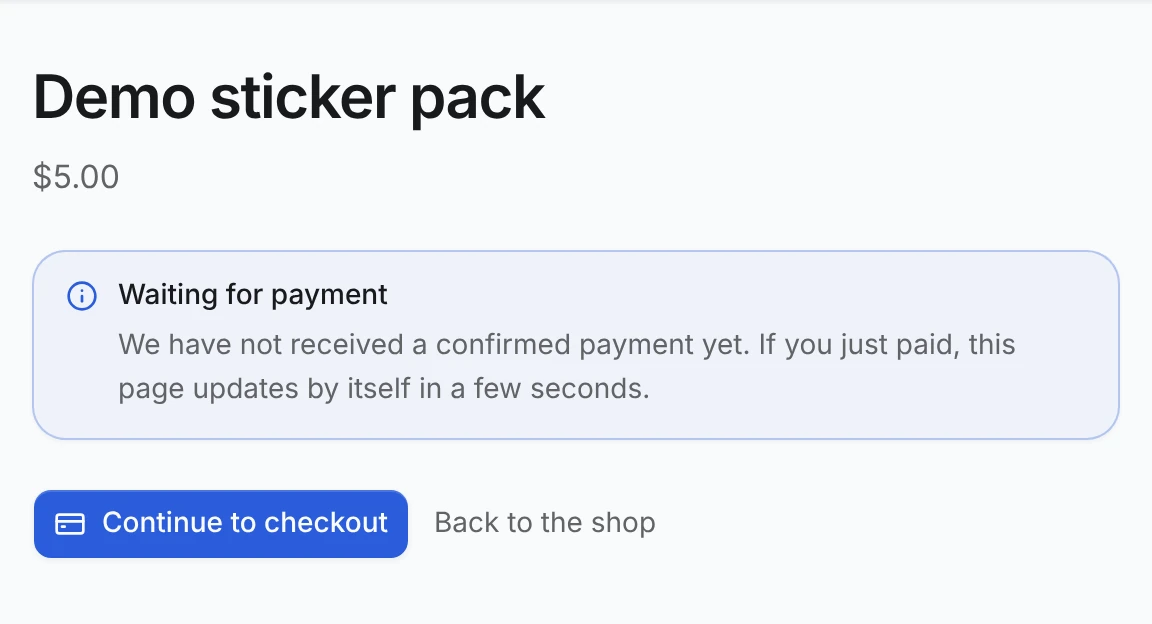
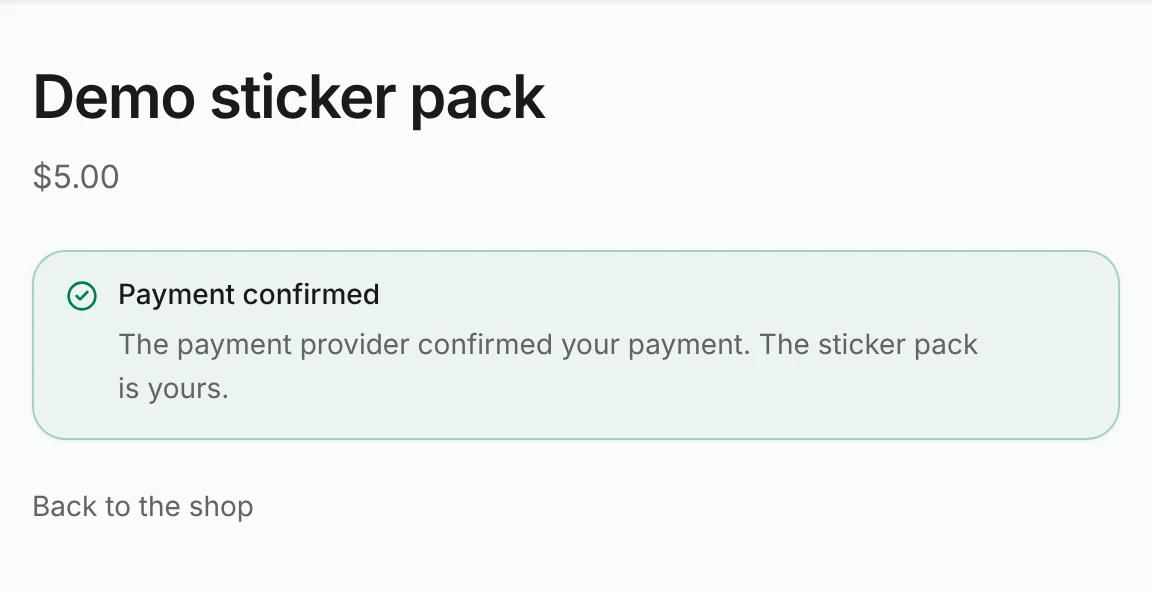
/payments-demosigned in and buy the item. You return to/payments-demo/purchases/{id}, which shows Waiting for payment until the webhook arrives, then Payment confirmed.
- Reload
/payments-demo: the card shows You own this item, and Buy now is gone. Buying again answers409 already_owned. - Open the purchase URL as another member: it answers
404.
Why ownership survives crashes
What a member owns is computed from core_payments every time it is read, and
the webhook commits the payment status and the event id in one transaction. If
the server dies before that commit, the provider redelivers the webhook; if it
dies after, the status is already stored. A duplicate webhook is acknowledged
without touching anything, and a second succeeded payment for one reference
still means one purchase.
The demo also listens to payment.succeeded to write a log line. That is fine
for side effects, but with the default events adapter a failing listener is not
retried, so never make an event the only record of a sale.