Routes
Declare plugin-owned URLs as a nested route tree with lazy pages, loaders, metadata, messages, and breadcrumbs.
Start by creating a plugin. A plugin's src/routes.ts
is its promise to the app: which URLs it owns, and which module renders each one.
The host turns that promise into lazy TanStack Start routes—no copied page files,
no drama.
Simple route
You can declare a single page with a path and a lazy component:
import { definePluginRoutes, lazy, page } from '@vitnode/core/routing'

export const routes = definePluginRoutes([
  page('/notes', {
    component: lazy(() => import('./pages/note-page')),
    messages: ['@acme/site-notes.home'],
  }),
])import { useTranslations } from 'use-intl'
const NotePage = () => {
const t = useTranslations('@acme/site-notes.home')
return (
<div className="container mx-auto max-w-2xl p-4">
<h1 className="text-2xl font-semibold tracking-tight text-balance">
{t('title')}
</h1>
</div>
)
}
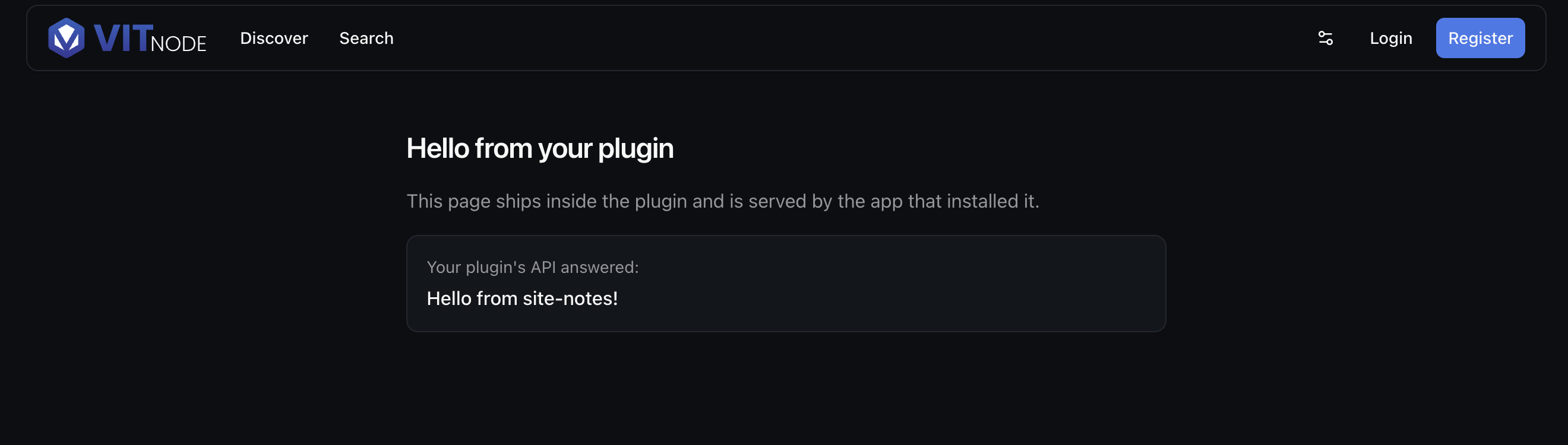
export default NotePageThe messages array specifies which translation namespaces this page requires. A namespace must always be a dotted path into your plugin's message tree (such as @acme/site-notes.home rather than the bare plugin ID), allowing VitNode to only download the strings that this screen renders. For more details on message structure and limits, see the Namespaces and Translating Pages guides.
Render without the main layout
Every route picks a shell with area. The default is 'main', which frames the
page in the host's public layout—header, breadcrumbs, navigation, footer.
Set area: 'blank' for a page that should stand on its own: an embed, a kiosk
screen, a print view, a checkout step with nothing to wander off to.
import { definePluginRoutes, lazy, page } from '@vitnode/core/routing'

export const routes = definePluginRoutes([
  page('/notes/embed', {
    area: 'blank',
    component: lazy(() => import('./pages/notes-embed-page')),
  }),
])
A blank page is mounted at the root of the host's route tree, so it still gets the document, the theme, the providers, and translations. It simply has no chrome around it—which also means no breadcrumb trail, so give the page its own way back.
area | Renders inside |
|---|---|
'main' | The public layout: header, breadcrumbs, footer (default) |
'blank' | Nothing but the app root—no chrome at all |
'admin' | The AdminCP shell: sidebar, staff guard |
Only a top-level route chooses an area. Every route nested in a layout()
renders in the shell its layout renders in, so it may not declare one of its
own.
Dynamic route
Use :slug for dynamic segments. VitNode converts it to TanStack Start's
internal $slug spelling while keeping your plugin portable.
import { definePluginRoutes, lazy, page } from '@vitnode/core/routing'

export const routes = definePluginRoutes([
  page('/notes/:slug', {
    component: lazy(() => import('./pages/note-page-slug')),
  }),
])import type { PluginRoutePageProps } from '@vitnode/core/routing'
const NotePage = ({ params }: PluginRoutePageProps) => {
return (
<article className="container mx-auto max-w-3xl p-4">
<h2 className="text-3xl font-semibold tracking-tight text-balance">
{params.slug}
</h2>
</article>
)
}
export default NotePageMetadata (Head)
The head function returns the page's <title> and <meta> tags. It runs
after the loader, so it can use the data to make a unique title, description, and other SEO tags.
import {
  definePluginRoute,
  type PluginRoutePageProps,
} from '@vitnode/core/routing'

export const route = definePluginRoute({
  head: ({ params }) => ({
    description: 'A note delivered by the Site notes plugin.',
    title: params.slug,
  }),
})

const NotePage = ({ params }: PluginRoutePageProps) => {
  return (
    <article className="container mx-auto max-w-3xl p-4">
      <h2 className="text-3xl font-semibold tracking-tight text-balance">
        {params.slug}
      </h2>
    </article>
  )
}

export default NotePage
Localizing metadata
head runs outside the React component tree—during SSR and on every
navigation—so hooks like useTranslations cannot reach it. Instead, head
receives t, a translator over the namespaces the route declared in messages:
page('/notes/:slug', {
  component: lazy(() => import('./pages/note-page-slug')),
  messages: ['@acme/site-notes.home'],
})import { definePluginRoute } from '@vitnode/core/routing'
export const route = definePluginRoute({
head: ({ params, t }) => ({
description: t('@acme/site-notes.home.desc'),
title: `${t('@acme/site-notes.home.note')}: ${params.slug}`,
}),
})Keys are full dotted paths, namespace included. A component scopes itself
once with useTranslations('@acme/site-notes.home') and then asks for
t('title'); in head there is no component to scope, so the whole key is
spelled out.
Values interpolate the same way they do in a component:
head: ({ t }) => ({
  title: t('@acme/site-notes.home.greeting', { name: 'Ada' }),
})
No extra request
The route's namespaces are already fetched before head runs—the loader warms
them, and head runs after the loader—so translating metadata costs a cache
read, not a round trip.
load receives the same t, for a title that depends on data you are already
fetching:
export const route = definePluginRoute({
  load: async ({ params, t }) => {
    const note = await findNote(params.slug)

    return { heading: `${t('@acme/site-notes.home.note')}: ${note.title}` }
  },
  head: ({ loaderData }) => ({ title: loaderData?.heading }),
})
Declare the namespace first
Calling t on a route that declares no messages throws, naming the
namespace to add. Echoing the key back instead would ship
@acme/site-notes.home.title into a <title>, where nothing would surface it
until it showed up in a search result.
Loaders
Fetch data in load. It runs on the server during SSR and on the client for subsequent navigations. Data returned from load is automatically passed to both head (for dynamic metadata) and the page component as loaderData.
Declare load above head
Always declare load above head in definePluginRoute. TypeScript
infers the type of loaderData in head directly from the return type of
load.
import {
  definePluginRoute,
  type PluginRoutePageProps,
} from '@vitnode/core/routing'

interface Note {
  content: string
  title: string
}

export const route = definePluginRoute({
  load: async ({ params }): Promise<Note> => {
    return {
      content: 'Loaded securely from your plugin loader.',
      title: `Note: ${params.slug}`,
    }
  },
  head: ({ loaderData, params }) => ({
    description: loaderData?.content,
    title: loaderData?.title ?? params.slug,
  }),
})

const NotePage = ({ loaderData }: PluginRoutePageProps<Note>) => {
  return (
    <article className="container mx-auto flex max-w-3xl flex-col gap-4 p-4">
      <h1 className="text-3xl font-semibold tracking-tight text-balance">
        {loaderData.title}
      </h1>
      <p className="text-muted-foreground leading-relaxed text-pretty">
        {loaderData.content}
      </p>
    </article>
  )
}

export default NotePage
Breadcrumbs
Declare a crumb directly in definePluginRoute to contribute to the public header or AdminCP breadcrumb trail.
Because breadcrumb renders as a React component within the route's declared namespaces, useTranslations from use-intl works out of the box:
import { definePluginRoute } from '@vitnode/core/routing'
import { useTranslations } from 'use-intl'

export const route = definePluginRoute({
  breadcrumb: () => {
    const t = useTranslations('@acme/site-notes.home')

    return t('title')
  },
})
For dynamic routes, the crumb receives { loaderData } and can combine dynamic records with localized copy:
import { definePluginRoute } from '@vitnode/core/routing'
import { useTranslations } from 'use-intl'

export const route = definePluginRoute({
  load: async ({ params }): Promise<Note> => {
    return {
      content: 'Loaded securely from your plugin loader.',
      title: params.slug,
    }
  },
  head: ({ loaderData, params }) => ({
    title: loaderData?.title ?? params.slug,
  }),
  breadcrumb: ({ loaderData }) => {
    const t = useTranslations('@acme/site-notes.home')

    return `${t('note')}: ${loaderData.title}`
  },
})
For nested trails, deferred crumbs, and AdminCP trails, see the Breadcrumbs guide.
Loading states
While a route's loader runs, VitNode displays its pendingComponent:
import { definePluginRoutes, lazy, page } from '@vitnode/core/routing'
import { TablePendingSkeleton } from '@vitnode/core/tanstack/pending'

export const routes = definePluginRoutes([
  page('/notes', {
    component: lazy(() => import('./pages/notes-page')),
    pendingComponent: TablePendingSkeleton,
  }),
])
A pending component is not code-split
A router draws it before the page's own chunk has arrived, so there is
nothing to wait for it—TanStack Router never splits a pendingComponent, and
neither does VitNode. It is imported outright into the initial bundle. Keep it
to a skeleton.
VitNode ships pre-built skeleton shapes from @vitnode/core/tanstack/pending: TablePendingSkeleton, FeedPendingSkeleton, FormPendingSkeleton, CardsPendingSkeleton, ProfilePendingSkeleton, AuthPendingSkeleton, and RoutePendingSpinner.
To customize skeleton props (such as rows or className), rename the file to routes.tsx and return a JSX element:
page('/notes', {
  component: lazy(() => import('./pages/notes-page')),
  pendingComponent: () => <FeedPendingSkeleton rows={4} />,
})
If pendingComponent is omitted, the route falls back to the application's global defaultPendingComponent. Learn more in the Loading States guide.
Missing pages
When a loader cannot find what the URL requested, throw notFound() from @tanstack/react-router to activate the route's notFound component:
import { notFound } from '@tanstack/react-router'
import { definePluginRoute } from '@vitnode/core/routing'

export const route = definePluginRoute({
  load: async ({ params }) => {
    const note = await findNote(params.slug)

    if (!note) {
      throw notFound()
    }

    return note
  },

  notFound: () => (
    <div className="container mx-auto p-4">
      <p className="text-muted-foreground leading-relaxed">No such note.</p>
    </div>
  ),
})
Unlike pendingComponent, notFound is part of the lazy page chunk and costs unvisited routes nothing. If omitted, the route falls through to the application's global defaultNotFoundComponent, preserving the application layout and navigation shell. Learn more in the Errors & Not Found guide.
Catch-all routes
A * segment matches every remaining segment of the URL, allowing a single route to own an entire subtree. It must be the final segment of a path and is only permitted on page() declarations (a layout ending in * would match before its child routes):
import { definePluginRoutes, lazy, page } from '@vitnode/core/routing'

export const routes = definePluginRoutes([
  page('/notes/*', {
    component: lazy(() => import('./pages/notes-catch-all')),
  }),
])
The page reads the matched trailing path from params._splat:
import type { PluginRoutePageProps } from '@vitnode/core/routing'

const NotesCatchAll = ({ params }: PluginRoutePageProps) => {
  const segments = (params._splat ?? '').split('/').filter(Boolean)

  return (
    <div className="container mx-auto max-w-3xl p-4">
      <p className="text-muted-foreground leading-relaxed">
        {segments.join(' / ')}
      </p>
    </div>
  )
}

export default NotesCatchAll
Route protection (requires)
Protect pages or entire layouts by declaring requires. VitNode checks the visitor's authentication state before the route chunk downloads:
import { definePluginRoutes, lazy, page } from '@vitnode/core/routing'

export const routes = definePluginRoutes([
  page('/notes/new', {
    component: lazy(() => import('./pages/new-note-page')),
    requires: 'authenticated',
  }),
])
requires | Behavior when not satisfied | Typical use cases |
|---|---|---|
'authenticated' | Redirects guests to /login with returnTo set to the target path | Dashboards, note editors, user settings |
'guest' | Redirects authenticated users away (to / or their post-auth destination) | Sign-in, account creation, password reset |
'admin-guest' | Redirects staff with active admin sessions into the AdminCP | AdminCP sign-in screen (/admin) |
AdminCP routes are pre-guarded
Routes with area: 'admin' are automatically placed behind the AdminCP staff
session guard and cannot declare requires. To restrict access to specific
staff roles or permissions, gate content inside the route component or loader.
Nested routes and layouts
A layout() wraps child routes in a shared UI frame without claiming a URL segment of its own. Use index() to render a page at the layout's root path.
Every path nested inside a layout is relative to its parent:
import {
  definePluginRoutes,
  index,
  layout,
  lazy,
  page,
} from '@vitnode/core/routing'

export const routes = definePluginRoutes([
  layout('/notes', {
    component: lazy(() => import('./pages/notes-layout')),
    messages: ['@acme/site-notes.home'],
    children: [
      index({
        component: lazy(() => import('./pages/notes-index-page')),
      }),
      page(':slug', {
        component: lazy(() => import('./pages/note-page-slug')),
      }),
    ],
  }),
])
A layout component renders {children}:
import { useTranslations } from 'use-intl'

const NotesLayout = ({ children }: { children: React.ReactNode }) => {
  const t = useTranslations('@acme/site-notes.home')

  return (
    <div className="container mx-auto flex max-w-4xl flex-col gap-6 p-4">
      <header className="border-b pb-4">
        <h1 className="text-2xl font-bold tracking-tight text-balance">
          {t('title')}
        </h1>
      </header>
      <main>{children}</main>
    </div>
  )
}

export default NotesLayout| Route helper | URL resolved | Purpose |
|---|---|---|
layout('/notes', ...) | — | Wraps nested child routes with a persistent UI shell |
index(...) | /notes | Renders at the exact URL of the parent layout |
page(':slug', ...) | /notes/:slug | Relative leaf route rendered inside the parent layout |
AdminCP routes
Mount a screen in the staff-only Admin Control Panel by adding area: 'admin'. It automatically inherits the AdminCP shell, sidebar, and staff authentication guard:
page('/admin/notes', {
  area: 'admin',
  component: lazy(() => import('./pages/admin-notes-page')),
  messages: ['@acme/site-notes.admin'],
})
Search parameters
Type and validate query strings (like pagination or filters). Declare search on the route for eager URL-level validation before code chunks load:
page('/notes', {
  component: lazy(() => import('./pages/notes-page')),
  search: (input: Record<string, unknown>) => ({
    page: Number(input.page) || 1,
  }),
})
The component receives typed search values and a navigate helper:
import type { PluginRoutePageProps } from '@vitnode/core/routing'

interface NotesSearch {
  page: number
}

const NotesPage = ({
  navigate,
  search,
}: PluginRoutePageProps<undefined, NotesSearch>) => (
  <div className="container mx-auto p-4">
    <button
      className="inline-flex items-center rounded-md bg-primary px-4 py-2 text-sm font-medium text-primary-foreground hover:bg-primary/90"
      onClick={() => void navigate({ search: { page: search.page + 1 } })}
      type="button"
    >
      Next Page ({search.page})
    </button>
  </div>
)

export default NotesPage
Data Fetching
Learn universal fetchers, cache invalidation, and background mutations.
Breadcrumbs
Customize static and dynamic breadcrumbs across public and admin pages.
Loading States
Display debounced spinners and tailored skeleton fallbacks while pages stream.
Errors & Not Found
Render localized 404 and 500 boundaries while keeping application layouts intact.
Translations
Stream localized message namespaces in parallel with route chunks using use-intl.
AdminCP Pages
Mount plugin screens, navigation links, and permissions in the AdminCP.