Templates
Build a translated VitNode email template with React Email and DefaultTemplateEmail, send it from a plugin route to the signed-in admin, and preview it in the browser.
An email template is a React component that VitNode renders to HTML and plain text with React Email. In this guide the site-notes plugin gets a New note email, translated into the recipient's language, sent from an admin route and previewed in the browser.
Before you begin
- An email adapter. Set
email.adapterin yourvitnode.api.config.ts, for example Resend or Nodemailer. Without one, sending fails with500. - The
site-notesplugin with itssite_notestable and the Create notes permission, from the beginner path up to Permissions. Any plugin with an admin route works the same way.
Add the email strings
The API renders emails, so it reads a plugin's server messages, not its frontend src/locales/en.json. Create src/locales/api/en.json:
{
  "site-notes": {
    "email": {
      "new_note": {
        "subject": "New note: {title}",
        "greeting": "Hello {name}!",
        "intro": "A new note was posted on the site.",
        "button": "Read all notes"
      }
    }
  }
}
Then a loader per locale in src/locales/api/index.ts:
import type { LocaleMessagesMap } from "@vitnode/core/lib/i18n/types";

const messages: LocaleMessagesMap = {
  en: async () => await import("./en.json", { with: { type: "json" } }),
};

export default messages;
Register it as messages in src/config.api.ts:
import apiMessages from "./locales/api";

export const siteNotesApiPlugin = () =>
  buildApiPlugin({
    manifest,
    messages: apiMessages,
    modules: [helloModule, notesModule, adminModule],
    // ...
  });
Create the template
Create src/emails/new-note.tsx:
import DefaultTemplateEmail, {
  type DefaultTemplateEmailProps,
} from "@vitnode/core/emails/default-template";
import { EmailButton } from "@vitnode/core/emails/ui/button";
import { Heading, Section, Text } from "react-email";
import { createTranslator } from "use-intl";

interface NewNoteEmailProps extends DefaultTemplateEmailProps {
  note: { body: string; title: string };
}

export default function NewNoteEmail({ note, user, ...props }: NewNoteEmailProps) {
  const t = createTranslator({ ...props.i18n, namespace: "site-notes.email.new_note" });
  const notesUrl = new URL("/site-notes/notes", props.templateProps.metadata.url).href;

  return (
    <DefaultTemplateEmail {...props} user={user}>
      <Section className="bg-card text-card-foreground rounded-lg p-6">
        <Text>{t("greeting", { name: user?.name ?? "" })}</Text>
        <Text className="text-muted-foreground">{t("intro")}</Text>
        <Heading as="h2">{note.title}</Heading>
        <Text>{note.body}</Text>
        <EmailButton href={notesUrl}>{t("button")}</EmailButton>
      </Section>
    </DefaultTemplateEmail>
  );
}DefaultTemplateEmailPropsis what VitNode passes to every template:i18n(the recipient'slocaleandmessages),templateProps(site title and URL, logo, preview text) anduserwhen the email goes to a user. Your own props, herenote, come on top.createTranslatorfromuse-intltranslates with those messages. Hooks such asuseTranslationsdo not work, because the email is rendered on the server, outside any React provider.DefaultTemplateEmailadds the logo, the footer link and the colour tokens thatEmailButtonand the classes above use.- Links must be absolute. Build them from
templateProps.metadata.url, the site's address.
Send it from a route
Create src/api/modules/admin/notes/email.route.tsx. The .tsx extension lets the handler render the template with JSX:
import { z } from "@hono/zod-openapi";
import { eq } from "drizzle-orm";
import { createTranslator } from "use-intl";

import { buildRoute } from "@/api/builders";
import { site_notes } from "@/database/notes";
import NewNoteEmail from "@/emails/new-note";

export const emailNoteRoute = buildRoute({
  adminStaffPermission: { module: "notes", permission: "can_create" },
  route: {
    method: "post",
    path: "/{id}/email",
    request: {
      params: z.object({ id: z.coerce.number().int().positive() }),
    },
    responses: {
      202: {
        content: { "application/json": { schema: z.object({ queued: z.literal(true) }) } },
        description: "The email is rendered and queued for delivery.",
      },
      404: { description: "No note has this id." },
    },
  },
  handler: async c => {
    const { id } = c.req.valid("param");
    const admin = c.get("admin");
    const [note] = await c
      .get("db")
      .select({ title: site_notes.title, body: site_notes.body })
      .from(site_notes)
      .where(eq(site_notes.id, id));
    if (!note || !admin) return c.body(null, 404);

    await c.get("email").send({
      user: admin.user,
      subject: ({ i18n }) =>
        createTranslator({ ...i18n, namespace: "site-notes.email.new_note" })("subject", {
          title: note.title,
        }),
      content: props => <NewNoteEmail {...props} note={note} />,
    });

    return c.json({ queued: true as const }, 202);
  },
});
Add emailNoteRoute to the routes of adminNotesModule in src/api/modules/admin/notes/notes.module.ts.
usersends to a user in their own language. It needsid,emailandlanguage;c.get("admin").userhas them, and so does a row fromcore_users.subjectis a string, or a function that translates it with the recipient's messages.contentreceives the template props and returns the email. Spread them into your template and add your own.send()resolves to nothing. The route answers202withqueued: true, never "sent", because at this point the email is still waiting for delivery.
Check the result
-
Add a temporary button that emails you note
2withfetcher. Createsrc/pages/check-email-note.tsx:plugins/site-notes/src/pages/check-email-note.tsx import { Button } from "@vitnode/core/components/ui/button"; import { fetcher } from "@vitnode/core/tanstack/fetcher"; import { useState } from "react"; import { manifest } from "@/manifest.gen"; export const CheckEmailNote = () => { const [status, setStatus] = useState<number>(); const [isPending, setIsPending] = useState(false); const onClick = async () => { setIsPending(true); try { const response = await fetcher({ plugin: manifest.id, method: "post", module: "admin/notes", path: "/{id}/email", args: { params: { id: 2 } }, }); setStatus(response.status); } finally { setIsPending(false); } }; return ( <div className="flex items-center gap-3"> <Button isLoading={isPending} onClick={onClick}> Email me note 2 </Button> {status ? <output>{status}</output> : null} </div> ); };Render
<CheckEmailNote />insrc/pages/notes-page.tsx, sign in to the AdminCP in the same browser, open/site-notes/notesand press the button. The status reads202. Remove the button when you are done. -
The email arrives at your admin account's address with the subject New note: Office closed on Friday. If it does not, check the adapter's settings and Debug Panel → Queue (
/admin/core/debug/queue). A failedsend-emailtask from@vitnode/coreshows the provider's error in Last error.
A note id that does not exist returns 404, and a request without the Create notes permission returns 403.
Queued or immediate
send() renders the email during the request, then stores it as a send-email task in the queue. Right after the response is sent, VitNode tries to deliver it, so a password reset does not wait for the next cron run. If that attempt fails, the queue retries the task, up to three attempts.
build() followed by deliver() skips the queue and waits for the provider during the request. Use it only when the route must know the outcome, because a failure is then the route's problem:
const email = await c.get("email").build(args); // the same args as send()
const { id } = await c.get("email").deliver(email); // the provider's message id, when it reports one
Neither is proof that the message reached an inbox. A provider accepting an email is not the recipient reading it.
Send to an address
For someone without an account, pass to and the locale to render in, instead of user:
await c.get("email").send({
  to: "guest@example.com",
  locale: "en",
  subject: "Your invitation",
  content: props => <InvitationEmail {...props} />,
});
user is then undefined in the template, which is why NewNoteEmail reads user?.name.
Preview templates
React Email's preview server renders the files of a folder in the browser, with hot reload. Add a script to the plugin's package.json, where react-email is already a dependency. Pick a port your app does not use:
{
  "scripts": {
    "dev:email": "email dev --dir src/emails --port 3001"
  }
}
Generated apps already have a dev:email script for their own src/emails. Run it from the plugin's folder:
bun run dev:emailOpen http://localhost:3001 and choose new-note. The preview has no request and no recipient, so give the template PreviewProps with sample data and the messages it translates, at the end of new-note.tsx:
NewNoteEmail.PreviewProps = {
  ...DefaultTemplateEmail.PreviewProps,
  note: { title: "Office closed on Friday", body: "We are back on Monday at 9:00." },
  user: { id: 1, email: "ada@example.com", language: "en", name: "Ada Lovelace" },
  i18n: {
    locale: "en",
    messages: {
      "site-notes": {
        email: {
          new_note: {
            subject: "New note: {title}",
            greeting: "Hello {name}!",
            intro: "A new note was posted on the site.",
            button: "Read all notes",
          },
        },
      },
    },
  },
} satisfies NewNoteEmailProps;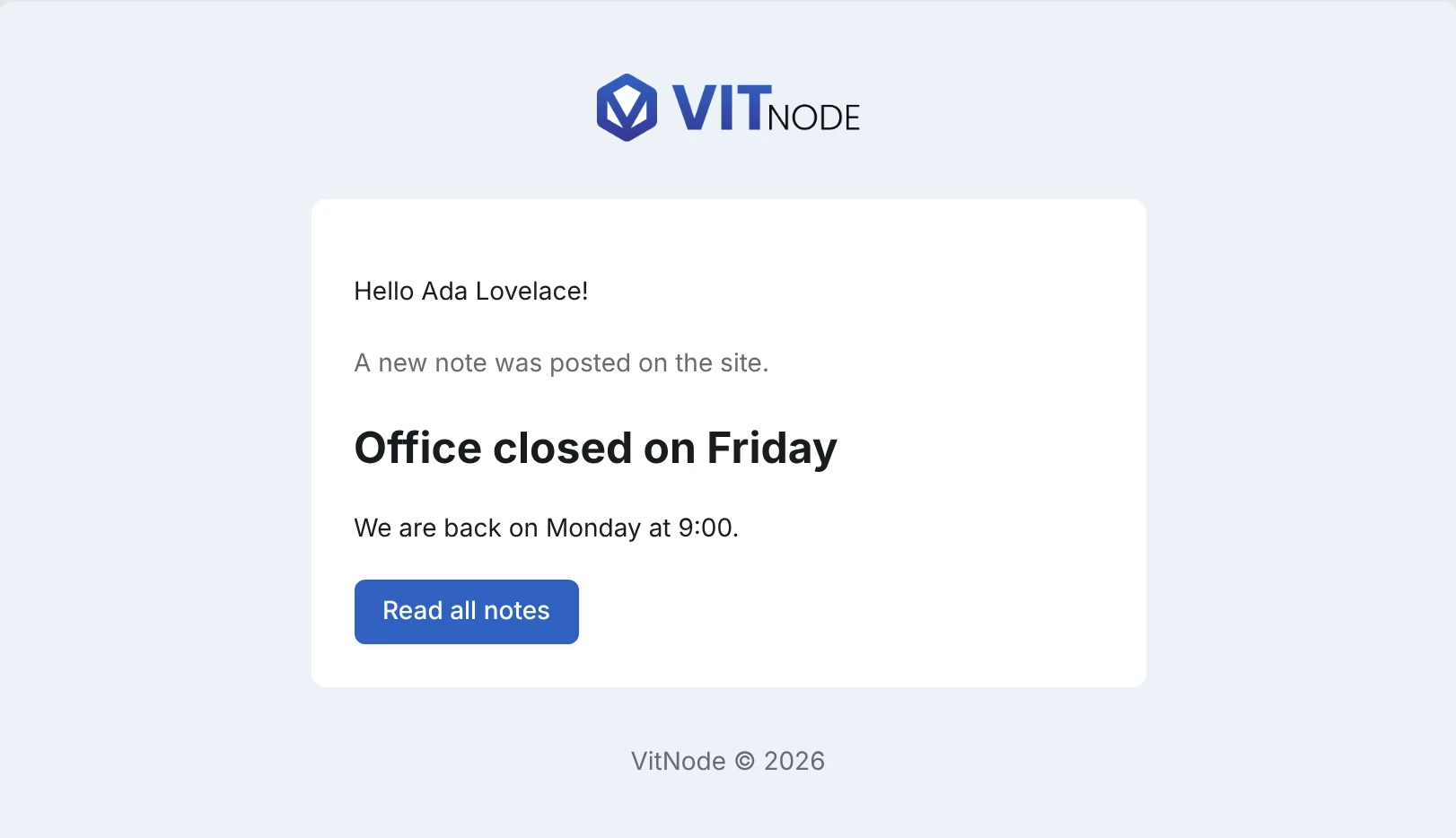
Colour tokens
DefaultTemplateEmail wraps your content in React Email's <Tailwind> with these colours, so classes such as bg-primary or text-muted-foreground work inside it:
| Token | Default | Token | Default |
|---|---|---|---|
background | #edf2f8 | foreground | #0e1216 |
card | #ffffff | card-foreground | #171b1f |
popover | #ffffff | popover-foreground | #171b1f |
primary | #3160c0 | primary-foreground | #fafafa |
secondary | #f4f9ff | secondary-foreground | #1e2226 |
muted | #eaeff5 | muted-foreground | #686c72 |
accent | #e0e5eb | accent-foreground | #1e2226 |
destructive | #de3b3f | warn | #906600 |
border | #d9dfe4 | input | #d9dfe4 |
ring | #5aa3ec |
Override them for every email with email.tailwindConfig in vitnode.api.config.ts:
email: {
  adapter: /* your adapter */,
  tailwindConfig: {
    theme: { extend: { colors: { primary: "#0f766e" } } },
  },
},
A template that builds its own <Html> instead of using DefaultTemplateEmail has none of these tokens, and EmailButton or EmailCard inside it loses its colours.
send() options
Prop
Type
Related
- Email components:
EmailButtonandEmailCard. - Notification emails: emails for VitNode notifications, including digests.
- Custom email adapter: deliver through your own provider.