Users
Account Deletion and Data Export
How VitNode lets members download their data and delete their account under GDPR, how staff delete accounts from the AdminCP, and how to configure the grace period and IP retention.
VitNode handles GDPR data requests out of the box. Members download a copy of their data (Art. 15 and 20) and delete their account (Art. 17) from Settings → Privacy & data, staff delete accounts from the AdminCP, and the Debug Panel warns you before a request misses GDPR's one-month deadline.
Core exports and erases its own tables. A plugin that stores data about members adds its own handlers, see Export and Erase Plugin Data.
Let members delete their account
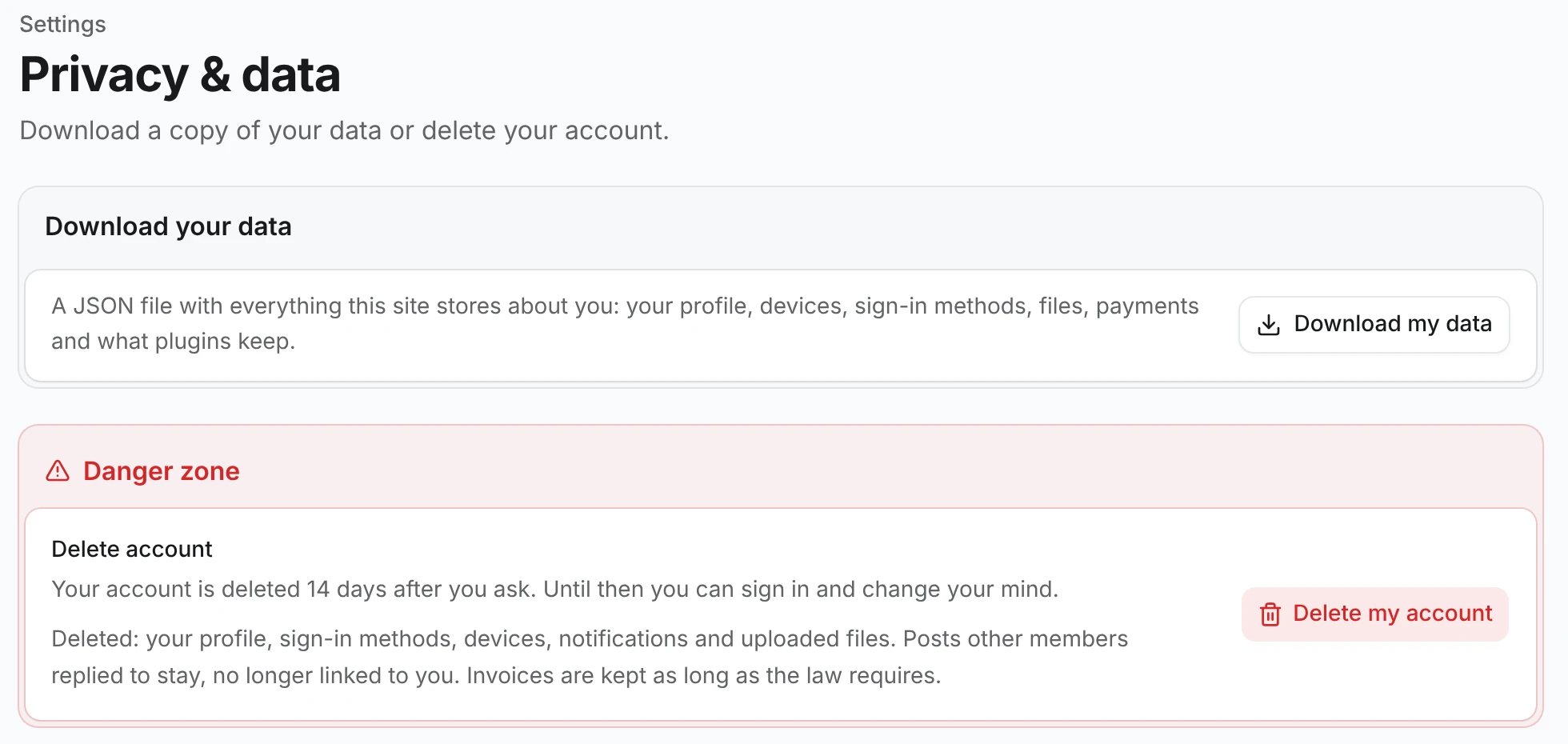
- Download my data saves a JSON file with one key per plugin under
plugins. The@vitnode/corekey holds the profile, devices, passkeys, connected accounts, files, payments, warnings and reports filed. - Delete my account asks for the current password, or a sign-in from the last 15 minutes when the account has no password. The member is then signed out everywhere, their public profile disappears, and an email explains how to cancel.
- During the grace period the account can't sign in quietly. Password, passkey and social sign-ins all stop at a Keep your account? dialog that counts down the days left, and only Keep my account and sign in starts a session and keeps the account. Stay signed out leaves them signed out. After the grace period, an hourly job erases the account and sends a goodbye email.
- The AdminCP sign-in refuses an account scheduled for deletion outright. Cancel the deletion first.
- AdminCP staff cannot delete their own account this way. Another administrator removes their AdminCP access first.
Turn self-deletion off for a role
Open AdminCP → Users → Roles, edit a role and switch off Allow deleting own account on the Profile tab. The setting is on by default, and a member needs it on every role they hold.
Without it, Privacy & data tells the member to contact staff, and the API answers 403 with not_allowed. GDPR still gives that member the right to erasure, so staff delete the account from the AdminCP when asked.
Sign in during the grace period
A sign-in with the right credentials doesn't start a session for an account scheduled for deletion. The API answers 403 with the date and a short-lived token instead:
{
  "error": "account_deletion_pending",
  "scheduledAt": "2026-12-05T10:00:00.000Z",
  "token": "eyJhdWQiOiJhY2NvdW50LWRlbGV0aW9uLWhvbGQi..."
}
Password sign-in, passkeys, SSO callbacks, emailed SSO confirmations and SSO account linking all answer this way. The built-in login and SSO pages show the confirmation dialog for you. A custom front end confirms with the token, which cancels the deletion and starts the session:
import { fetcher } from "@vitnode/core/tanstack/fetcher";

const res = await fetcher({
  plugin: "@vitnode/core",
  method: "post",
  module: "users",
  path: "/sign_in/cancel-deletion",
  args: { body: { token } },
});
The token lasts 10 minutes and works once. An expired or reused token answers 400 with invalid_hold, so ask the member to sign in again. No confirmation means no session, so leaving the screen keeps the deletion scheduled.
Delete an account from the AdminCP
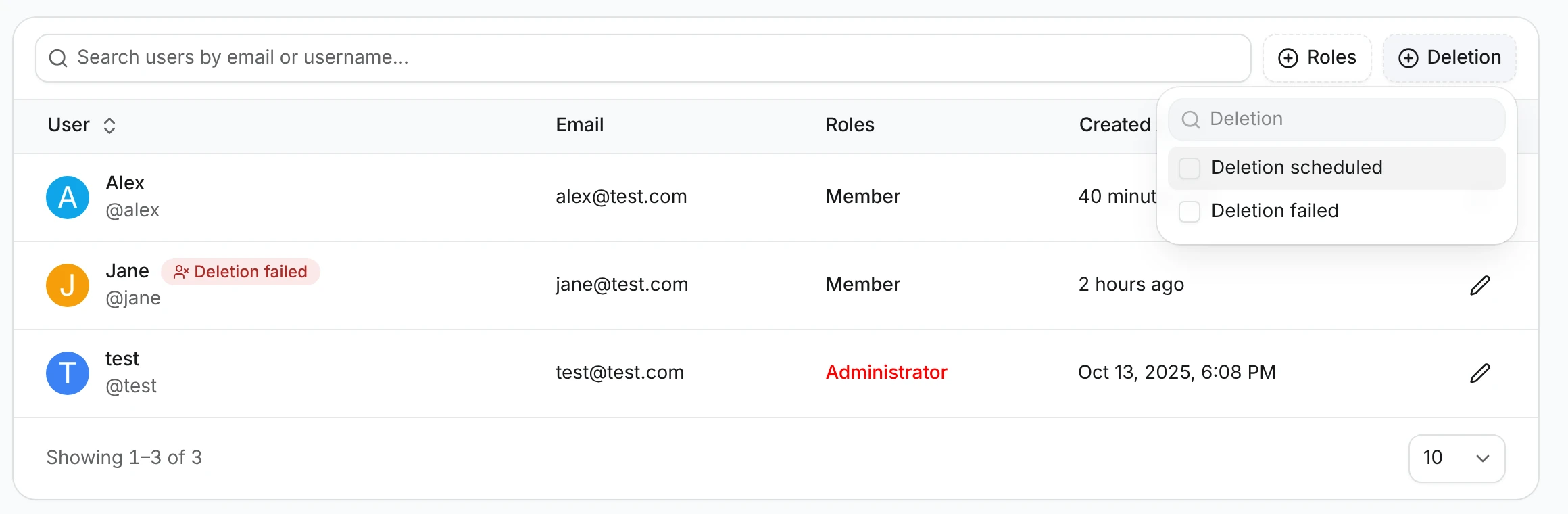
In AdminCP → Users, an account with an open request shows a Deletion scheduled or Deletion failed badge, and the Deletion filter lists only those accounts.
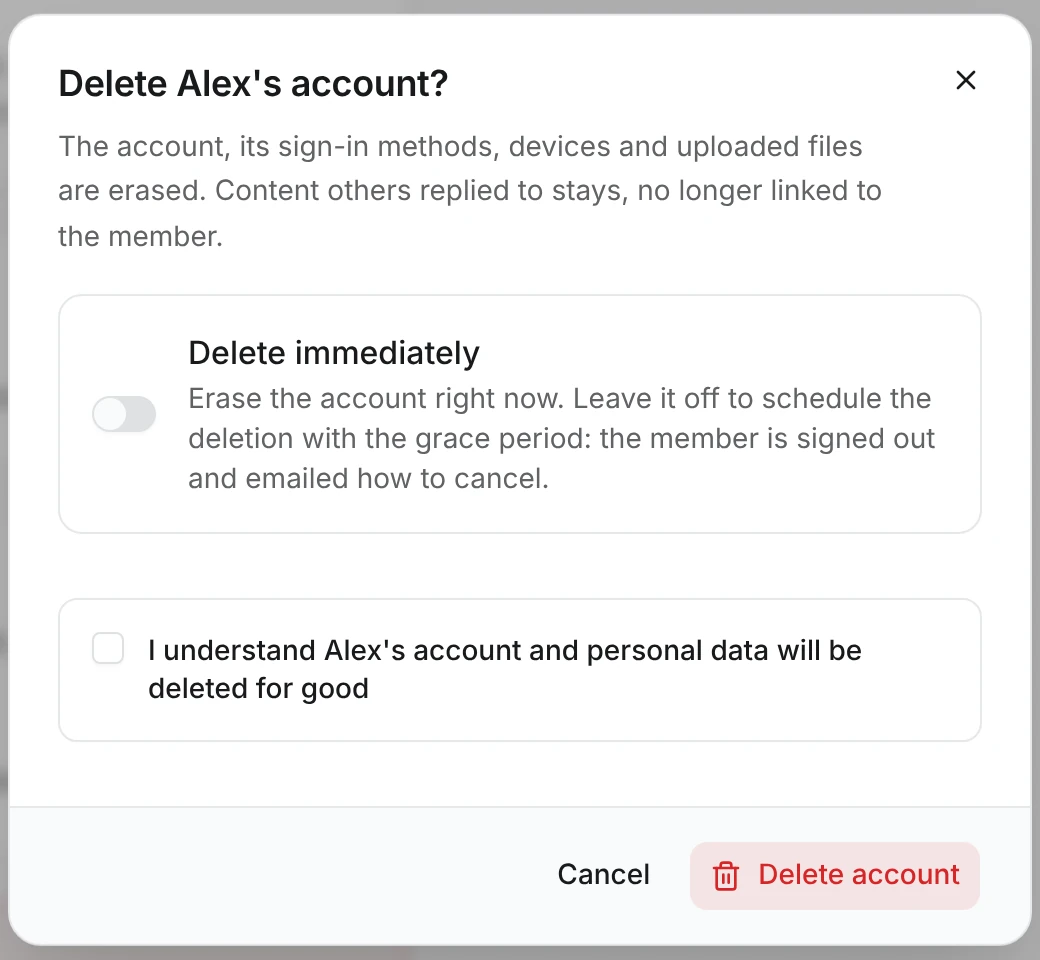
Open a user and scroll to the red Danger zone at the end of their page:
- Delete account opens a dialog with a Delete immediately switch. Switched on, the account is erased right away. Switched off, the deletion is scheduled with the grace period, and the member is signed out and emailed how to cancel.
- Cancel deletion keeps an account whose deletion is scheduled.
- Retry erasure appears when an erasure failed, next to the reason it failed.
These actions need the Delete user accounts staff permission (users:can_delete), which depends on Edit users.
Monitor deletions in the Debug Panel
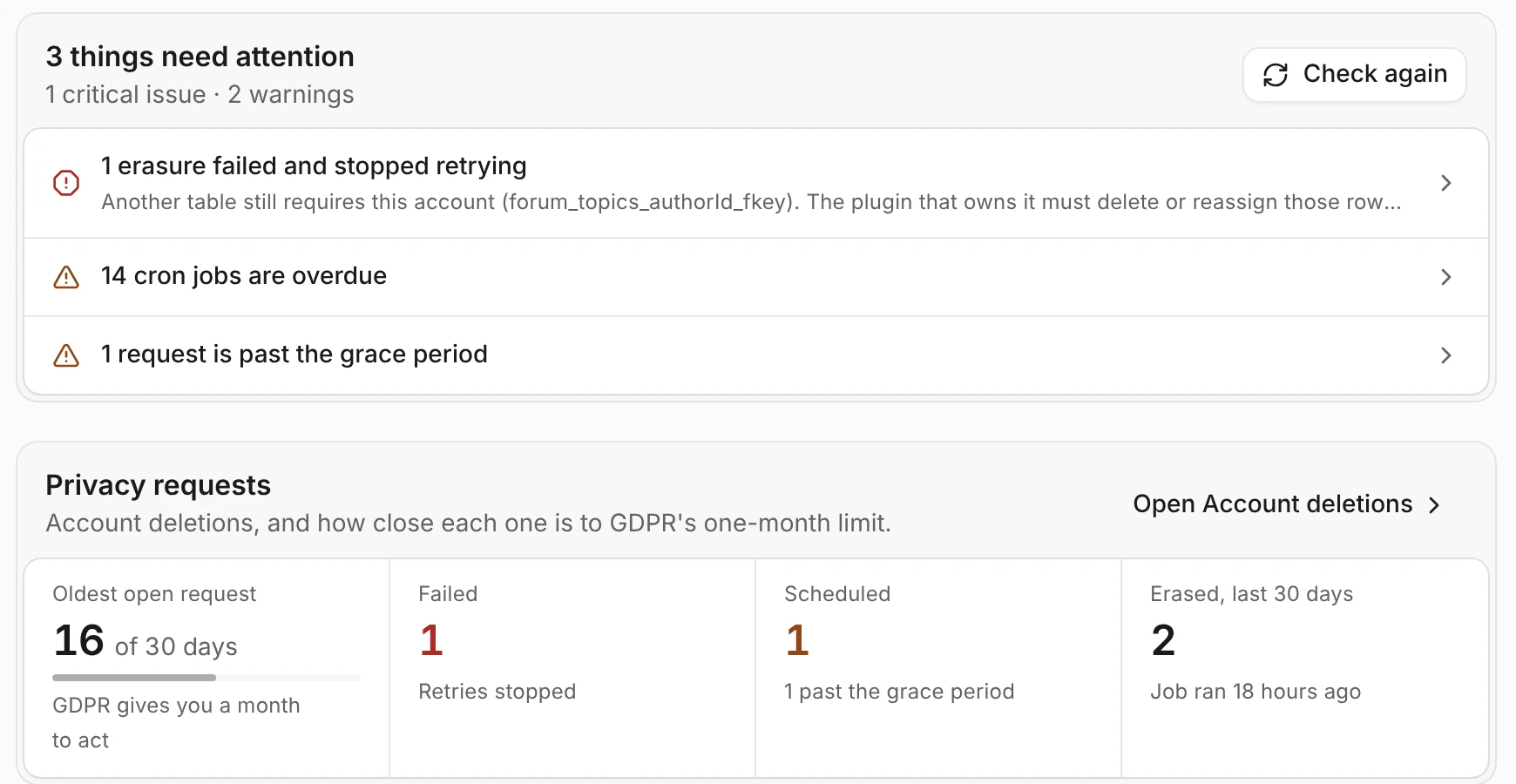
AdminCP → Debug Panel → Overview treats account deletion like any other system. A failed erasure is a critical issue and a request past its grace period is a warning. The Privacy requests card shows how many of GDPR's 30 days the oldest open request has used, how many requests failed or are scheduled, and when the hourly job last ran.
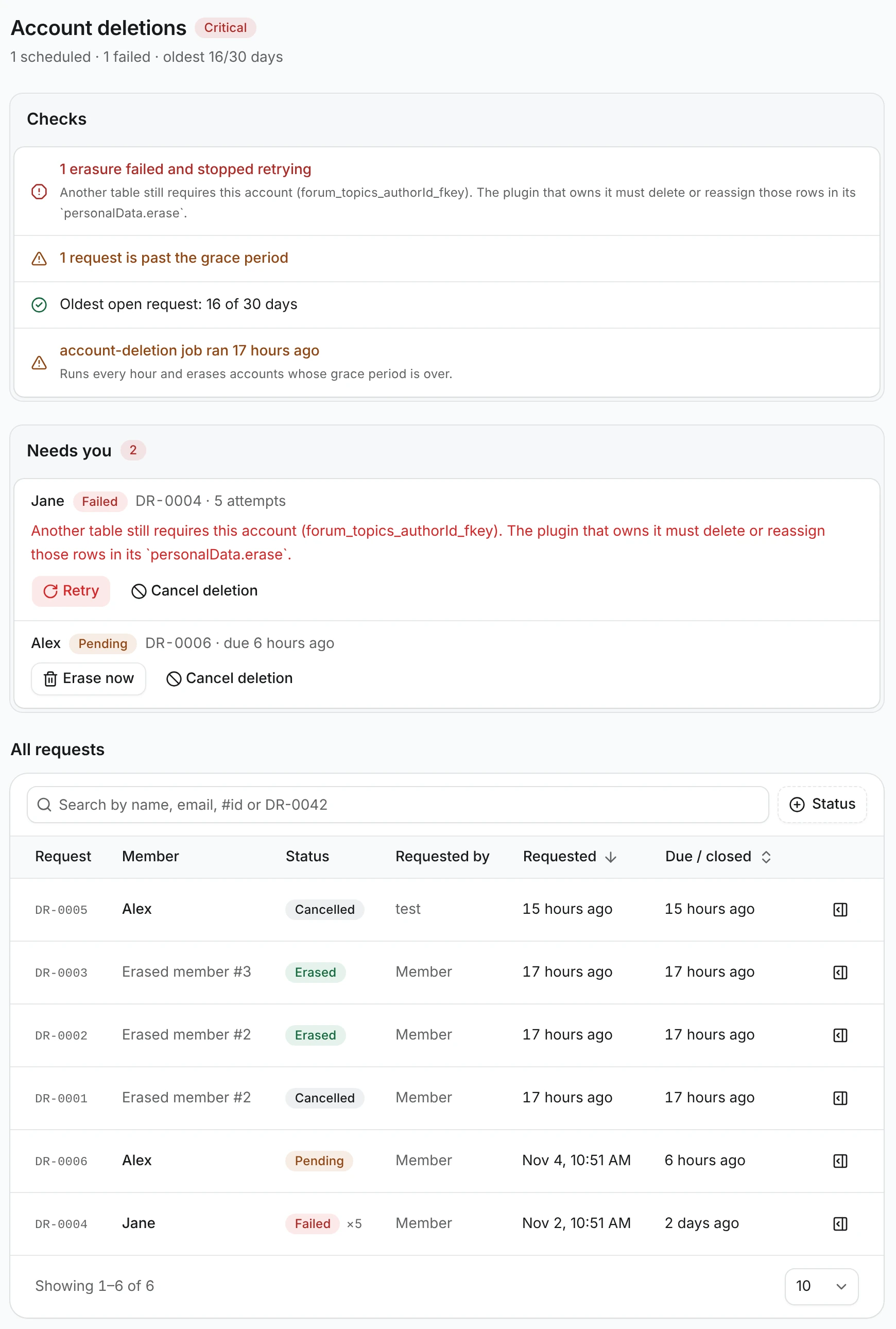
Diagnostics → Account deletions has the detail:
- Checks: failed erasures, requests past their grace period, the oldest open request against 30 days, and the last run of the
account-deletionjob. - Needs you: each failed or overdue request with its reason, and Retry, Erase now or Cancel deletion.
- All requests: every request, searchable by name, email,
#idorDR-0042and filterable by status. The details button opens the request's timeline.
A request outlives its account. It keeps only the erased user's id, the dates and the outcome. That is your proof the request was handled, and it holds nothing about the person.
Configure the grace period and IP retention
Both options live under users in buildApiConfig:
export const vitNodeApiConfig = buildApiConfig({
  // ...
  users: {
    accountDeletion: { graceDays: 14 },
    ipRetentionDays: 90,
  },
});| Name | Type | Required | Default | Description |
|---|---|---|---|---|
accountDeletion.graceDays | number | No | 14 | Whole days between the request and the erasure. 0 erases on the next hourly run. Capped at 30, so every request is handled within the month GDPR allows. |
ipRetentionDays | number | No | 180 | Days IP addresses are kept. A daily job deletes older debug logs and clears the IP on older Activity Logs entries and sign-up records. 0 keeps them. |
The account-deletion job runs every hour at minute 25 and ip-retention daily at 03:50. Both are ordinary cron jobs, so they need a cron adapter or an external trigger like every other job.
How an account erasure runs
- Every session of the account is revoked.
- Each file the member uploaded is deleted from storage. A file that live content still shows is kept and counted as files kept on the request.
- In one database transaction, each plugin's
personalData.eraseruns, core removes the member's name and IP from Activity Logs and deletes their debug logs, and thecore_usersrow is deleted. Tables withonDelete: "cascade"(sessions, passkeys, notifications, warnings) go with it, andset nullcolumns (authors, reporters, payments) lose the link. - The request is marked Erased, the
user.deletedevent is emitted and a goodbye email is sent.
A failure rolls the transaction back, leaves the account in place and stores the error on the request. The hourly job retries it up to five times, then marks it Failed and waits for staff. Staff can press Retry erasure at any time.
Check the result
- Sign in as a test member and open Settings → Privacy & data. Press Download my data and check that the file's
pluginsobject has a@vitnode/corekey. - Press Delete my account, enter the password, type your name and press Delete account. A dialog shows the deletion date. Press Go to the home page and you are signed out.
- Sign in again as that member. Instead of signing you in, a dialog asks Keep your account?. Press Stay signed out.
- Sign in as an admin and open AdminCP → Users. The member has a Deletion scheduled badge.
- Open the member, press Delete account in the danger zone, switch on Delete immediately and confirm. You land back on the user list.
- In Debug Panel → Diagnostics → Account deletions, the request is Erased, and the member's profile URL returns 404.