Debugging
Error Page
What VitNode shows when a request or a route crashes on the dev server, and how to add "Ways to fix this" hints to your own errors.
When a request crashes on the server while you run vite dev, VitNode answers
with its own error page instead of a raw stack trace. It shows the error, the
line that threw it, suggested fixes when the error has them, and the call stack.
You don't configure anything: the vitnode() Vite plugin turns it on for the
dev server.
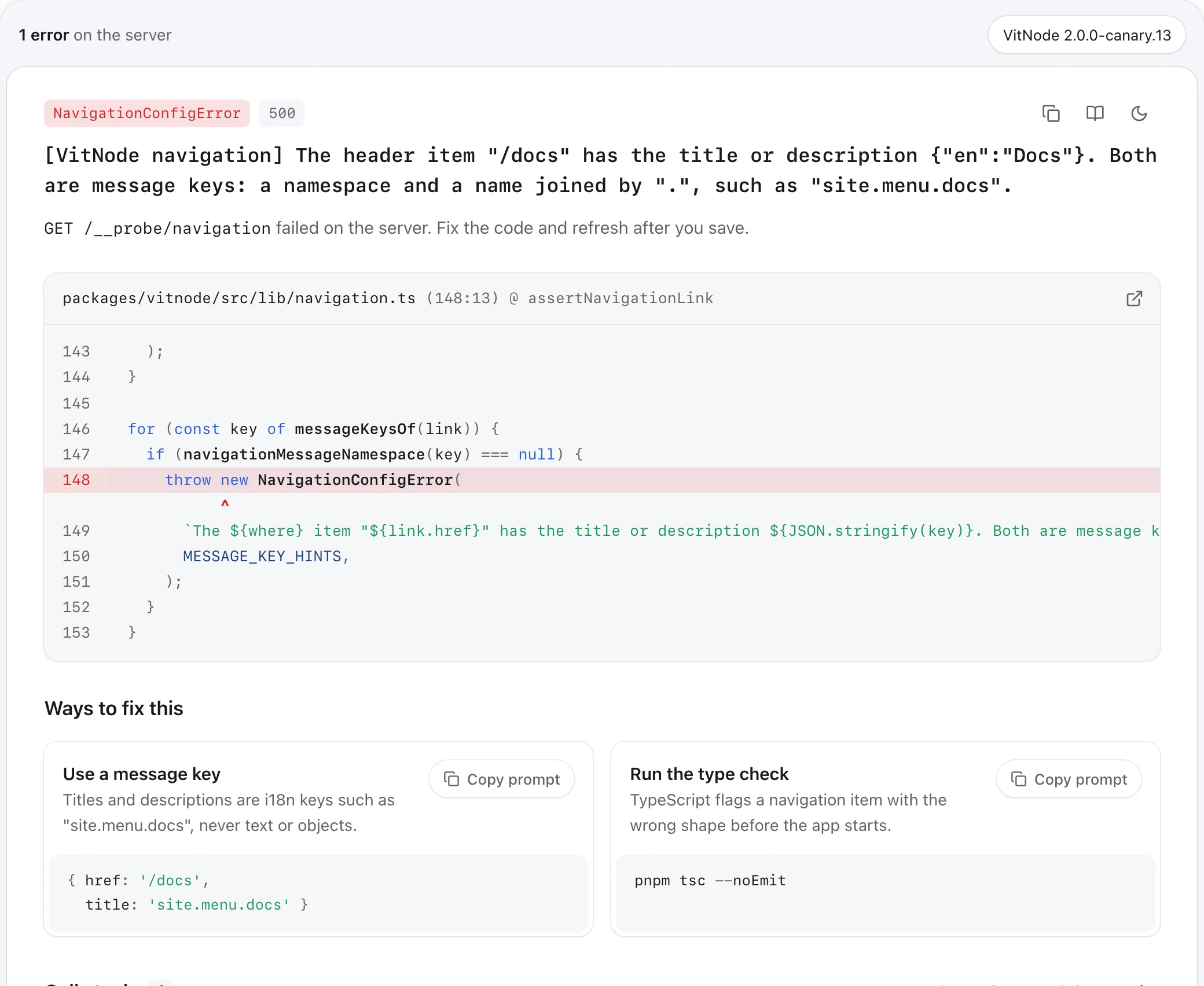
What the page shows
| Part | What it gives you |
|---|---|
| Header | Where it failed, the error name, the status code, the message, and the request |
| Code frame | Five lines on each side of the first line in your code, with a caret under the column. The icon opens the file in your editor |
| Ways to fix this | Suggestions the error carries, each with a snippet and a Copy prompt button for your AI assistant |
| Call stack | Your frames first, each one opens in your editor. Frames from node_modules and Node stay folded until you show them |
The copy icon in the header copies the error and its stack trace. The page follows your system theme, and the moon icon switches it.
When it appears
The page replaces Nitro's built-in error page in development only. Anything else keeps Nitro's normal behavior:
vite buildnever includes the handler, so production errors are unchanged.- Requests that don't accept
text/html, likefetchcalls from your code, still get JSON. - Errors you throw on purpose with a status below 500, such as a 404, pass through untouched.
An error thrown while the app's server entry first loads, before any request reaches it, still shows Nitro's own page, because VitNode's code isn't running yet.
Route errors
A loader or component that throws doesn't reach Nitro: TanStack Router catches
it and renders the route's error component. Use RouteErrorPage as the
router's defaultErrorComponent and the same page opens as an overlay on top
of your 500 page:
import { ErrorActions, RouteErrorPage } from '@vitnode/core/tanstack/layout'

const router = createTanStackRouter({
  // ...
  defaultErrorComponent: ({ error }) => (
    <RouteErrorPage actions={<ErrorActions />} error={error} />
  ),
})
The bar above the card says on the server when the error happened during server rendering, and in the browser when it happened after a client-side navigation. Browser frames are mapped back to your source files too. Press Esc or the close icon to see the 500 page underneath.
In production, RouteErrorPage renders only the 500 page. No stack trace,
file path or source line ever leaves the server.
Build errors
When Vite can't compile a module, like an import that doesn't resolve or a
syntax error, the same page replaces Vite's error overlay and says in the
build. The code frame points at the line Vite stopped on. An import that
doesn't resolve also gets hints: check the package's exports, rebuild a
workspace package, or install a missing dependency.
DocumentHead loads the small script that does this, in development only.
When you save a fix and Vite clears its overlay, this page closes too. If the
page can't be built for some reason, Vite's own overlay stays as a fallback.
Add hints to your own errors
Any error with a hints array gets a Ways to fix this section. Implement
DevErrorWithHints on your error class and pass the hints in:
import type {
  DevErrorHint,
  DevErrorWithHints,
} from '@vitnode/core/framework/dev-error'

const MISSING_KEY_HINTS: DevErrorHint[] = [
  {
    title: 'Set the API key',
    description:
      'Add your Stripe secret key to .env, then restart the dev server.',
    snippet: 'STRIPE_SECRET_KEY=sk_test_...',
  },
]

export class PaymentsConfigError extends Error implements DevErrorWithHints {
  readonly hints: readonly DevErrorHint[]

  constructor(message: string, hints = MISSING_KEY_HINTS) {
    super(message)
    this.name = 'PaymentsConfigError'
    this.hints = hints
  }
}
Each hint takes these fields:
| Name | Type | Required | Description |
|---|---|---|---|
title | string | Yes | The fix, as an action: "Set the API key" |
description | string | Yes | One sentence on why the fix works |
snippet | string | No | Code or a command to copy, shown under the text |
Hints are plain English text, not message keys: the page is a developer tool that only exists on your machine. Three hints fit side by side. Keep them to the fixes that actually solve the error.
VitNode's own config errors already carry hints. A navigation item with a
title that isn't a message key, for example, suggests using a key such as
site.menu.docs and running the type check.
Check the result
Throw your error from a route loader, then open that page in the browser while
vite dev runs. The Ways to fix this section lists your hints, and
Copy prompt puts the error, the stack and the hint on your clipboard.
Next, see Logging for errors that happen in production.